
DAP Audio WPS Guitar Manual
PDF manual · 17 Pages
English



Quick check
Incorrect answer, please try again.
Chat with your DAP Audio WPS Guitar manual using AI
Get instant AI answers from your DAP Audio WPS Guitar manual
Ask anything about the DAP Audio WPS Guitar. Answers come from this manual, with the pages they are based on.
WPS Guitar Maintenance Schedule
Disconnect from power and wipe with a damp cloth. Do not immerse in liquid or use alcohol.
Disconnect from power and wipe connectors with a damp cloth. Ensure they are fully dry before reconnecting.
Free maintenance reminders
Timed to your purchase date. Always free, unsubscribe anytime.
Ask a Question
Do you recommend WPS Guitar?
Yes NoFrequently Asked Questions
The system supports up to 16 channels, and the guidance states you can run a maximum of 4 sets together on one stage. To avoid overlap, set channels so each active set is separated by at least 4 channels from the others.
Is this answer helpful?
If the sound is distorted when using a clean amp, lower the transmitter input gain trimmer. If the output becomes too low, increase the input gain using the included screwdriver. Also confirm the receiver volume is matched to your desired clean tone before the show.
Is this answer helpful?
The squelch threshold can eliminate interference from other transmission links by preventing the receiver from accepting unwanted signals. If you set squelch too high, the transmission range decreases. The recommended approach is to use the lowest squelch setting that still removes the interference.
Is this answer helpful?
The system is specified for use within about 30 meters. For best results, keep the transmitter and receiver antennas visible to each other, reduce distance, and adjust the receiver antennas away from each other at about a 45-degree angle from vertical. Avoid placing antennas near metal and obstructions, and do a walk-through to find dead spots.
Is this answer helpful?
The transmitter uses one AAA 1.5 V battery (LR03). Battery life is specified up to around 8 hours. When the power LED turns red, remaining life is approximately 30 minutes, so replace the battery promptly before the performance.
Is this answer helpful?
The diversity receiver is designed to fit into a pedalboard. Connect the receiver output to your first effect pedal input (or directly to your amplifier input if you are not using pedals). Keep cables secure, and ensure the receiver and transmitter channels match to maintain stable operation.
Is this answer helpful?
Advantages and Disadvantages
Advantages

- 16 switchable channels in the 863-865 MHz band for flexible use across stages and countries.
- Jack-style transmitter with adjustable angle reduces belt-pack hassle and helps keep your setup clean.
- Compact diversity receiver designed to fit into a pedalboard workflow.
- Practical controls for gain and squelch help optimize audio level and reduce interference.
Disadvantages

- Indoor-only use and careful handling are required to avoid moisture, damage, and warranty issues.
- Multiple systems require careful channel planning, including at least 4-channel separation per set.
- High squelch settings can reduce range, so adjustment must be done carefully.
- Receiver output is unbalanced 6.3 mm, which may be less ideal for some signal chains.
Product Specification
Type
Instrument system
Frequency band
UHF
True Diversity
yes
Channels
16
Battery life
8h
Audio frequency range
50Hz-16kHz
Includes
Receiver, plug-on transmitter
Product Description
DAP Audio WPS Guitar: Compact 16-Channel Wireless for Live Performances
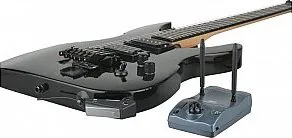
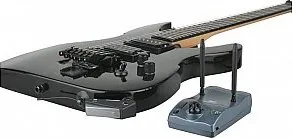
The DAP Audio WPS Guitar is a wireless guitar set designed to bring freedom to your stage without adding clutter. With a compact, jack-style transmitter and a pedalboard-friendly diversity receiver, it is built for quick setup and confident performance. Whether you prefer simple plug-and-play operation or want tighter control over sound and interference, this system gives you the tools to match your show.
At the core is a 16-channel link operating in the 863-865 MHz band, making it a practical choice for many venues. You can also scale up for busy stages, since up to 4 sets can be used together when channels are separated correctly (keeping at least 4 channels between active sets). The transmitter uses a single AAA battery for up to 8 hours, while the receiver provides an unbalanced 6.3 mm output and clear status feedback.
Highlights (key results)
- 16 switchable channels in the 863-865 MHz band for flexible stage use.
- Jack-style transmitter fits guitar outputs at an adjustable angle, reducing belt-pack needs.
- Diversity receiver is compact and intended to sit in the pedalboard signal path.
- Gain and squelch controls help you dial in audio level and reduce interference.
Setup and day-to-day use
Start by connecting the receiver output to your first pedal (or directly to your amp input) and powering the unit with the supplied DC adapter. Plug in the transmitter to your instrument, press in securely, and match both transmitter and receiver to the same channel. For best results, set the receiver volume to your target tone, then use the transmitter input gain trimmer when you need to correct for low-output guitars.
To manage interference, the receiver includes a squelch threshold trimmer. Raising squelch can reduce unwanted signals, but setting it too high reduces range, so the goal is the lowest effective setting. A quick walk-through before a gig helps you identify and avoid dead spots.
Notes
- Works indoors and should be kept away from rain and moisture.
- Replace the transmitter battery promptly when the power LED turns red.
- If you are using multiple systems, separate active channels by at least 4 channels per set.
- For step-by-step guidance, consult the DAP Audio WPS Guitar Manual.
Search for 67,706 Manuals online


Type-in Brand or Model