
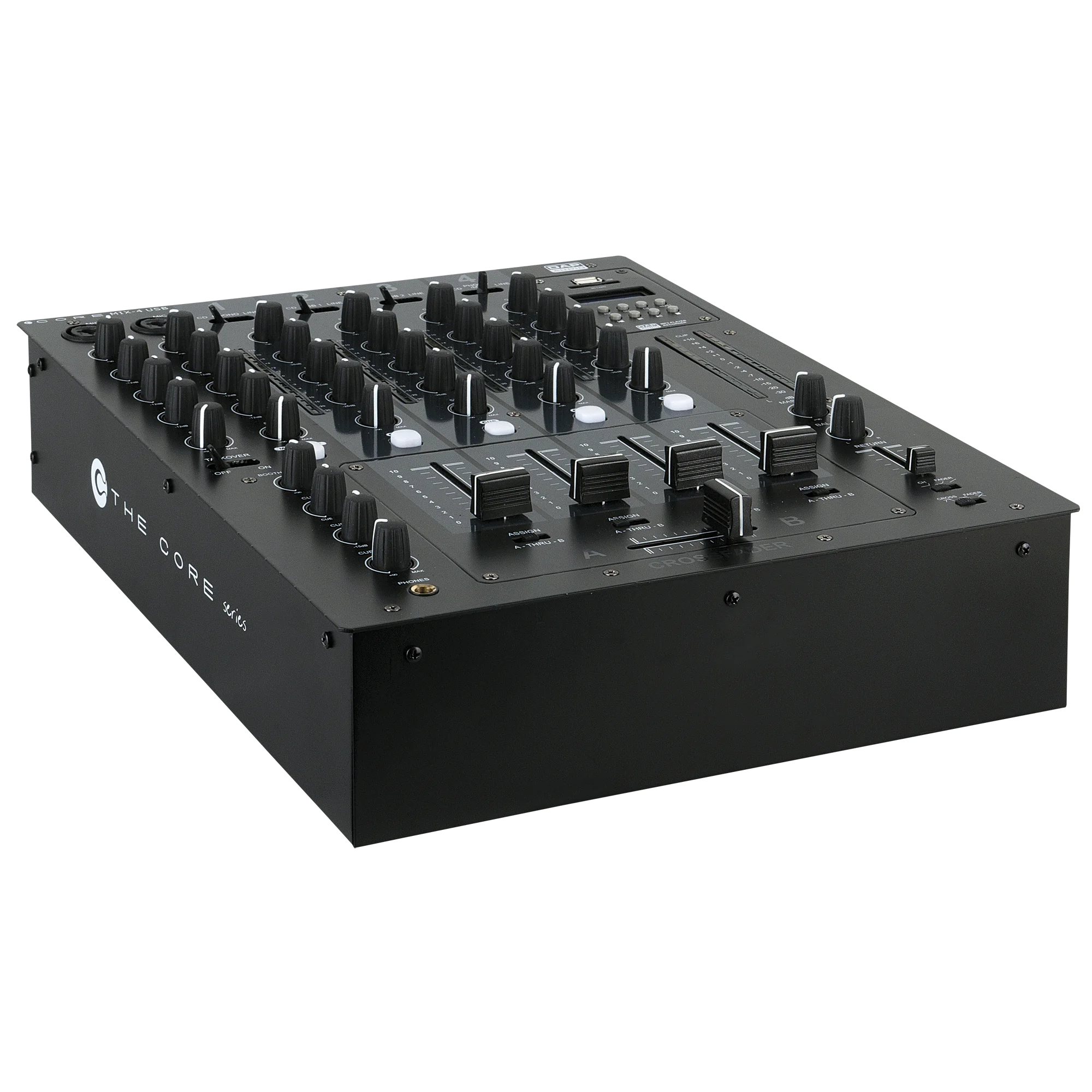
DAP Audio Core Mix-4 USB Manual
PDF manual · 22 Pages
English


Quick check
Incorrect answer, please try again.
Chat with your DAP Audio Core Mix-4 USB manual using AI
Get instant AI answers from your DAP Audio Core Mix-4 USB manual
Ask anything about the DAP Audio Core Mix-4 USB. Answers come from this manual, with the pages they are based on.
Core Mix-4 USB Maintenance Schedule
Periodically check all cables for knots, twists, or damage. Ensure audio connections are clean and dry before use.
Disconnect power and wipe the cover with a damp cloth. Clean audio connections with a damp cloth, ensuring they are thoroughly dry before reconnecting.
Free maintenance reminders
Timed to your purchase date. Always free, unsubscribe anytime.
Ask a Question
Do you recommend Core Mix-4 USB?
Yes NoFrequently Asked Questions
It is a 4-channel DJ club mixer with analogue inputs, dual USB audio interfaces, microphone channels, and a built-in MP3 record/play section.
Is this answer helpful?
Yes. The mixer includes two USB Type B audio interfaces designed for PC and Mac connection, so it can route audio to and from DJ software.
Is this answer helpful?
Yes. It has two microphone channels with XLR inputs, level and EQ controls, plus a talkover function for speech over music.
Is this answer helpful?
Yes. The MP3 module can record the master mix to USB storage or an SD card, making it easy to capture live performances.
Is this answer helpful?
Yes. It includes phono, CD, and line inputs on multiple channels, plus ground screws for turntable connection.
Is this answer helpful?
Yes. The mixer offers a balanced XLR master output alongside unbalanced RCA outputs for flexible system connections.
Is this answer helpful?
No. The unit is meant for regular operation with breaks, not permanent continuous use, to help preserve reliability and lifespan.
Is this answer helpful?
Advantages and Disadvantages
Advantages

- Two independent USB interfaces make PC/Mac routing and DJ software use more flexible.
- Built-in MP3 USB/SD recording adds easy live-set capture without extra gear.
- Four channels, crossfader, and EQ controls support versatile mixing styles.
- Mic channels with talkover help DJs and MCs manage announcements cleanly.
Disadvantages

- Not intended for permanent continuous operation, so downtime is recommended.
- Rear-panel connectivity is extensive and may be confusing for first-time users.
- Some functions require careful gain staging to avoid clipping and distortion.
- Service tasks like fader replacement should be done by qualified technicians.
Product Specification
Channels
3
Equalizer
2-Band
Kill Switches
no
Inputs
8x Phono/Stereo Line In (RCA), FX Return (RCA)
Outputs
Master Out (XLR), Master Out (RCA), Booth/Monitor Out (RCA), Record Out (RCA), Headphones (0.25 in Jack)
Other Connections
1x USB-A
Special Features
Audio Interface
Dimensions
12.20x3.46x14.96in (WxHxD)
Weight
11.02lb
Product Description
DAP Audio Core Mix-4 USB: a versatile mixer for DJs and live setups
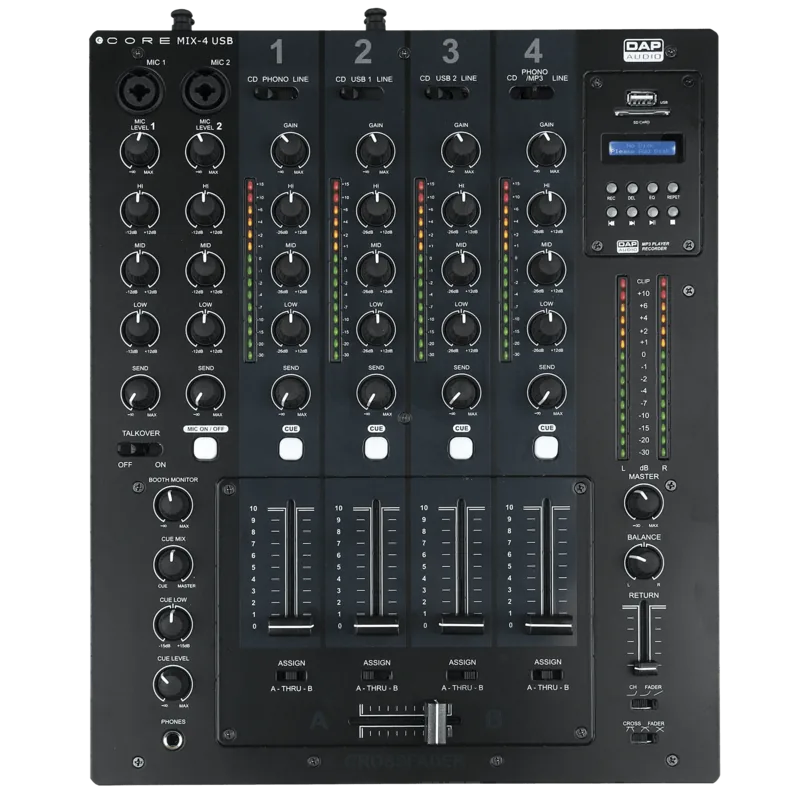
The DAP Audio Core Mix-4 USB is built for performers who want flexibility without overcomplicating their workflow. It combines a 4-channel DJ club mixer layout with 12 analogue inputs, dual USB audio interfaces, and a built-in MP3 record/play module. That mix of features makes it a practical choice for clubs, mobile DJs, MCs, and small event spaces that need fast connection options and dependable control.
Why it stands out
One of the biggest strengths of the Core Mix-4 USB is how naturally it bridges traditional and modern audio sources. You can connect CD players, turntables, line devices, microphones, and laptops at the same time, then route audio with simple front-panel controls. The two independent USB interfaces are especially useful for DJ software, giving users more than one path for computer integration and recording.
The mixer also focuses on performance control. Each channel includes its own EQ and send control, while the crossfader section offers adjustable curve settings for different mixing styles. The microphone section adds talkover, on/off switching, and a 3-band EQ, which helps keep announcements clear in busy environments. For monitoring, the cue section and headphone controls make it easier to preview tracks and shape the sound before it reaches the main output.
Designed for creative routing
The built-in send and return system opens the door to external effects, while balanced and unbalanced outputs make integration into different systems easier. The MP3 recorder adds another layer of usefulness by letting users capture live mixes directly to USB or SD media. For anyone reading the DAP Audio Core Mix-4 USB Manual, the layout shows a mixer designed around practical performance, maintenance access, and everyday use.
Notes
- Best suited for DJ and event use rather than permanent 24/7 installation.
- Use balanced connections where possible to reduce noise and hum.
- Keep gain staging under control to avoid clipping and distortion.
- Always match voltage and follow safe power practices.
Pros and cons
Pros
- Two USB audio interfaces make laptop and software integration more flexible.
- Built-in MP3 record/play functions add direct capture and playback convenience.
- Four-channel layout with EQ, cue, and crossfader control supports creative mixing.
- Mic channels with talkover are practical for DJs and MCs.
Cons
- Not designed for permanent nonstop operation.
- Many rear-panel connections may feel complex for beginners.
- Fader replacement and internal servicing should be done by a technician.
- Sound quality depends heavily on proper gain staging and balanced wiring.
FAQ
What type of mixer is the Core Mix-4 USB?
It is a 4-channel DJ club mixer with analogue inputs, USB audio interfaces, microphone channels, and a built-in MP3 recorder/player.
Can it connect to a laptop?
Yes. It includes two USB Type B audio interfaces for PC and Mac use, making it suitable for DJ software and computer-based audio routing.
Does it support microphones?
Yes. It has two microphone channels with XLR inputs, EQ controls, and a talkover function for announcements.
Can I record my mix directly?
Yes. The MP3 module supports recording to USB storage or SD media, allowing direct capture of live sets.
Is it good for turntables?
Yes. It provides phono inputs and ground screws, so turntables can be connected properly and safely.
Does it have balanced outputs?
Yes. In addition to unbalanced RCA outputs, it also offers a balanced XLR master output for cleaner signal transfer.
Is this mixer meant for continuous long-term operation?
No. The product is intended for regular use with breaks, not permanent nonstop operation, to help protect the unit and extend its lifespan.
Search for 67,706 Manuals online


Type-in Brand or Model