
DAP Audio Core Club Manual
PDF manual · 16 Pages
English


Quick check
Incorrect answer, please try again.
Chat with your DAP Audio Core Club manual using AI
Get instant AI answers from your DAP Audio Core Club manual
Ask anything about the DAP Audio Core Club. Answers come from this manual, with the pages they are based on.
Core Club Maintenance Schedule
Periodically check your cables for faults. Hold by connectors and avoid knots to increase life.
Disconnect power and wipe cover with a damp cloth. Do not use alcohol or solvents.
Disconnect power and wipe connections with a damp cloth. Ensure they are dry before reconnecting.
Ask a Question
Do you recommend Core Club?
Yes NoFrequently Asked Questions
It is best for small clubs, mobile DJ setups, rehearsal rooms, and presentation spaces where a compact mixer with microphone control, stereo input handling, and Bluetooth playback is useful.
Is this answer helpful?
Yes. The mixer includes Bluetooth support, allowing compatible devices such as phones or tablets to connect and play audio without a cable.
Is this answer helpful?
Yes. The unit has a dedicated microphone channel with its own level and EQ controls, so voice and music can be mixed together. The talk-over mode can also lower other channels when speaking.
Is this answer helpful?
It provides master, booth, and record RCA outputs, plus a headphones output. This makes it easy to feed speakers, a booth monitor, or a recording device.
Is this answer helpful?
It is intended more for regular event use than nonstop permanent operation. Breaks between sessions help maintain long-term reliability and stable performance.
Is this answer helpful?
Turn on the Bluetooth device and the mixer, press the Pair/Unpair button, then find BT CORE on your device and connect. If prompted, use the pairing code 0000.
Is this answer helpful?
Advantages and Disadvantages
Advantages

- Bluetooth input adds easy wireless playback from phones or tablets.
- Four main channels plus a microphone input support multiple sources.
- Three-band EQ and mic tone controls help tailor sound quickly.
- Cue monitoring and crossfader controls suit live DJ-style operation.
Disadvantages

- RCA-based connections may feel limited for more advanced digital setups.
- It offers practical control, but not many extra effects or processors.
- Designed for indoor use, so it is not ideal for demanding permanent installs.
- The feature set is focused and simple, which may not satisfy power users.
Product Specification
Channels
3
Equalizer
2-Band
Kill Switches
no
Inputs
8x Phono\/Stereo Line In (RCA)
Outputs
Master Out (RCA), Booth\/Monitor Out (RCA), Record Out (RCA), Headphones (6.35mm Jack)
Dimensions
11.50x3.31x14.02in (WxHxD)
Weight
11.02lbs
Product Description
DAP Audio Core Club: Compact Control for DJs and Small Event Spaces
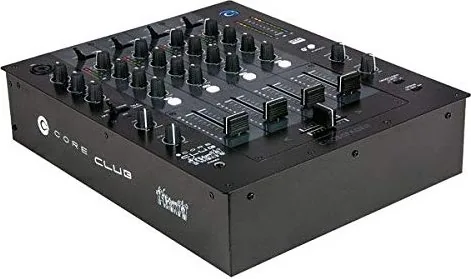
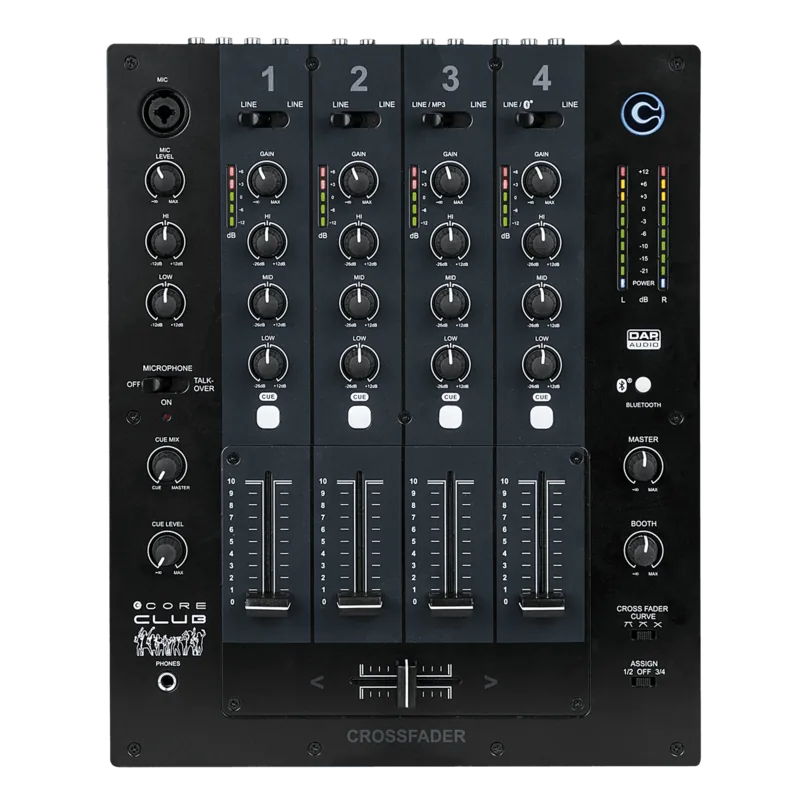
The DAP Audio Core Club is designed for users who want a straightforward mixer with useful modern features and a familiar hands-on workflow. It fits naturally into small clubs, mobile DJ rigs, rehearsal rooms, and presentation setups where fast operation matters. With one microphone channel, four main input channels, Bluetooth support, and separate monitor and master controls, it offers a balanced mix of convenience and control.
What makes the Core Club appealing is its clear layout and practical channel structure. The main channels give you gain control, three-band EQ, cue routing, and faders, so you can shape each source with confidence. The microphone channel is equally flexible, offering level control plus high and low EQ adjustments. Its talk-over function is especially useful when announcements need to stay clear above the music.
The monitoring section adds another layer of value. Headphone cueing makes it easier to prepare transitions, while the cue mix and cue level controls help you compare the master output with selected channels. For performers and operators who like to work precisely, this kind of control can make a big difference during live use. The crossfader and assign options also support classic DJ-style mixing, keeping the unit versatile without making it complicated.
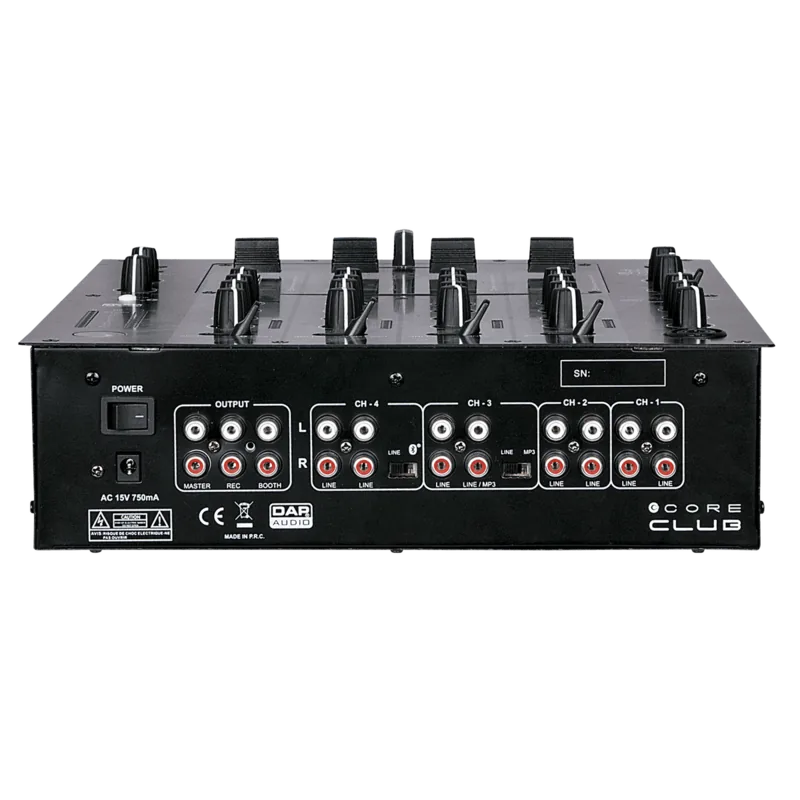
Connectivity is another strong point. The rear panel includes RCA inputs and outputs for line sources, master output, booth output, and recording, giving the mixer a practical range of connections for everyday audio tasks. Bluetooth pairing expands its usefulness even further, making it easy to add wireless playback from a compatible device. For readers checking the DAP Audio Core Club Manual, the setup steps are simple enough to follow quickly, which reflects the product’s no-nonsense design.
For anyone building a compact audio system, this mixer delivers a good mix of simplicity and flexibility. It is not overloaded with advanced extras, but it covers the essentials well: microphone handling, stereo mixing, cue monitoring, wireless input, and output routing. That makes it a dependable choice for users who value direct control and reliable operation over flashy complexity.
Notes
- Best suited for indoor use and regular operating breaks.
- Keep cables in good condition to reduce noise and connection issues.
- Use the cue section to preview signals before opening them to the main mix.
- Bluetooth works best when paired cleanly and kept free from previous connections.
Search for 67,706 Manuals online


Type-in Brand or Model