

DAP Audio Compact 8.1 Manual
PDF manual · 16 Pages
English



Quick check
Incorrect answer, please try again.
Chat with your DAP Audio Compact 8.1 manual using AI
Get instant AI answers from your DAP Audio Compact 8.1 manual
Ask anything about the DAP Audio Compact 8.1. Answers come from this manual, with the pages they are based on.
Compact 8.1 Maintenance Schedule
Periodically check your cables for faulty contacts, ground hum, or discharges. Handle by connectors and avoid knots.
Disconnect mains power and wipe the cover with a damp cloth. Do not use alcohol or solvents or immerse in liquid.
Disconnect electric power and wipe audio connections with a damp cloth. Ensure they are thoroughly dry before reconnecting.
Ask a Question
Do you recommend Compact 8.1?
Yes NoFrequently Asked Questions
It works well for small live sound setups, installed audio systems, rehearsal rooms, and compact recording or monitoring tasks where multiple mic and line sources need simple control.
Is this answer helpful?
It provides eight combined channels, each able to accept microphone or line sources. That makes it flexible for mixed setups with vocals, instruments, or playback devices.
Is this answer helpful?
Yes. Phantom power can be selected per channel, which is useful for condenser microphones. Dynamic microphones may also be used when wired correctly in a balanced configuration.
Is this answer helpful?
It includes a balanced master XLR output, an unbalanced monitor RCA output, a record RCA output, and a headphones output for monitoring.
Is this answer helpful?
Yes. Its 19-inch, 1U design is made for rack installation, so it takes up very little space while still offering a full set of channel controls.
Is this answer helpful?
Use the correct power supply, keep the gain levels under control, and prefer balanced connections where possible. Clean cabling and careful routing will help reduce noise and clipping.
Is this answer helpful?
Advantages and Disadvantages
Advantages

- Eight mic/line channels in a compact 1U rack format.
- Individual phantom power, low-cut filters, and channel EQ improve flexibility.
- Balanced master output plus monitor and record outputs expand routing options.
- Signal/clip LEDs and output metering help with fast level checks.
Disadvantages

- Not designed for permanent nonstop operation.
- Uses an external power adapter, so proper voltage and cabling matter.
- RCA line connections are unbalanced, which may require careful setup.
- Only eight channels, so larger productions may need a bigger mixer.
Product Specification
Type
Rack Mixer
Input Channels
8 (8 Mono)
Mic Preamps
8
Aux Sends
no
Subgroups
no
Faders
no
Analog Inputs
8x Mic In (XLR), 8x Stereo Line In (RCA), 1x 2-Track In (RCA)
Analog Outputs
1x Stereo Main Out (XLR), 1x 2-Track Out
Weight
4.85 lb
Product Description
DAP Audio Compact 8.1
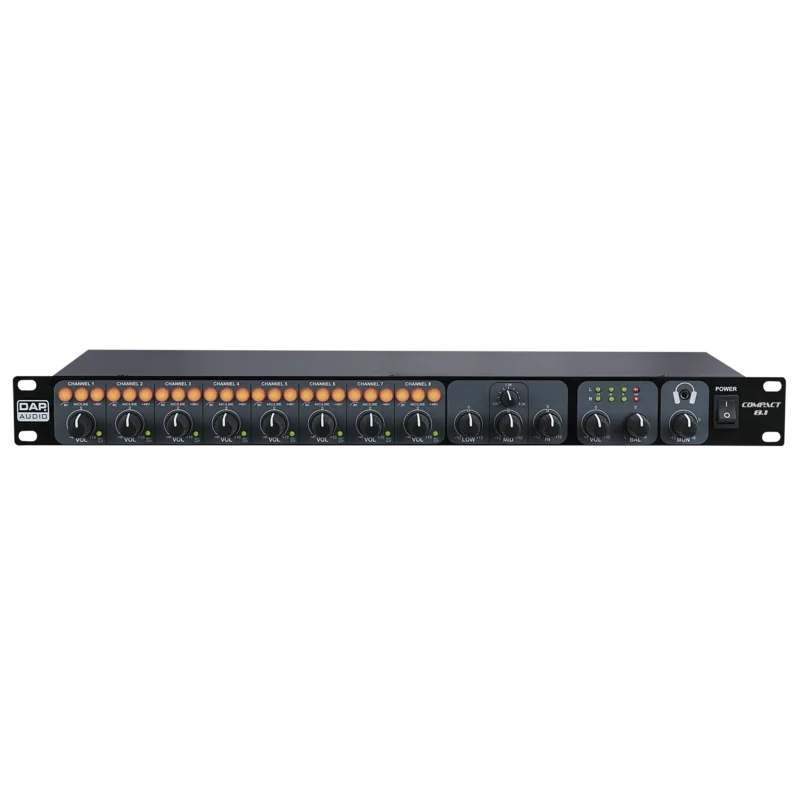
The DAP Audio Compact 8.1 is a practical 1U rack mixer built for users who need a small footprint without giving up flexible routing and clear control. In everyday use, it feels like a smart bridge between microphone-heavy setups and simple line-level mixing, making it a useful fit for installed sound systems, compact recording spaces, rehearsal setups, and multi-zone audio projects. If you are searching for the DAP Audio Compact 8.1 Manual, the product itself already shows a design focused on straightforward operation and dependable signal management.
Flexible input handling
One of the strongest points of this mixer is its channel design. Each of the eight channels can work as either a microphone or line input, which gives it a lot of versatility in a very small format. The front panel includes low-cut filtering, phantom power selection, signal/clip indicators, and level control per channel. That means users can quickly shape each source and keep an eye on levels without digging through complicated menus. The variable mid-frequency EQ is especially helpful when tuning voices or reducing feedback in live or installed environments.
Clear output control and monitoring
The Compact 8.1 also stands out for its output section. It offers a balanced master XLR output, an unbalanced monitor output, and a record output, so it can easily feed more than one destination at the same time. The headphones level even affects the monitor output, which makes it useful for a second listening zone or control area. On top of that, the output meter helps users stay in a healthy level range and avoid unwanted clipping.
Built for practical, everyday use
This mixer is designed with simple operation in mind. Its rackmount 19-inch, 1U form keeps it tidy and easy to integrate into existing audio racks. The included external power adapter and selectable mic/line inputs make setup accessible, while the balanced input options help reduce noise when everything is wired properly. The Compact 8.1 is not trying to be flashy; it is trying to be efficient, reliable, and easy to manage.
Notes
- Best suited for indoor use and controlled environments.
- Channel-level care matters: balanced routing helps reduce hum and interference.
- Keep gain staging sensible to preserve headroom and avoid overdrive.
- A compact mixer like this rewards clean cabling and regular level checks.
Search for 67,706 Manuals online


Type-in Brand or Model