
DAP Audio COM-ART Manual
PDF manual · 12 Pages
English



Quick check
Incorrect answer, please try again.
Chat with your DAP Audio COM-ART manual using AI
Get instant AI answers from your DAP Audio COM-ART manual
Ask anything about the DAP Audio COM-ART. Answers come from this manual, with the pages they are based on.
COM-ART Maintenance Schedule
Ensure all safety-relevant and mechanical devices are inspected by qualified personnel once a year.
Disconnect from power and wipe with a damp soft cloth. Do not use alcohol or solvents.
Disconnect from power and wipe connectors with a damp cloth. Ensure they are completely dry before reconnecting.
Check that the power cable is undamaged and shows no signs of material fatigue.
Free maintenance reminders
Timed to your purchase date. Always free, unsubscribe anytime.
Ask a Question
Do you recommend COM-ART?
Yes NoFrequently Asked Questions
It is a wireless audio link system that sends signal from a mixer to an amplifier or active speaker. The setup is designed for simple, cable-free audio transfer in small to medium applications.
Is this answer helpful?
One set includes a transmitter and a receiver. Together they form the wireless connection needed for basic audio transmission.
Is this answer helpful?
The system operates in the UHF 606–630 MHz range, with 16 presets available to help users select a suitable channel.
Is this answer helpful?
Yes. Both the transmitter and receiver can use an AA battery, and they can also be powered through USB, which makes the system flexible for different setups.
Is this answer helpful?
Yes, but stereo use requires two complete COM-ART sets. One set covers a single wireless path, so two are needed for left and right channels.
Is this answer helpful?
Keep both units elevated, avoid metal obstacles, and maintain line of sight where possible. Also, test the presets if interference appears from other electronics.
Is this answer helpful?
Advantages and Disadvantages
Advantages

- Compact transmitter/receiver pair makes wireless audio routing fast and easy.
- 16 selectable presets help reduce interference and improve channel flexibility.
- USB or AA battery power adds convenience for portable and fixed setups.
- Balanced XLR connections support straightforward integration with audio gear.
Disadvantages

- Range is limited to under 50 meters, so it is not ideal for larger venues.
- Stereo use requires two complete sets, increasing total cost.
- Performance can be affected by nearby digital devices and RF noise.
- Best results depend on careful placement and line-of-sight positioning.
Product Specification
Type
Plug-on transmitter, Receiver
Carrier frequency range
606-630MHz
True Diversity
no
Channels
16
Battery life
5h
Audio transmission range
30Hz-17kHz
Consisting of
1x Plug-on transmitter
Product Description
DAP Audio COM-ART: Compact Wireless Audio with Practical Range
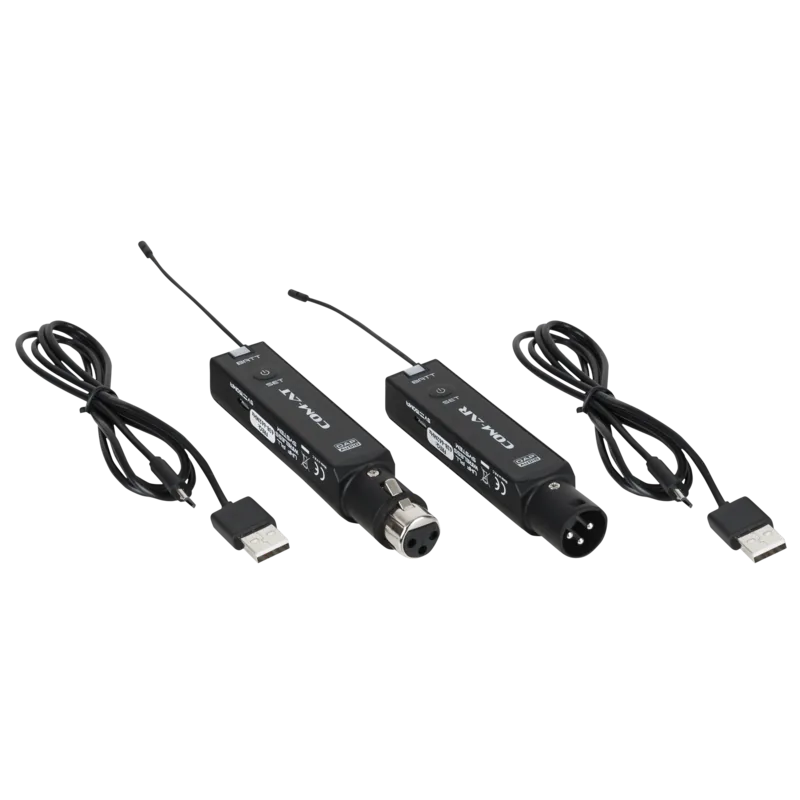
The DAP Audio COM-ART is a lightweight PLL UHF wireless audio set designed for simple, flexible signal transmission between a mixer and an amplifier or active speaker. It includes one transmitter and one receiver, making it a convenient solution for clean audio routing without long cable runs. The design focuses on portability, fast setup, and reliable everyday use, especially in compact live, presentation, or installation environments.
Flexible setup and dependable performance
What stands out immediately is the system’s balance of simplicity and control. The transmitter connects to a mixer’s XLR output, while the receiver feeds an amplifier or powered speaker through XLR. With 16 frequency presets across the 606–630 MHz range, users can quickly adapt to local conditions and avoid interference. The COM-ART is built to work up to 50 meters in ideal conditions, giving enough freedom for small stages, rooms, and mobile setups.
Power options and user-friendly details
Another advantage is the choice of power sources. Both units can run on an AA battery or via USB power, which makes the system useful in situations where mains power is limited or where quick deployment matters. The battery indicator and LED display add clarity during operation, while the SET button makes frequency selection straightforward. According to the DAP Audio COM-ART Manual, settings are stored even after power-off, which is helpful for repeat use.
Good fit for compact wireless audio needs
The COM-ART is especially appealing for users who want an uncluttered audio path without sacrificing sound quality. Its frequency response of 30 Hz to 17 kHz supports full-range audio, while the signal-to-noise ratio and dynamic range are strong enough for clear playback in many practical scenarios. For stereo operation, two sets are required, which is worth noting when planning a broader wireless setup.
Notes
- Best results come when transmitter and receiver stay in line of sight.
- Keep the units away from metal surfaces and strong digital interference.
- Use the available presets to find the cleanest channel before regular operation.
- Follow proper battery and cleaning practices to keep the system performing well.
Search for 67,706 Manuals online


Type-in Brand or Model