
DALI Katch One Manual
PDF manual · 19 Pages
English



Quick check
Incorrect answer, please try again.
Chat with your DALI Katch One manual using AI
Get instant AI answers from your DALI Katch One manual
Ask anything about the DALI Katch One. Answers come from this manual, with the pages they are based on.
Ask a Question
Do you recommend Katch One?
Yes NoFrequently Asked Questions
To power on, press the Power ON/OFF button. The volume and input or sound mode indicators light up to show your last used settings. To power off, press and hold the Power ON/OFF button until the LEDs turn off.
Is this answer helpful?
Auto Power OFF shuts the speaker down if no audio has been playing for 20 minutes. If the speaker is connected to a TV via HDMI and HDMI CEC is enabled, the TV can also send a power-off command that turns the Katch One off.
Is this answer helpful?
Yes. Press and hold Source Select (Button 1). While holding it, press Volume Down (Button 4) to disable Auto Power ON/OFF and Auto Source Select, or press Volume Up (Button 5) to enable them again (default setting).
Is this answer helpful?
Turn on the speaker, select Bluetooth (Button 2), and then start pairing on your device. If the Bluetooth LED blinks, no device is currently paired. If it is not blinking, a device is connected. The speaker can only have one device connected at a time.
Is this answer helpful?
Bluetooth Release lets you free the currently connected device if you cannot pair a new one. Press and hold the Bluetooth release button (Button 2) until the release sound plays and the Bluetooth LED starts blinking, then re-run pairing.
Is this answer helpful?
Connect the speaker to your TV's HDMI ARC input, enable HDMI CEC, and select the alternative audio output on the TV. Set the audio output to Stereo or PCM. If HDMI ARC is not supported, use optical input instead. HDMI CEC can be named differently depending on the TV brand.
Is this answer helpful?
USB Power Out provides 5V/1A for charging many devices directly. It can also power compatible streaming adapters like Google Chromecast Audio-style devices. Music cannot be played via USB; firmware upgrades use the USB port with the provided DALI Tool and a USB stick.
Is this answer helpful?
Advantages and Disadvantages
Advantages

- Auto Source Select automatically switches to the active input when audio starts.
- Auto Power OFF turns the speaker off after 20 minutes without audio.
- Wide and Focus sound modes tailor the listening experience to content type.
- HDMI ARC with CEC can enable TV remote control for volume, mute, and power.
Disadvantages

- Auto features must be enabled or disabled via a specific button sequence.
- USB Power Out is for charging/powering, not for music playback.
- Bluetooth pairing is limited to one connected device at a time.
- Bass performance drops if the speaker is placed away from the wall.
Product Specification
Type
Soundbar
Channels
2.0
Power
200W RMS
Frequency Range
46Hz-25kHz
HDR
no
Video Connections
1x HDMI Out
Audio Connections
2x Digital Audio In (optical), 1x AUX In (0.14in jack), 1x Sub Out (RCA)
Other Connections
1x USB-A
Wireless
Bluetooth 4.0, aptX
Dimensions
33.86x6.46x2.72in (WxHxD)
Weight
8.16lb
Composed of
Soundbar
Product Description
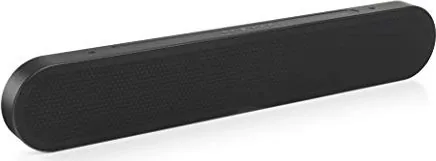
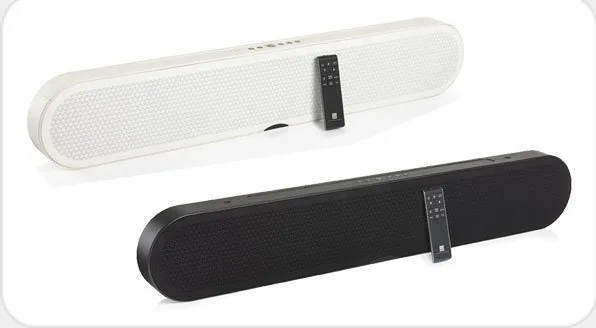
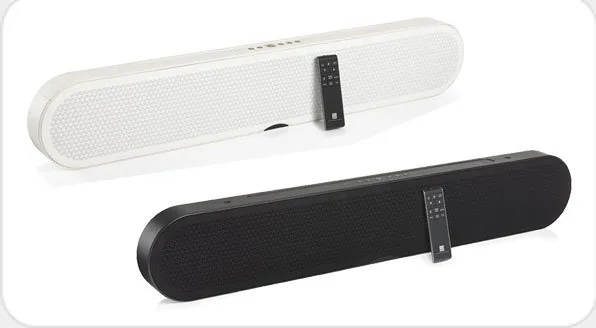
DALI Katch One - DALI Katch One Manual (at a glance)
The DALI Katch One is a compact, wall-mount friendly speaker designed for big, room-filling listening, with simple controls for power, input switching, volume, and sound tuning. Built for everyday use, it lets you move between Bluetooth and multiple wired sources such as HDMI ARC, optical, AUX, and even adds the option to expand bass with a subwoofer.
Start quickly: press power and the indicator lights show your current volume and the active input. Volume changes are displayed clearly, with mute indicated by blinking lights. For convenience, Auto Source Select can automatically switch the Katch One to the input that is currently playing, whether it is audio over Bluetooth, HDMI from your TV, or other connected sources.
Bluetooth is a core feature. Pair by selecting Bluetooth and initiating pairing on your device. The speaker supports release and re-pairing, so you can quickly connect a different phone or laptop. When you switch sources, you can control playback from the connected device, while basic commands can also be triggered via the Bluetooth button.
Sound quality is shaped with two modes: Wide (default) spreads the sound beyond the speaker dimensions for movies and concerts, while Focus narrows the stereo image for news, documentaries, and talk shows. Toggle the mode any time to match your content.
Connectivity is flexible. Use HDMI ARC for TV sound with CEC enabled, plus TV remote control for basic actions like volume, mute, and power. If HDMI ARC is not available, optical input (including the TV optical option) offers a straightforward alternative. A USB Power Out port provides 5V/1A for charging compatible devices, and a service-oriented USB setup supports firmware upgrades.
For setup and maintenance, best bass performance comes from positioning the speaker close to the wall, ideally with the front aimed directly toward your main listening position. Cleaning is kept simple and safe: use a dry soft cloth or a lightly dampened cloth with cleaner, and avoid getting moisture near the electronics.
Key results
- Auto Power OFF turns the speaker off after 20 minutes with no audio, with optional TV-driven shutoff via HDMI CEC.
- Auto Source Select switches inputs automatically when audio starts on the active source.
- Two sound modes (Wide and Focus) let you tune the stereo experience for movies or voice content.
- HDMI ARC supports TV remote control for basic functions when CEC is enabled and TV audio is set correctly.
Notes
- USB Power Out is for charging and powering small devices, not for music playback.
- USB firmware updates require a USB stick with the firmware file via the included DALI Tool.
- Bluetooth pairing is limited to one connected device at a time.
Pros and cons
Pros
- Auto Source Select helps you switch seamlessly when audio starts.
- Auto Power OFF saves energy by turning off after inactivity.
- Wide and Focus sound modes adapt quickly to different content.
- HDMI ARC with CEC can enable TV remote control for basic commands.
- USB Power Out supports device charging and enables firmware upgrades.
Cons
- Auto behavior can be disabled, but requires button sequence setup.
- Bluetooth release and re-pairing are needed if pairing fails.
- USB port does not support playing music directly.
- Best bass requires proper wall-close positioning.
- Only one Bluetooth device can be connected at a time.
Search for 67,706 Manuals online


Type-in Brand or Model