

D-Link DIS-700G-28XS Manual
PDF manual · 90 Pages
English



Quick check
Incorrect answer, please try again.
Chat with your D-Link DIS-700G-28XS manual using AI
Get instant AI answers from your D-Link DIS-700G-28XS manual
Ask anything about the D-Link DIS-700G-28XS. Answers come from this manual, with the pages they are based on.
Ask a Question
Do you recommend DIS-700G-28XS?
Yes NoFrequently Asked Questions
It explains how to manage the switch through its command-line interface, including setup, monitoring, security, VLANs, routing-related features, firmware actions, and diagnostics. It is aimed at administrators who need precise control.
Is this answer helpful?
It is best suited for operating personnel, network engineers, and administrators working in industrial or enterprise environments. The feature set is broad, so users should be comfortable with CLI-based network management.
Is this answer helpful?
The text references console access, Telnet, and SSH. It also mentions web-based management features, so administrators can choose the access method that matches their workflow and security requirements.
Is this answer helpful?
It includes VLAN management, STP, QoS, ACL profiles, SNMP, IGMP, port isolation, port mirroring, alarm handling, firmware updates, configuration backup/restore, and detailed status commands.
Is this answer helpful?
Yes. The reference includes login protection, privilege levels, account management, session handling, and the ability to restrict sensitive actions to superusers or engineers. That makes it suitable for controlled deployments.
Is this answer helpful?
The switch is designed for deep network control and troubleshooting. Each command targets a specific task, which gives administrators flexibility when building stable, segmented, and monitored network environments.
Is this answer helpful?
Advantages and Disadvantages
Advantages

- Extensive CLI coverage for switching, VLANs, QoS, ACLs, IGMP, SNMP, and maintenance tasks.
- Supports strong access control with roles, account management, inactivity logout, and login protection.
- Offers useful monitoring tools, including counters, forwarding tables, temperature, uptime, and logs.
- Includes configuration backup, restore, export/import, firmware scheduling, and system restart options.
- Suitable for industrial rackmount deployments that need both copper ports and fiber uplink flexibility.
Disadvantages

- The command structure is complex and can be intimidating for less experienced users.
- Many functions are available only in specific modes or for higher privilege levels.
- The CLI-oriented workflow may feel slower than a simpler web-based management approach.
- Some command syntax is dense, making routine tasks harder to learn and remember.
- Advanced features require careful planning to avoid misconfiguration or downtime.
Product Specification
Function
Switch
Type
Standalone, Rackmount (via mounting brackets)
Network ports
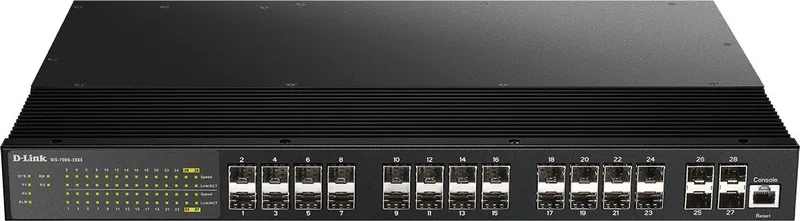
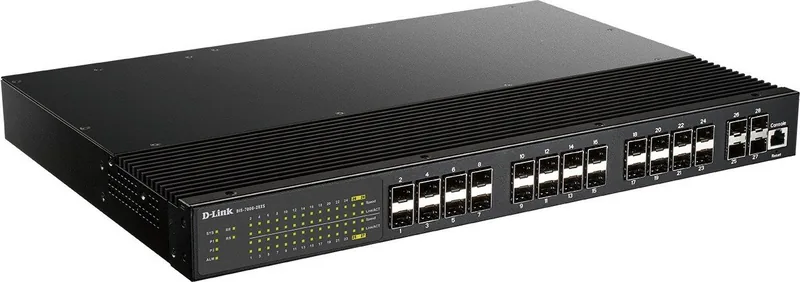
24x RJ-45, 4x SFP+
Speeds
24x RJ-45 (10/100/1000Base-T), 4x SFP+ (100M/1Gb/s)
PoE
N/A
Backplane
9KB Jumboframes, 8K MAC addresses
Officially supported standards
802.1AX, 802.1D, 802.1Q, 802.1X, 802.1ad, 802.1s, 802.1v, 802.1w, 802.3x, IGMPv3
Configuration
Web interface, console, alarm port (screw terminals, rear), serial (RJ-45), serial (USB-A 2.0, rear)
Cooling
passive
Dimensions (WxHxD)
17.32x1.73x12.54in, 1U
Weight
9.92 lb
Color
black
Special features
Metal housing, removable mounting brackets, firmware updates possible, redundant power supply, screw terminals (20-58V), primary power supply not included (1x necessary), power supply only via remote feeding, extended operating range (temperature: -40F to 167F, humidity: 5% to 95%), NEMA TS2
Note
For this device, "link aggregation" was officially specified with the obsolete standard IEEE802.3ad. Since 2008, the function is no longer managed by the IEEE "Working Group 3" (IEEE 802.3, CSMA/CD - Ethernet), but by "Working Group 1" (IEEE 802.1, High Level Interface - Internetworking) and technically defined unchanged via IEEE 802.1AX.
Product Description
D-Link DIS-700G Industrial Rackmount Gigabit Managed Switch, 24x RJ-45, 4x SFP+ Manual
The D-Link DIS-700G Industrial Rackmount Gigabit Managed Switch, 24x RJ-45, 4x SFP+ Manual highlights a switch built for serious industrial and enterprise networking. It is aimed at environments where dependable performance, flexible configuration, and deep visibility are essential. Rather than focusing only on basic connectivity, the switch is presented as a control point for administrators who need to manage traffic, secure access, and monitor the network in detail.
One of the most notable themes in the CLI reference is breadth. The switch supports multiple execution modes, from initial access to advanced configuration areas for interfaces, VLANs, ACLs, IGMP, ring protection, trunking, SNMP, alarms, and scheduling. That makes it a practical fit for complex networks where different teams may handle different responsibilities, from day-to-day monitoring to low-level tuning.
The text also shows a strong emphasis on operational control. Administrators can view system status, manage accounts, check uptime, inspect forwarding tables, track counters, and review firmware or backup states. Maintenance tasks such as configuration import/export, scheduled rebooting, firmware updates, and syslog integration suggest a device designed to reduce downtime and support long-term stability.
Security and access control are also central. Login protection, user roles, inactivity logout, and account management options help keep administration organized. For industrial settings, that matters because network changes often need to be traceable and restricted to the right personnel. The manual also points to remote access methods such as console, Telnet, and SSH, which makes the switch easier to integrate into managed environments.
From a practical perspective, this switch looks best suited for teams that want more than plug-and-play switching. It offers the kind of command-driven precision that supports segmentation, redundancy, quality of service, multicast handling, and port-level control. If your deployment needs reliable copper access and fiber uplinks, the 24x RJ-45 and 4x SFP+ layout provides a balanced foundation for mixed infrastructure.
Notes
- Best for experienced administrators and industrial deployments.
- CLI depth is a strength when you need fine-grained control.
- Plan user roles and backups before making major changes.
- Review interface, VLAN, and security settings together for consistent results.
Search for 67,732 Manuals online


Type-in Brand or Model