Manual.ly Logo

Cougar Surpassion Manual

5.0 · 2 Ratings

PDF manual · 2 Pages

English

M: OA-GPT-54-NAN
page

/ 2

Loading...
fa6688d587e25c35402650ad4a1c9823a994 page 1
DEFAULT BUTTON ASSIGNMENT
SPECIFICATIONS
Product name
Sensor
Resolution
Polling rate
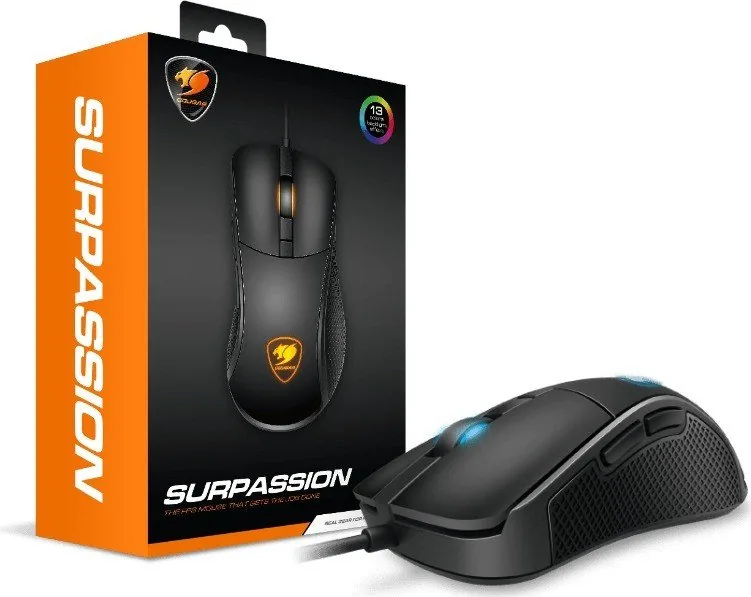
SURPASSION Gaming Mouse
PixArt PMW3330 Optical gaming sensor
50-7200 DPI
Game type
FPS
125 / 250 / 500 / 1000Hz
Switching OMRON gaming switches
Profile LED backlight
Maximum tracking speed
Maximum acceleration
Interface
Cable length
Dimension
2 zone backlight
150 IPS
30 G
Golden-plated USB plug
1.8m
120(L) X 65(W) X 38(H) mm
The above specifications may vary by country or region
USER MANUAL
REAL GEAR FOR REAL GAMERSREAL GEAR FOR REAL GAMERS
www.cougargaming.com
A
Left Click
(
OMRON 50 million
)
C
Wheel Click
(
ALPS Encoder
)
E
Forward
B
Right Click
(
OMRON 50 million
)
D
Color Backlight Cycle
G
Left Button
H
Right Button
I
LCD Screen
F
Backward
SURPASSION
E
F
C
D
B
A
FEATURES
G H
I
●
FULLY ADJUSTABLE 7200 DPI OPTICAL SENSOR
Adjust the DPI level easily from 50 to 7200 (in 50 DPI intervals) to find the sweet spot that suits your gaming style! When
you've reached it, the on-board memory will store it in one of its six modes.
●
ON-BOARD KEY SETTING CONTROL
Fine-tune your mouse in-game, without having to install any software! Just use the LCD screen and two dedicated buttons
to adjust DPI, Polling Rate, LOD and to activate or deactivate angle snappings. Pro-level customization in a fast and
convenient manner!
●
FPS-ORIENTED ERGONOMIC DESIGN
To optimize your FPS gaming experience, Surpassion’s shape has been designed to be both comfortable and effective. A palm grip
shape that adapts itself well to claw grip when needed, independent pressing areas on the two main buttons reduce the
force required to activate the buttons, allowing you to react faster and minimizing accidental presses and finger grooves to
make your grip more comfortable work together to make you better at FPS gaming.
●
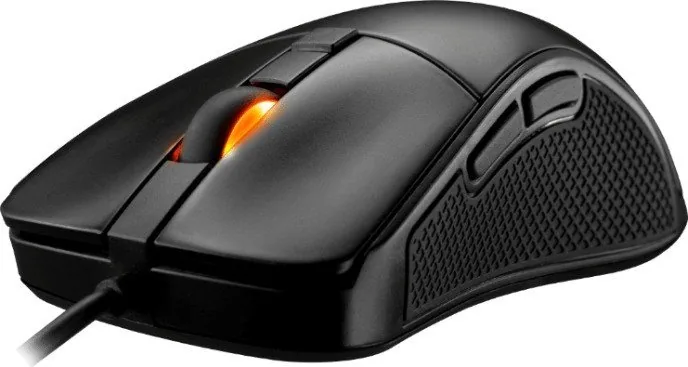
ANTI-SLIP REAL RUBBER FLANKS
To help you get a solid hold during intensive gaming sessions, Surpassion comes with two real rubber (not coating) flanks
that further stabilize your grip.
●
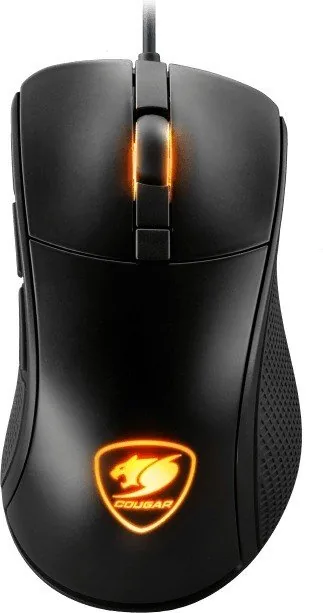
MULTICOLOR BACKLIGHT WITH 13 MODES
Create the best gaming atmosphere by just clicking a button! Surpassion allows you to choose one of 13 different backlight
modes (11 single-color, 2 multi color) simply by clicking the dedicated backlight button.
●
Оптический игровой сенсор 7200 DPI с шагом 50
DPI для точной настройки DPI
●
Управление настройками бортового ключа: ЖК-экран с
2 кнопками для DPI, скорости опроса, LOD и Angle Snapping
●
Эргономичный дизайн, идеальный для FPS игроков и не только
●
Переключатели OMRON с гарантированными 50
миллионами нажатий
●
Настоящие резиновые фланцы: обеспечивают
стабильный захват мыши
РУССКИЙ
中 文
●
电竞级7200 DPI光学滑鼠感应器,配有50 DPI一阶的
微调功能
●
即时调整设定: 搭载LCD萤幕,按压2个按钮即可调整DPI、
回报率、工作高度、与直线修正功能
●
FPS游戏导向的人体工学设计
●
保证5千万点击次数的欧姆龙按键
●
纯橡胶侧边: 抓握更稳定
ESPAÑOL
●
Sensor Óptico de 7200 DPI Personalizable en Pasos de
50 DPI
●
Configurable Sin Software: Pantalla LCD con 2
Botones para Control de DPI, Ratio de Refresco,
Distancia de Seguimiento y Ajuste de Ángulos
●
Diseño Ergonómico Orientado a Juegos FPS
●
Interruptores OMRON con Vida Útil de 50 Millones de
Pulsaciones
●
Flancos de Caucho Real: Agarre Más Estable
한국어
●
50 DPI 스텝 DPI 미세 조정이 가능한 7200 DPI
광
게이밍 센서
●
온보드 키 설정 컨트롤: DPI, 전송 속도, LOD 및 수평/
수직
보정을 미세 조정하는 버튼이 2개인 LCD 화면
●
FPS 게임 중심의 인체공학적 디자인
●
5,000만 회 누름이 가능한 OMRON 스위치
●
천연 고무 소재의 측면: 안정성이 높아진 그립감
日本語
●
7200 DPI
の光学センサーを誇るゲーミングマウスで、
50 DPI刻
みで調整が可能
●
本体で設定を変更可能:液晶スクリーンを搭載し、DPI、
ポーリングレート、LODと直線補正は2つのボタンによって
調整可能
●
人間工学に基づいて設計されたFPS向けマウス
●
5千万回
のクリックに耐えるオムロン製スイッチを採用
●
両側面
には滑り止めのラバー素材を使用しており、
しっかりとグリップできます。
FRANÇAIS
●
Capteur de jeu optique 7200 DPI avec réglage précis
50 DPI par pas
●
Contrôle intégré de la configuration des touches: Écran
LCD avec 2 boutons pour le réglage précis du DPI, du
taux dʼinterrogation, du LOD et de la correction dʼangle
●
Conception ergonomique orientée FPS
●
Interrupteurs OMRON avec 50 millions dʼappuis
●
Côtés en caoutchouc véritable : Préhension plus stable
HUNGARIAN
●
7200 DPI játékhoz való optikai érzékelő 50 DPI
lépésenként finomhangolható felbontással
●
Beépített gombállító kezelőszerv: LCD kijelző 2
gombbal a DPI, lekérdezési sebesség, LOD és
saroklevágás finomhangolásához
●
Lövöldözős játékra hangolt, ergonóm kialakítás
●
OMRON kapcsolók 50 millió leütésre hitelesítve
●
Valódi gumi oldalrészek: stabilabb fogás
POLISH
●
Optyczny czujnik do gier o rozdzielczości 7200 DPI z
krokiem 50 DPI dostrajania DPI
●
Pokładowe sterowanie ustawieniem przycisków: Ekran
LCD Screen z 2 przyciskami regulacji DPI, liczby raportów,
wysokości podniesienia i dokładnej regulacji predykcji
●
Ergonomiczna konstrukcja zorientowana na FPS
●
Przełączniki OMRON o trwałości 50 milionów naciśnięć
●
Boki wykonane z prawdziwej gumy: Trwały uchwyt
●
Sensore Ottico 7200 DPI selezionabile di 50 DPI
per volta.
●
Impostazione dei tasti possibile direttamente dal
mouse:
Schermo LCD con due pulsanti per DPI,
Polling Rate, LOD
e impostazione Angle Snapping
●
Design specifico per FPS
●
Switch OMRON garantiti per 50 milioni di digitazioni
●
Grip laterale in vera gomma per una maggiore stabilità
ITALIANO
PORTUGUÊS
●
Sensor de jogo ótico 7200 DPI com ajuste de DPI
de 50 DPI
●
Controle de Configuração de Chave Integrado:
Tela LCD com 2 botões para DPI, Taxa de Sondagem,
LOD e encaixe angular
●
Design ergonômico orientado a FPS
●
Chave OMRON com 50 milhões de pressões
●
Flancos de borracha real: Apoio mais estável
●
Optischer 7200-dpi-Gaming-Sensor mit
dpi-Feinabstimmung in 50-dpi-Schritten
●
Integrierte Tasteneinstellungssteuerung:
LCD-Bildschirm mit 2 Tasten für dpi, Abfragerate,
LOD und Feinabstimmung der Winkeleinrastung
●
FPS-orientiertes ergonomisches Design
●
OMRON-Schalter mit 50 Millionen Anschlägen
●
Echtgummiflanken: Stabiler Griff
DEUTSCH
●
7200 DPI Optical Gaming Sensor with 50 DPI step
DPI fine-tuning
●
On-Board Key Setting Control: LCD Screen with 2
Buttons for DPI, Polling Rate, LOD and Angle Snapping
fine-tuning
●
FPS-oriented Ergonomic Design
●
OMRON switches with 50 million presses
●
Real Rubber Flanks: Stabler Grip
ENGLISH

Chat with your Cougar Surpassion manual using AI

Get instant AI answers from your Cougar Surpassion manual

Ask anything about the Cougar Surpassion. Answers come from this manual, with the pages they are based on.

Ask a Question

0/1000

Do you recommend Surpassion?

Yes No
0
User Pic

Marta Klein

10 months ago

Is this mouse grippy (no slipping in hand) and can I adjust DPI easily? Also, how good is the RGB lighting and is it programmable?

0
User Pic

Manual.ly

10 months ago

Yes. Several buyers report it is very grippy and helps prevent slipping during use. DPI can be adjusted directly via a small display on the bottom of the mouse (along with other basic settings like report/polling). A DPI level around 7000 is enough for most people. For lighting, note it does not have fully customizable true-RGB. It offers around 13 color options and rainbow-style effects, but it is not programmable.

M: OA-GPT-5-NAN
M: OA-GPT-5-NAN

Frequently Asked Questions

A

It uses a PixArt PMW3330 optical gaming sensor. The sensor is designed for accurate tracking and can be tuned from very low sensitivity up to 7200 DPI in 50 DPI steps.

Is this answer helpful?

A

Yes. The mouse includes on-board controls with an LCD screen and buttons, so you can adjust DPI, polling rate, lift-off distance, and angle snapping directly on the device.

Is this answer helpful?

A

There are six DPI modes. The default values are 400, 800, 1600, 3200, 5600, and 7200 DPI, and each mode can be customized to fit your play style.

Is this answer helpful?

A

The mouse supports 125, 250, 500, and 1000 Hz polling rates. This lets you choose between different levels of responsiveness depending on your gaming needs.

Is this answer helpful?

A

Yes. Its ergonomic shape, responsive buttons, adjustable sensor settings, and stable grip were all designed with FPS play in mind, where speed and precision matter most.

Is this answer helpful?

A

The main buttons use OMRON switches rated for 50 million clicks, which indicates strong durability for frequent gaming and everyday use.

Is this answer helpful?

M: OA-GPT-54-NAN

Advantages and Disadvantages

Advantages

  • 7200 DPI optical sensor with 50 DPI steps for precise, personalized aiming.
  • On-board LCD controls let you change DPI, polling rate, LOD, and angle snapping without software.
  • OMRON switches rated for 50 million clicks support long-term durability.
  • Real rubber side grips and FPS-friendly shape improve control during intense play.
VS

Disadvantages

  • Wired design may not appeal to users who prefer a wireless setup.
  • Feature set is focused more on FPS control than broad all-purpose gaming extras.
  • The compact size may not suit every hand shape or grip preference.
M: OA-GPT-54-NAN

Product Specification

Hand orientation

right hand

Buttons

6 (total), 2 (main), 1 (top), 2 (left), 1 (scroll wheel click)

Scroll wheel

1x 2-way

Tracking

LED-red/IR

Resolution

7200dpi, adjustable

Sensor

PixArt PMW 3330

Switches

mechanical switches, Omron

Polling rate

1000Hz, adjustable to 500/250/125Hz (wired USB)

Lighting

RGB

Connection

wired (70.87 in), USB

Power supply

USB

Dimensions (WxHxD)

2.56x1.50x4.72in

Approximate volume

4.76 in3 (approximate shape)

Weight

3.39 oz

Special features

Display (bottom), Onboard memory

M: OA-GPT-54-NAN

Product Description

Cougar Surpassion Optical Gaming Mouse, USB: A Fast, Adjustable FPS Companion

The Cougar Surpassion Optical Gaming Mouse, USB is built for players who want quick response, precise control, and easy tuning without extra software. At its core is a PixArt PMW3330 optical sensor that reaches up to 7200 DPI, with fine adjustment in 50 DPI steps. That makes it simple to match the mouse to different games, screen sizes, and personal aiming styles.

Designed for On-the-Fly Control

One of the most appealing parts of the Surpassion is its on-board key setting control. A small LCD screen and dedicated buttons let you adjust DPI, polling rate, lift-off distance, and angle snapping directly on the mouse. This is especially useful for competitive play, where fast changes matter and software can feel like a distraction.

The mouse offers six DPI stages, with default values of 400, 800, 1600, 3200, 5600, and 7200 DPI. Polling rates can be switched between 125, 250, 500, and 1000 Hz, helping users balance smooth tracking and responsiveness. The built-in memory also keeps your preferred setup ready for the next session.

Comfort and Performance for FPS Players

Cougar shaped the Surpassion with FPS gaming in mind. Its ergonomic body supports a palm grip while still working well for claw-style use. The main buttons use OMRON switches rated for 50 million clicks, which adds confidence for long-term use and heavy clicking. Independent button zones also help reduce accidental presses and make actions feel more controlled.

To improve stability, the mouse includes real rubber side grips rather than a simple coating. That helps during intense matches or long play sessions when sweat or quick movements could otherwise loosen your hold. A 1.8-meter cable with a gold-plated USB plug rounds out the package with reliable wired connectivity.

Lighting and Style

Beyond performance, the Surpassion also brings personality to the desk. Its multicolor backlight offers 13 modes, including single-color and multi-color effects. That makes it easy to match a setup’s mood without sacrificing function.

Notes

  • Best suited for FPS players who want fast tuning and a wired connection.
  • The mouse is made for customization without requiring software.
  • Recommended for users who value grip stability and durable switches.

In short, the Cougar Surpassion Optical Gaming Mouse, USB blends precise sensor control, practical onboard adjustment, and gamer-focused comfort into a compact and capable everyday battle-ready mouse.

M: OA-GPT-54-NAN

© Copyright 2026 Manual.ly
