
Cougar QBX Manual
PDF manual · 1 Pages
English


Quick check
Incorrect answer, please try again.
Chat with your Cougar QBX manual using AI
Get instant AI answers from your Cougar QBX manual
Ask anything about the Cougar QBX. Answers come from this manual, with the pages they are based on.
Ask a Question
Do you recommend QBX?
Yes NoFrequently Asked Questions
The Cougar QBX supports Mini-ITX motherboards only, optimized for compact high-performance builds while keeping internal space for components and cooling.
Is this answer helpful?
Yes. If the HDD bay cage is removed, the case can accommodate up to a 240mm radiator or a single 120mm fan in that area. With the HDD cage installed, a 120mm fan fitment is supported.
Is this answer helpful?
The QBX requires PSUs whose AC socket and plug orientation match Cougar’s specified formats. Confirm the PSU’s plug orientation before purchase because incompatible units will not fit correctly in the compact layout.
Is this answer helpful?
The HDD bay cage supports two 2.5" drives and one 3.5" drive simultaneously. The ODD bay is compatible with slot-loading slim ODDs and can also accept 2.5" drives depending on configuration.
Is this answer helpful?
The chassis includes one pre-installed 90mm rear exhaust fan. Additional fan mounts are available: two optional 120mm bottom fans for GPU cooling and an optional 80mm front fan for HDD and GPU airflow.
Is this answer helpful?
Yes. The case includes front and bottom dust filters and rubber covers to block dust when slim ODDs are not used. Removable panels facilitate cleaning and component access.
Is this answer helpful?
Yes. Cougar supplies an accessory kit with various screws for fans, SSD/HDD, ODD brackets, PSU screws and cable ties to help with a tidy and complete build.
Is this answer helpful?
Advantages and Disadvantages
Advantages

- Ultra-compact yet supports high-performance components including GPUs and optional radiators up to 240mm without the HDD cage.
- Excellent cooling flexibility with support for up to seven fans and multiple fan mounting positions.
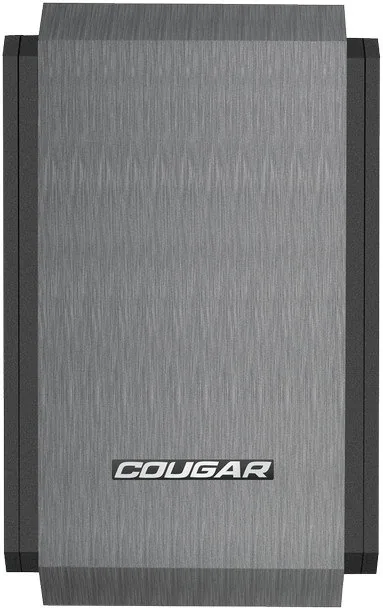
- Stylish hairline front panel and vented side covers for aesthetic and practical airflow.
- Removable panels and filters simplify cable management, maintenance, and installation.
- Comprehensive accessory kit includes screws, brackets and cable ties for tidy builds.
Disadvantages

- Strict PSU orientation and form-factor requirements limit compatible power supplies.
- Limited internal space can make installation of large components or cable routing challenging.
- Supports only slot-loading slim ODDs, reducing optical drive options.
- Some optional fans and accessories must be purchased separately for optimal cooling.
- Tight layout may restrict certain aftermarket coolers or tall CPU coolers.
Product Specification
External
1x 5.25" Slimline (Slot-In)
Internal
1x 3.5", 4x 2.5"
Ports
2x USB-A 3.0 (5Gb/s), 1x 3.5mm Jack (Line-Out), 1x 3.5mm Jack (Line-In)
PCI Slots
2
Fan (front)
1x 3.15" (optional)
Fan (rear)
1x 3.62"
Fan (left)
1x 4.72" (optional)
Fan (right)
N/A
Fan (top)
2x 4.72" (optional)
Fan (bottom)
2x 4.72" (optional)
Fan (other)
N/A
Radiator sizes
N/A front, N/A top, 4.72" left
Motherboard
up to Mini-ITX
Supported Motherboards
Mini-ITX (6.7"x6.7")
Power Supply
ATX (max. 5.51" deep)
Power Supply position
front bottom
CPU cooler
max. 4.13" height
Graphics cards
max. 13.78"
Color
black, interior black
Lighting
no lighting
Dimensions (WxHxD)
7.01"x11.46"x15.12"
Volume
5.25gal
Case type
ITX/DTX
Front
closed
Top
closed
Bottom
partially closed, mostly fan grille, dust filter external
Left
partially closed, Mesh, mostly fan grille, dust filter internal
Right
partially closed, Mesh, mostly fan grille, dust filter internal
Rear
partially closed, fan grille right center, PCI slots bottom (2x horizontal)
Front I/O position
Case side: right, Height: bottom, Position: Front
Features
Cable management, Dust filter
USB notation
Link
Product Description
Cougar QBX Mini-ITX — Compact Powerhouse
The Cougar QBX Mini-ITX is an ultra-compact, stylish chassis engineered to house a high-performance gaming or media PC in a remarkably small footprint. Its hairline-surface front panel and vented side covers deliver a sleek look while maximizing airflow. Despite the compact size, the QBX supports a broad range of components and cooling options, making it ideal for builders who want desktop-level performance in a small form factor.
Design and Layout
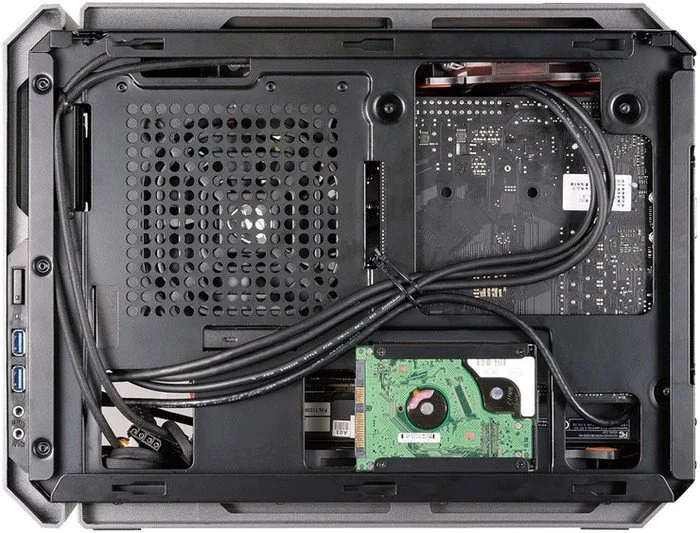
The chassis’ layout focuses on efficient space use and thermal control. A removable top cover simplifies installation of the PSU and up to two 120mm fans. The removable right side panel offers convenient cable management behind the motherboard tray. Vented slot covers and a left-side mesh with ventilation exits enhance passive and active airflow.
Storage is flexible: an ODD bay cage accepts a slot-loading slim ODD or a 2.5" HDD/SSD, and a dedicated HDD cage can hold up to two 2.5" drives plus one 3.5" drive. If the HDD cage is omitted, the case can accommodate up to a 240mm radiator or a single 120mm fan, making liquid-cooling setups possible within the tight enclosure.
Cooling and Fans
Out of the box the QBX includes a pre-installed 90mm rear exhaust fan. Optional fan mounts allow for additional cooling: two 120mm bottom fans for graphics card assistance and an 80mm front fan for HDD and GPU airflow. The case supports up to seven fans in total, and features front and bottom dust filters plus rubber covers to block dust when slim ODDs aren’t used.
Power and Compatibility
The QBX requires specific PSU form-factor orientation due to its compact interior; builders must verify AC socket and plug orientation against Cougar’s specified formats. A power bracket secures the PSU inside the chassis. The design supports modern connectivity including dual USB 3.0 ports on the front panel for high-speed peripherals.
Build Experience and Accessories
Cougar supplies a comprehensive accessory kit: multiple screws for fans, SSDs, HDDs, ODD brackets, power supply screws and cable ties to assist tidy builds. Slot-loading slim ODDs are supported only in the specified format. Removable covers and filters make maintenance and upgrades straightforward.
Notes
- Verify PSU plug orientation before purchase to ensure compatibility.
- Removing the HDD cage increases cooling and radiator options.
- Dust filters on front and bottom improve long-term thermal stability.
Search for 67,706 Manuals online


Type-in Brand or Model
Lena Kowalski
9 months ago
Does this ITX case clearly state the maximum GPU width and PSU fit limits? I heard some cards do not fit without modifying the case or using SFX.
Manual.ly
8 months ago
The case gives maximum GPU length and expansion slot limits, but maximum GPU width/clearance is not always easy to infer from the listing. In practice, fit depends on the exact GPU cooler dimensions and how much space you need for PSU cables. For power supplies, ATX models are generally limited by internal clearance (notably around 140 mm length). If you use a modular PSU, the modular cable area can become tight and may require switching to an SFX unit for better cable routing. Some users report that, when a GPU is too wide, minor case modifications (carefully removing small obstructions) were needed. Before buying, compare your GPU and PSU dimensions against the measured internal clearances and plan your cable routing accordingly.