Manual.ly Logo

Cougar Minos XC Manual

0.0 · 0 Ratings

PDF manual · 2 Pages

English

M: QW-35-FL
page

/ 2

Loading...
8356b278fce57e387ad780d0498f75b499a9 page 2
CAUTION
Please do not directly look into the optical beam!
LEGAL NOTICES
This manual was created by Compucase Enterprise and may not be completely or partially copied, passed on, distributed
or stored without written consent by Compucase Enterprise.
COUGAR® is a registered brand of Compucase Enterprise Other product and company names mentioned in this
documentation may be brands or trademarks of their respective owners.
Compucase Enterprise reserves the right to make changes concerning the contents of the manual and the technical data
of the product without previous announcement.
All other registered trademarks belong
to their respective companies.
MSIP-REI-CEE-COUGAR
MINOS XC
Tested to comply with FCC standards
FOR HOME OR OFFICE USE
DISCLAIMERS
●
COUGAR does not authorize or endorse the user of COUGAR products as a part of, together with, or connected to,
life support devices, medical equipment in general, military equipment, traffic or transportation-related equipment or
disaster prevention systems.
●
COUGAR is not liable for any damage, expense, loss, cost, injury or any other result derived from the use of COUGAR
products not specifically for PC gaming in the compatible operative systems indicated by COUGAR.
●
COUGAR is not liable for any damage, expense, loss, cost, injury or any other result due to use of COUGAR products
not in strict accordance with the instructions provided by COUGAR in the instruction manual.
●
Software, instruction manuals, consumables (for example mouse pads, mouse feet, etc.), boxes or other external
packaging are not covered by the warranty.
●
For inquiries about the warranty, please contact us at [email protected]
WARRANTY AGREEMENT
●
If the product has defects in material or manufacture, COUGAR will provide product repair and replacement service
within the warranty period.
●
Our warranty service is based on the date of the invoice or warranty card (must be affixed with the store stamp).
If you lose the aforementioned evidence, we will apply the original shipping date of the product as the beginning date
of warranty period. The shipping date will be identified by the product serial number(S/N).
CONDITIONS WHERE FREE MAINTENANCE IS NOT PROVIDED
●
Any fault or damage caused by natural disasters (including storm, fire, flood, thunder, earthquake, etc).
●
Any fault or damage caused by accidental factors and man-made reasons (including hit, scrape, crash, moving,
compression, stain, corrosion, use of incurred on unsuitable voltage, computer virus, riot, misuse, malicious damage, etc).
●
Use in an improper operating environment (including high temperature, high humidity, water inflow, etc).
●
Inability to provide the product warranty card, purchase receipt or invoice to prove the product is still within the
warranty period and the shipping date of the product is out of warranty.
●
The warranty card or product serial number has been altered or its number is hard to identify.
●
The warranty period has expired.
●
Any fault or damage caused by non-compliance with regulations stated on the user manual or improper, rough and
careless treatment.
●
Any fault or damage caused by use of parts not certified by COUGAR original manufacturer.
●
The problem is caused by improper repair or adjustment by the buyer or any manufacturer without authorization from COUGAR.
●
The product is not acquired from an authorized distributor of the company or is acquired from illicit sources.
●
Paper carton, instruction and other accessories are not warranted.
GLOBAL WARRANTY POLICY
WARRANTY PERIODS OF COUGAR GAMING DEVICES
Product : COUGAR MONOS XC gaming mouse Warranty : 1 Year
This warranty gives you specific legal rights. You may also have other rights granted under local law.
R63088
RoHS
ENGLISH
1.Go to the COUGAR official website.
(http://www.cougargaming.com)
2.Download the COUGAR UIX
TM
SYSTEM_MINOS XC
installer from the MINOS XC download page.
DEUTSCH
1. Gehe zur offiziellen COUGAR Homepage.
(http://www.cougargaming.com)
2. Download COUGAR UIX
TM
SYSTEM_MINOS XC installer
von der MINOS XC download seite.
中 文
1.连上COUGAR官方网站(http://www.cougargaming.com)
2.进入
MINOS XC的下载页面,下载COUGAR UIX
TM
SYSTEM_MINOS XC
한국어
1. COUGAR 공식 웹사이트
(http://www.cougargaming.com)로 이동합니다.
2.
MINOS XC 다운로드 페이지에서 COUGAR UIX
TM
SYSTEM_MINOS XC
설치 프로그램을 다운로드합니다.
日 本
1. COUGAR 公式サイトに移動します。
(http://www.cougargaming.com)
2.
COUGAR_MINOS XC ダウンロードページから
COUGAR UIX
TM
SYSTEM_MINOS XCの
インストーラーをダウンロードします。
РУССКИЙ
1. Ïåðåéäèòå íà âåá-ñàéò COUGAR.
(http://www.cougargaming.com)
2. Çàãðóçèòå ïðîãðàììó óñòàíîâêè äðàéâåðà COUGAR UIX
TM
SYSTEM_
MINOS XC
ñî ñòðàíèöû çàãðóçîê äëÿ
MINOS XC
.
PORTUGUÊS
1. Visite o website oficial da COUGAR.
(http://www.cougargaming.com)
2. Transfira o programa de instalação COUGAR UIX
TM
SYSTEM_MINOS XC a partir da página de
transferência MINOS XC.
ESPAÑOL
1. Vaya a la web oficial de COUGAR.
(http://www.cougargaming.com)
2. Descargue el instalador de COUGAR UIX
TM
SYSTEM_MINOS XC de la página de descarga
MINOS XC.
DOWNLOAD
Download
COUGAR UIX
TM
SYSTEM
2
www.cougargaming.com
1
The COUGAR UIX
™
SYSTEM is the ultimate gaming device configuration tool.
SYSTEM REQUIREMENTS
Windows 10
1. Connettere la presa USB al PC
2. Scarica e installa i driver da http://cougargaming.com/downloads/
3. Il vostro device è pronto per essere utilizzato.
ITALIANO
год и месяц изготовления продукции указаны в серийном номере продукта. (существует 2 способа
определения даты изготовления, оба способа описаны ниже)
После S/N: первые две цифры означают год, вторые две – месяц изготовления.
Например, S/N: H1702000001 означает, что товар был произведен в феврале 2017 года.
После S/N: если указаны буквы, то две буквы представляют цифры из таблицы ниже, и означают
год, последующие две цифры – месяц изготовления.
Например, S/N: DAG02REVI000001 означает, что товар был произведен в феврале 2017 года.
●
Например, AG = 17 = 2017 год
ДАТА ИЗГОТОВЛЕНИЯ ПРОДУКЦИИ
A B C D E F G H I J
1 2 3 4 5 6 7 8 9 0
A
B
MANUFACTURER CONTACT
Compucase Enterprise Co.,Ltd.
No. 225, Lane 54, An Ho Road Sec. 2 Tainan, Taiwan, R.O.C
Tel:+886-6-356-0606
Service E-Mail: [email protected]
For more information, please visit
https://cougargaming.com
Compucase Enterprise Co.,Ltd.
All rights reserved. Made in China
COUGAR USA Technical Service
Tel: (833) 256-3778
https://cougargaming.com/support/contact/upload/

Chat with your Cougar Minos XC manual using AI

Get instant AI answers from your Cougar Minos XC manual

Ask anything about the Cougar Minos XC. Answers come from this manual, with the pages they are based on.

Ask a Question

0/1000

Do you recommend Minos XC?

Yes No

Frequently Asked Questions

A

It uses the ADNS-3050 Optical gaming sensor which supports up to 4000 DPI for precise tracking.

Is this answer helpful?

A

Yes, the COUGAR UIX™ software allows you to customize LED backlight colors and patterns based on DPI levels.

Is this answer helpful?

A

Yes, the package includes the Cougar Speed XC mouse pad made of cloth and natural rubber.

Is this answer helpful?

A

There are six programmable buttons that can be mapped to specific functions using the provided software.

Is this answer helpful?

A

The COUGAR Minos XC gaming mouse comes with a one-year warranty covering defects in material and manufacture.

Is this answer helpful?

A

The software is primarily designed for Windows 10; basic functionality may work on Mac but customization features are limited.

Is this answer helpful?

A

You can adjust DPI on the fly using dedicated buttons on the mouse or configure specific levels via the COUGAR UIX™ software.

Is this answer helpful?

M: QW-35-FL

Advantages and Disadvantages

Advantages

  • High-precision ADNS-3050 sensor with 4000 DPI resolution
  • Durable 20-million-click switches for long-term use
  • 1000Hz polling rate ensures minimal input lag
  • Includes compatible Speed XC mouse pad for smooth sliding
  • Full customization via COUGAR UIX™ software
VS

Disadvantages

  • Software installation required for full feature access
  • Cable length may require management for some desk setups
  • LED lighting cannot be turned off completely in some modes
  • No wireless connectivity option available in this model
  • Specific compatibility requirements for Windows operating systems
M: QW-35-FL

Product Specification

Suitability

right hand

Keys

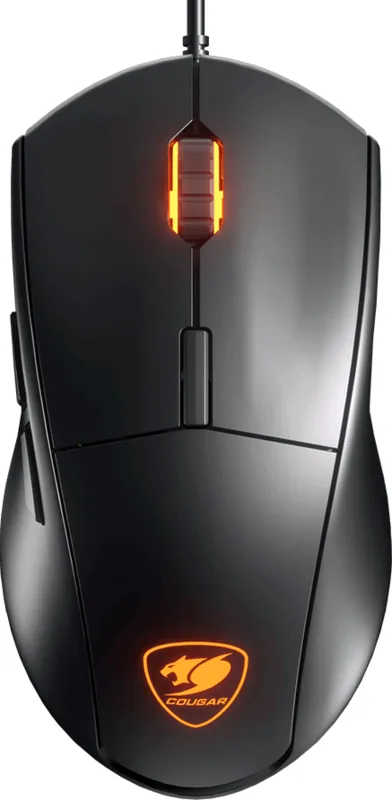
6 (total), 2 (main), 1 (top), 2 (left), 1 (scroll wheel click)

Scroll Wheel

1x 2-way

Scanning

LED-red/IR

Resolution

4000dpi, adjustable

Sensor

PixArt ADNS-3050

Switches

mechanical switches, Omron

Polling Rate

1000Hz (wired USB)

Lighting

orange

Connection

wired (7.1ft), USB

Power Supply

USB

Dimensions (WxDxH)

2.67x1.5x4.92in

Approximate Volume

5.19cu in (approximate shape)

Color

solid, black, logo

Features

includes mousepad, onboard memory

M: QW-35-FL

Product Description

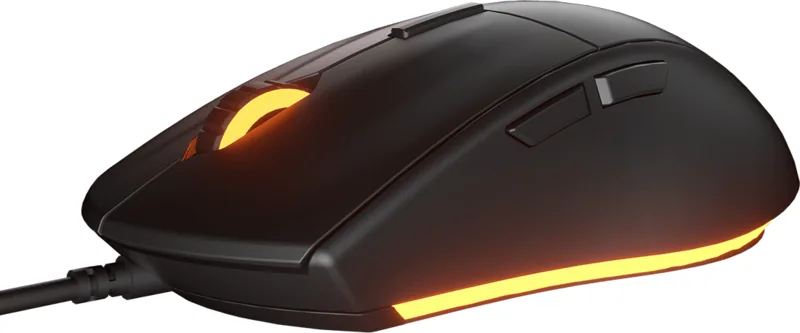
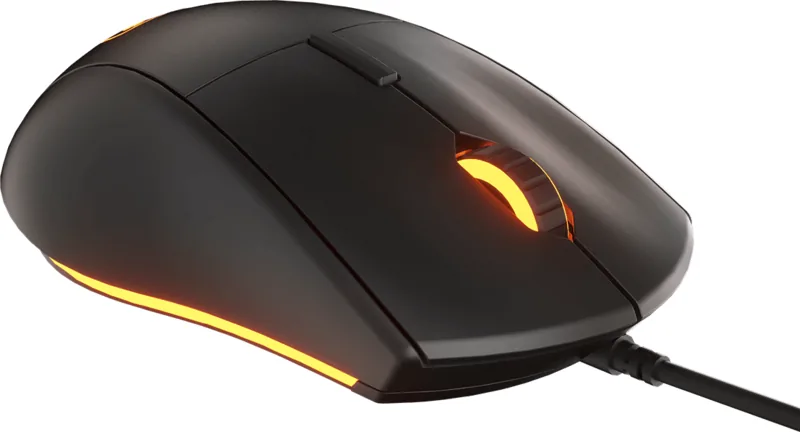
Elevate Your Gaming with the Cougar Minos XC Combo

For gamers who demand precision and durability, the Cougar Minos XC Gaming Gear Combo offers an exceptional entry into high-performance peripherals. This USB bundle pairs the Minos XC gaming mouse with the Speed XC mouse pad, creating a synergy designed for FPS, MMORPG, MOBA, and RTS titles. The mouse features an advanced ADNS-3050 optical sensor capable of 4000 DPI resolution, ensuring that every movement is tracked with deadly accuracy. With a polling rate of 1000Hz, users experience nearly zero input lag, allowing for split-second reactions in competitive environments.

The hardware is built to last, utilizing 20-million-click switches that guarantee longevity even under intense gaming sessions. Six programmable buttons allow players to map complex commands efficiently, while the COUGAR UIX™ software provides deep customization options for lighting profiles and button assignments. The included Speed XC mouse pad complements the setup with its 3mm thickness, cloth surface, and natural rubber base, offering a smooth glide and excellent anti-slip stability.

Customization and Design

Lighting customization is a standout feature, with LED indicators showing DPI levels ranging from 125 to 4000 through a spectrum of colors like red, blue, green, and white. The mouse dimensions of 125x68x38 mm fit comfortably in most hand sizes, and the braided cable ensures tangle-free management. Whether you are adjusting sensitivity on the fly or defining your own gaming style via the software, this combo delivers the tools needed to dominate the virtual battlefield.

Important Notes

Ensure you download the latest COUGAR UIX™ driver from the official website for full functionality. Avoid exposing the optical sensor to direct sunlight or strong ambient light sources for best performance. Always use the product on a flat, stable surface to maintain tracking accuracy.

M: QW-35-FL

© Copyright 2026 Manual.ly
