Manual.ly Logo

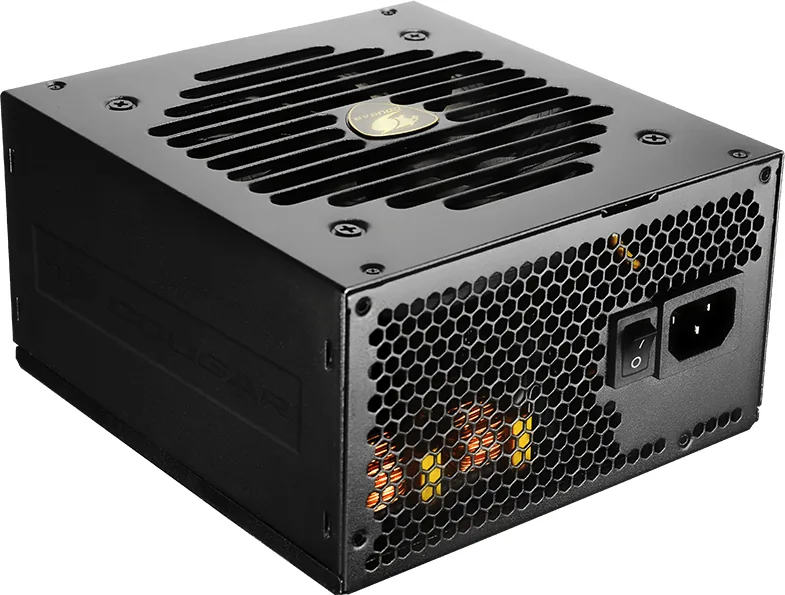
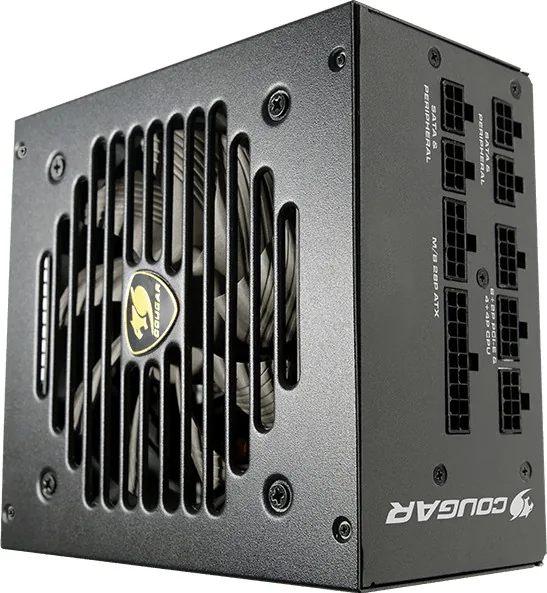
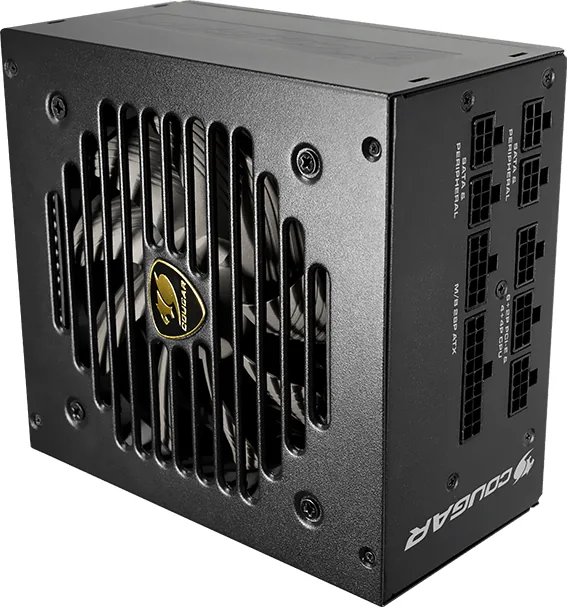
Cougar GEX Manual

0.0 · 0 Ratings

PDF manual · 2 Pages

English

M: QW-35-FL
page

/ 2

Loading...
cfd55348411ab825438c0b1680fa7710436b page 1
English
Introduction
Dear customer:
Thank you for choosing a COUGAR
®
power supply unit. Before the installation please read the
manual below carefully. If you have any questions, please contact our customer service:
Warnings and safety notes
Never open the PSU cover. There is potential danger of life due to high voltage inside. The PSU
should only be opened by an authorized technician. The manufacture warranty will be void, if
the PSU is opened by an unauthorized person.
Do not work on the PSU or the PC as long as the main voltage is still connected.
Switch the I/O button to position "0" and disconnect the power plug from the power network.
Protect the PSU against moisture.
The PSU is suitable for operation at 100-240V~/50-60 Hz and thus universally usable. The
ambient temperature should not exceed 40°. Please ensure that there is sufficient ventilation
of the entire system.
Make sure during the installation of the PSU that the ventilation slots are not covered. Do not
clog the ventilation slots of the PSU. Keep your PC away from direct heat sources such as
radiators.
When using an extension cord and/or multiple sockets pay attention to the maximum
through-connection ability in order to avoid short-circuits.
During the operation of the PSU pay attention to the maximum loads. The single loads and the
total loads must not exceed to cross the values shown in output power table.
Avoid the use of adapters, such as 4Pin Molex to 6+2Pin PCI-Express.
●
80-PLUS® GOLD CERTIFIED
Up to 91% efficiency power conversion for reducing your electricity bill
●
FULLY MODULAR POWER SUPPLY UNIT
Connect only the cables you need for less clutter and better airflow
●
HDB FAN POWERED
Hydro Dynamic Bearing fan: Extended durability and lower noise levels
●
SUPERIOR FAN CURVE TUNING
Advanced tuning technologyy for noise minimization
●
FLAWLESS OPERATION AT 40°C
Powerful performance at 40°C ambient temperature
●
ULTRA-STABLE VOLTAGE OUTPUTS
DC to DC technology for enhanced voltage stability
●
SUPPORT FOR MULTI-GPU TECHNOLOGY
Supports PCI Express 3.0 graphic cards with 6+2pin PCI-E connectors
●
SINGLE +12V DC SOURCE
Massive outputs for high power devices
●
STRONG SAFEGUARDS: OCP, OPP, OVP, UVP, SCP & OTP
Maximum safety for your key system components
Installation/accessories
Before you begin with the installation, please read the section “Warnings and safety notes.”
For the arrangement only use the supplied screws since these have the correct thread. You need
a screwdriver for the correct arrangement.
The following parts are included within the delivery:
●
Screws for the PSU assembly
●
Power cord (Please only use the power cord which is included; low-quality cords can damage
your PSU and your PC-system.)
●
Brief instruction incl. Information about the warranty
Installation of the COUGAR
®
PSU:
●
Place the PSU into its designated place within the case and fix it with the supplied screws.
●
First insert the plugs for the mainboard supply (20/24 pin, 4 pin and possibly 8 pin – according
to mainboard layout) into the respective slots.
●
Connect the disk drives and if necessary the graphics cards to the PSU.
●
Close the PC and ensure that the PSU power switch is set to the position "0".
●
Connect the PSU to the power network using the supplied power cord. Using only the power
cord provided in the package. Low quality power cord may damage the PSU and PC system!
●
Turn on the PSU and then start your PC.
Safety functions
●
OCP (Overcurrent protection)
If the current on a single line is higher than indicated, the PSU automatically switches off.
●
UVP (Under voltage protection)
If the voltages fall below a certain tolerance value on the single lines, the PSU automatically
switches off.
●
OVP (Over voltage protection)
If the voltages increase above a certain tolerance value on the single lines, the PSU
automatically switches off.
●
SCP (Short-circuit protection)
In the case of a short-circuit this feature prevents damage to the core components of the PSU
and its system components.
●
OPP (Over power protection)
If the system is oversized and requires more power from the PSU than it can perform, this
protection function is activated.
●
OTP (Over Temperature Protection)
If the temperature is too high, the PSU automatically switches off.
Warranty and information of the manufacturer
For further information of the warranty terms, please read the information of
“
Guarantee Terms and conditions for COUGAR Power Supply Units (PSU) of the GEX series”.
Compucase Enterprise Co.,Ltd.
No. 225, Lane 54, An Ho Road Sec. 2 Tainan, Taiwan, R.O.C
Tel:+886-6-356-0606
Service : cougargaming.com/support/contact/
More information you will find at cougargaming.com
Compucase Enterprise Co.,Ltd.
All rights reserved.
Legal notices
This manual was created by COMPUCASE ENTERPRISE CO., LTD. and may not be completely or
partially copied, passed on, distributed or stored without written consent by
COMPUCASE ENTERPRISE CO., LTD.
COUGAR® is a registered brand of COMPUCASE ENTERPRISE CO., LTD. Other product and
company names mentioned in this documentation may be brands or trademarks of their
respective owners.
COMPUCASE ENTERPRISE CO., LTD. reserves the right to make changes concerning the contents
of the manual and the technical data of the product without previous announcement.
Trouble shooting
Never work on the PSU yourself. Even long time after its deactivation, life-threatening voltages
can still be present in the PSU. Repairs should only be made by authorized specialists.
Working at power sources can lead to life-threatening injuries. If there is smoke, cable damage
or intrusion of liquids the PSU has to be immediately disconnected from the power network
and must not to be put into operation anymore afterwards.
Never open the PSU. It contains components, which can show high voltages even after long
periods of deactivation.
Again, repairs should only be done by authorized specialists!
Problem: After the installation of the new PSU the system does not start.
Possible solutions:
●
Check the power cord and the power supply of the wall socket and/or multiple socket strip.
Also check whether the multiple socket strip can supply the necessary power.
●
Check all connections within the PC; maybe not all cables are correctly connected.
●
Check the components for possible short-circuits or defects.
Please also check the other components for compatibility. Often mainboard chipsets are not
compatible with all memory and/or graphics card solutions.
Contact the manufacturer of the component to get more information.
If your PSU still does not function even though you have checked sources of errors mentioned
above, please get in touch with our customer service.
Advice
This product is not to be disposed in the regular household waste and must be brought to a
collection-point for electrical and electronic devices for recycling. The symbol to the left refers
to that and can be found on the product, in the manual or on the packaging. Materials can be
recycled according to their description. With the reuse, the recycling or other forms of
reutilization of old devices you make an important contribution to the protection of
our environment. Please inquire the appropriate location of disposal from your local
administration.
Specifications
●
Operating conditions
Working temperature: +10°C ~ +40°C
Storage temperature: -40°C~+70°C
Operating humidity (without condensation water): 20%~85% relative humidity
Storage humidity (without condensation water): 5%~95% relative humidity
●
Output power
●
Connectors
COUGAR provides a 5-year limited warranty on GEX series against manufacturing defects in
materials and workmanship.
During this period, defects in material or workmanship will be repaired or restored with spare
parts. To make use of the warranty service, the customer contact the retailer where the PSU
was bought and provide a copy of the invoice and an error description.
Compucase will only support directly if the retailer is not reachable repeatedly.
In the case of direct support by Compucase, the end user shall be responsible for packing the
product properly and will assume all transportation costs.
Compucase’s warranty does not cover any of the following:
●
Damages due to acts of nature (e.g. Lightning, Water, Fire and so on)
●
Accessory or consequential damages that happened by using or not using the PSU
●
Damages caused by misuse of the PSU or caused by negligence
●
Loss of information or data, software or applications
●
Damages caused by opening or modifying the PSU without previous accordance
●
Damages caused by using or installing the PSU under conditions outside of the technical
specifications which are described in the attached manual
This warranty is valid only for the first end user or consumer and is restricted to the above
named period.
GUARANTEE TERMS AND CONDITIONS FOR
COUGAR POWER SUPPLY UNITS (PSU) OF THE GEX
facebook.com/cougargaming
youtube.com/user/COUGARGLOBAL
www.cougargaming.com
GEX
GEX
+3.3V +5V +12V Total-12V +5Vsb
AC input
DC output
AC100-240V
50-60Hz 10-5A
650W
18A 20A
100W 649.2W
54.1A
0.3A
3A
GEX650
AC100-240V
50-60Hz 10-5A
750W
18A 20A
100W 750W
62.5A
0.3A
3A
GEX750
AC100-240V
50-60Hz 12-6A
850W
20A 20A
120W 849.6W
70.8A
0.3A
3A
GEX850
AC100-240V
50-60Hz 10-5A
550W
18A 20A
100W 549.6W
45.8A
0.3A
3A
GEX550
Main CPU
24
(
20+4
)
Pins 8
(
4+4
)
Pins
Peripheral S-ATA PCI-E
Pin
Connector
8
(
6+2
)
Pins5 Pins4 Pins
1 1 3 8 2
1 2 6
1 2 6
GEX750
1 2 6
GEX850
GEX650
GEX550
8 4
8 4
8 6

Chat with your Cougar GEX manual using AI

Get instant AI answers from your Cougar GEX manual

Ask anything about the Cougar GEX. Answers come from this manual, with the pages they are based on.

Ask a Question

0/1000

Do you recommend GEX?

Yes No

Frequently Asked Questions

A

Cougar provides a five-year limited warranty against manufacturing defects in materials and workmanship for the GEX series power supply units. This covers the first end user.

Is this answer helpful?

A

Yes, but you must follow safety notes. Switch the I/O button to position zero and disconnect the power plug before working. Never open the PSU cover due to high voltage risk.

Is this answer helpful?

A

Yes, it supports PCI Express 3.0 graphic cards with 6+2 pin connectors. It offers massive outputs on a single +12V DC source suitable for high power devices.

Is this answer helpful?

A

The PSU is suitable for operation at 100-240V and ambient temperature should not exceed 40 degrees Celsius to ensure flawless operation at that temperature.

Is this answer helpful?

A

Yes, you must only use the power cord which is included in the package. Low quality cords can damage your PSU and PC system significantly.

Is this answer helpful?

A

Check the power cord and connections within the PC. Check components for possible short-circuits or defects and ensure compatibility with mainboard chipsets.

Is this answer helpful?

A

This product is not to be disposed in regular household waste. It must be brought to a collection-point for electrical and electronic devices for recycling.

Is this answer helpful?

M: QW-35-FL

Advantages and Disadvantages

Advantages

  • 80-PLUS Gold certified for up to 91% efficiency reducing electricity bills significantly
  • Fully modular power supply unit connects only necessary cables for less clutter
  • HDB fan powered for extended durability and lower noise levels during operation
  • Ultra-stable voltage outputs using DC to DC technology for enhanced stability
  • Comprehensive safeguards like OCP, OPP, OVP, UVP, SCP and OTP for safety
VS

Disadvantages

  • Warranty void if PSU is opened by unauthorized persons due to high voltage danger
  • Repairs should only be done by authorized specialists not by end users
  • Single +12V DC source may limit specific partitioning needs for some builders
  • Must use the supplied power cord only to avoid damage to PSU and PC
M: QW-35-FL

Product Specification

Fan

4.72 inches, semi-passive

Cable Management

Fully Modular

Dimensions (WxHxD)

5.91x3.39x6.30 inches

Manufacturer Warranty

5 Years

+5V

20A

-12V

0.3A

+5Vsb

3A

Number of 12V Rails

1

PFC

Active

Form Factor

ATX PS/2

Specification

ATX 2.4

Special Features

ErP Lot 6

Color

Black

M: QW-35-FL

Product Description

Unleashing Full Power with Cougar GEX ATX 2.4

Building a reliable computer requires a solid foundation. The Cougar GEX ATX 2.4 series delivers exceptional stability for users seeking high performance. Every component must work perfectly together. This power supply unit stands out due to its efficiency ratings. It is designed to meet the demands of modern gaming rigs.

Energy Efficiency and Savings

Achieving 80 PLUS Gold certification means up to ninety-one percent energy is used effectively. This high efficiency rating helps reduce your electricity bills significantly over the lifespan of the machine. Less waste translates to cooler operation inside the chassis. Proper airflow management ensures these efficiency gains last through long gaming sessions without thermal throttling issues or system instability problems affecting your setup.

Clean Cable Management

A fully modular power supply unit allows you to connect only the cables you need. This feature results in significantly less clutter inside the computer case for better airflow. Ventilation slots must not be covered during installation to prevent overheating. Keep your PC away from direct heat sources such as radiators to maintain optimal performance levels while ensuring safety for all connected hardware.

Quiet Operation Technology

The Hydro Dynamic Bearing fan provides extended durability and lower noise levels. Advanced tuning technology minimizes sound output while maintaining cooling capacity for the system. Flawless operation is possible even at forty degrees Celsius ambient temperature. DC to DC technology ensures ultra-stable voltage outputs for sensitive components throughout the system load during intensive tasks.

Comprehensive Safety Features

Maximum safety for key system components is provided through multiple protection modes. OCP, OPP, OVP, UVP, SCP, and OTP safeguards activate during electrical faults. Never open the PSU cover because of potential danger of life due to high voltage inside. Unauthorized opening voids the warranty immediately and puts you at risk. Support for multi-GPU technology helps those with advanced graphical setups with 6+2pin connectors effectively.

Warranty and Maintenance

Cougar provides a five-year limited warranty against manufacturing defects in materials and workmanship. Defects will be repaired or restored with spare parts during the coverage period. Contact the retailer where the PSU was bought for assistance if needed. Use the supplied power cord only as low-quality cords can damage the system. Finally, remember this product is not to be disposed in regular household waste and must be brought to a collection-point for recycling properly.

M: QW-35-FL

© Copyright 2026 Manual.ly
