
Cougar Gemini M Manual
PDF manual · 2 Pages
English



Quick check
Incorrect answer, please try again.
Chat with your Cougar Gemini M manual using AI
Get instant AI answers from your Cougar Gemini M manual
Ask anything about the Cougar Gemini M. Answers come from this manual, with the pages they are based on.
Ask a Question
Do you recommend Gemini M?
Yes NoFrequently Asked Questions
Yes. Gemini M uses the integrated Trelux RGB system and includes a dedicated front lighting control button. You can switch between fourteen preset lighting effects directly from the case without installing additional RGB devices.
Is this answer helpful?
You can. Use the included adaptor to connect the Trelux system to a compatible motherboard 3-pin 5V addressable RGB header, enabling system-wide synchronization with supported motherboard software.
Is this answer helpful?
Gemini M supports up to two graphics cards, each up to 330mm long. This makes it suitable for many mainstream and high-performance GPU models.
Is this answer helpful?
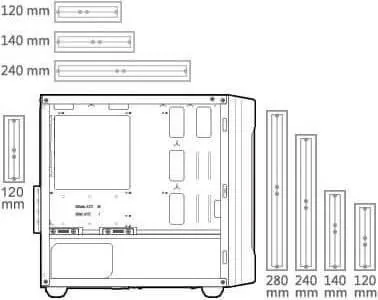
Cooling support is extensive for a compact chassis. Gemini M supports up to six fans (with one standard fan preinstalled) and up to three water-cooling radiators. The front can support up to 280mm for radiator length.
Is this answer helpful?
You can install up to two 3.5-inch HDDs and two 2.5-inch SSDs, or choose a configuration with up to four 2.5-inch SSDs. This supports flexible storage layouts for games and media.
Is this answer helpful?
Yes. The lighting functionality requires powering the I/O panel. Connect the I/O panel power cable to an appropriate PSU SATA connector to enable the case lighting features.
Is this answer helpful?
In motherboard synchronization mode and in the Core Box v2 mode, the Trelux lighting button has no assigned functionality. In those modes, lighting is controlled through the motherboard or the Core Box.
Is this answer helpful?
Advantages and Disadvantages
Advantages

- Integrated Trelux RGB with fourteen preset effects controlled from the front
- Supports 5V addressable RGB motherboard synchronization using the included adaptor
- Tempered glass full side window showcases the build
- Up to two 330mm graphics cards for powerful gaming setups
- Strong cooling and AIO support: up to six fans and radiators up to 280mm front
Disadvantages

- Lighting button function is disabled in motherboard sync and Core Box modes
- Expanded lighting control via Core Box v2 requires an additional sold-separately accessory
- Some cooling and lighting configurations may require optional fans or radiators to reach maximum capacity
- Tempered glass handling requires careful procedure (lay the case flat during panel work)
Product Specification
External
N/A
Internal
2x 2.5"/3.5" (horizontal, drive rails), 2x 2.5"
Ports
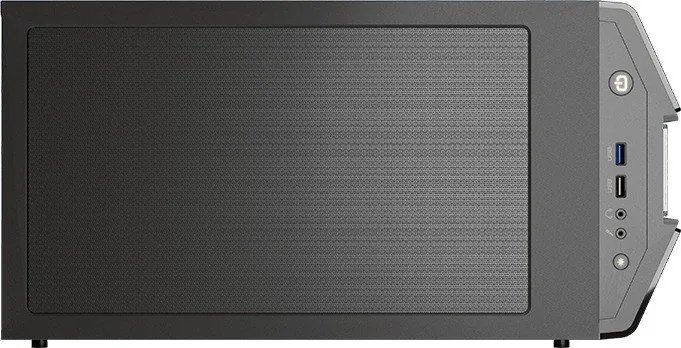
1x USB-A 3.0 (5Gb/s), 1x USB-A 2.0 (480Mb/s), 1x 3.5mm jack (Line-Out), 1x 3.5mm jack (Line-In)
PCI slots
4
Fans (front)
2x 5.51in (optional) or 3x 4.72in (optional)
Fans (rear)
1x 4.72in (optional)
Fans (left)
N/A
Fans (right)
N/A
Fans (top)
2x 5.51in (optional)
Fans (bottom)
N/A
Fans (other)
N/A
Radiator sizes
4.72/5.51/9.45/11.02in front, 4.72/5.51/9.45in top, 4.72in rear
Motherboard
up to µATX
Supported motherboards
Mini-ITX (6.7"x6.7")/µATX (9.6"x9.6")
Power supply
ATX (max. 6.30in deep)
Power supply position
bottom
CPU cooler
max. 6.89in height
Graphics cards
max. 12.99in
Lighting
RGB-Header 3-Pin ARGB (+5V/DATA/GND), integrated LED control, integrated RGB LED lighting
Dimensions (WxHxD)
8.27x16.65x15.75in
Volume
9.39gal
Weight
12.21lb
Case type
Mini-Tower
Front
closed, ventilation slots in the middle
Top
partially closed, mostly fan grille, external dust filter
Bottom
partially closed, rear fan grille, external dust filter
Left
closed, glass
Right
closed
Rear
partially closed, fan grille top right, PCI slots (4x horizontal)
Front I/O Position
Case side: top, Height: Front, Position: center
Special features
Cable management, dust filter, glass side panel
USB notation
Link
Product Description
Cougar Gemini M: compact power with integrated Trelux RGB
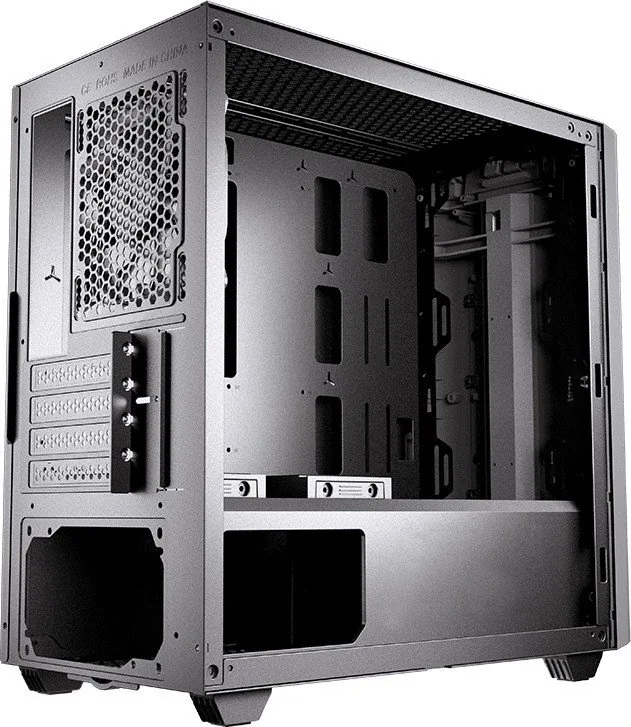
Cougar brings a fresh take on the Gemini M concept with a compact case designed for top-end builds and bold styling. The Cougar Gemini M Manual highlights what makes this model stand out: integrated Trelux RGB lighting, a brushed metal-like front panel, and smart internal support for high-performance components in a smaller footprint.
Integrated Trelux RGB lighting, no extra installs
Gemini M features Cougar's exclusive Trelux integrated lighting system with addressable-style control. From the front, you can cycle through fourteen preset lighting effects using the dedicated lighting button. If you prefer system-wide synchronization, the lighting can also sync with compatible 5V addressable RGB motherboard headers through the included adaptor. For expanded control, an additional COUGAR Core Box v2 (sold separately) enables up to synchronized control across supported devices, including fans and RGB LED strips, with remote-based management.
Premium look and full side visibility
The brushed metal-like front panel gives Gemini M a distinct appearance, while its full-sized tempered glass side window lets you enjoy the inside of your rig. Because the front lighting shines through the textured surface, the reflective finish helps reinforce the overall visual effects.
Built for gaming hardware in a compact layout
Despite its compact form, Gemini M is engineered for serious components. It supports micro ATX and mini ITX motherboards and accommodates up to two graphics cards, each up to 330mm long. Cooling options are flexible, with support for up to six fans (including a standard pre-installed fan) and up to three water cooling radiators, with the front radiator support reaching up to 280mm. That means you can tailor airflow and thermals to your preferred build.
Storage is equally practical. Gemini M supports up to two 3.5-inch HDDs and two 2.5-inch SSDs, or alternatively up to four 2.5-inch SSDs, giving you room for games, media libraries, and faster loading drives.
Key takeaways
- Integrated Trelux RGB: fourteen lighting effects via the front button
- 5V addressable motherboard sync with the included adaptor
- Up to two 330mm GPUs and micro ATX/mini ITX support
- Cooling capacity: up to six fans and water cooling radiators up to 280mm (front)
- Storage flexibility: mixed 3.5-inch HDD and 2.5-inch SSD configurations
Notes
- For lighting to work, connect the I/O panel power cable to an appropriate PSU SATA connector.
- When using motherboard synchronization or Core Box modes, the lighting button has no assigned function.
- When removing or installing the tempered glass panel, lay the case flat to avoid damage.
Search for 67,706 Manuals online


Type-in Brand or Model