
Cougar DarkBlader-S Manual
PDF manual · 2 Pages
English



Quick check
Incorrect answer, please try again.
Chat with your Cougar DarkBlader-S manual using AI
Get instant AI answers from your Cougar DarkBlader-S manual
Ask anything about the Cougar DarkBlader-S. Answers come from this manual, with the pages they are based on.
Ask a Question
Do you recommend DarkBlader-S?
Yes NoFrequently Asked Questions
The case supports Mini ITX, Micro ATX, ATX, CEB, and E-ATX motherboards.
Is this answer helpful?
The warranty period is one year for electrical components of the Cougar DarkBlader-S.
Is this answer helpful?
The maximum graphics card length supported is 380mm with a card holder.
Is this answer helpful?
No, you must choose either the front or top to install a 360mm radiator.
Is this answer helpful?
Yes, it includes 4 max 2.5-inch drive bays compatible with SSDs using rubber mounts.
Is this answer helpful?
Use the RGB SW button for 13 effects or connect to a 5V motherboard header for synchronization.
Is this answer helpful?
It includes two USB 3.0 ports, one microphone jack, one audio jack, and an RGB control button.
Is this answer helpful?
Advantages and Disadvantages
Advantages

- Brushed aluminum front panel provides a distinctive and modern aesthetic
- Integrated RGB button allows 13 preset effects without software
- Full tempered glass side panels offer massive visibility for components
- Supports E-ATX motherboards and up to 360mm water cooling radiators
- Excellent cable management including cover and graphic card holder
Disadvantages

- Must remove cable bar specifically for E-ATX motherboard installation
- Cannot install 360mm radiator on both front and top simultaneously
- Warranty period is limited to one year for electrical components
- Front panel removal requires care to avoid damaging I/O cables
- Air filters for bottom, top and front can accumulate dust requiring cleaning
Product Specification
External
N/A
Internal
2x 2.5"/3.5" (horizontal, drive rails), 2x 2.5"/3.5"
Ports
2x USB-A 3.0 (5Gb/s), 1x 3.5mm jack (Line-Out), 1x 3.5mm jack (Line-In)
PCI Slots
10 (2x Riser Card)
Fan (front)
3x 5.51 inches (optional)
Fan (rear)
1x 4.72 inches
Fan (left)
N/A
Fan (right)
N/A
Fan (top)
2x 5.51 inches (optional) or 3x 4.72 inches (optional)
Fan (bottom)
N/A
Fan (other)
N/A
Radiator Sizes
4.72/5.51/9.45/11.02/14.17 inches front, 4.72/5.51/9.45/11.02/14.17 inches top, 4.72 inches rear
Motherboard
up to E-ATX (SSI EEB, 12"x13")
Supported Motherboards
Mini-ITX (6.7"x6.7")/microATX (9.6"x9.6")/ATX (12"x9.6")/E-ATX (SSI CEB, 12"x10.5")/E-ATX (SSI EEB, 12"x13")
Power Supply
ATX (max. 7.87 inches deep)
Power Supply Position
Bottom
CPU Cooler
max. 6.69 inches height
Graphics Cards
max. 14.96 inches
Color
black/orange, interior black
Lighting
RGB Header 3-Pin ARGB (+5V/DATA/GND), integrated LED controller, integrated RGB LED lighting
Dimensions (WxHxD)
9.13x20.39x20.59 inches
Volume
2.22 cubic feet
Weight
31.31 lbs
Case Type
Big-Tower
Features
Cable management, Dust filter, Graphics card vertical mountable, Graphics card support bracket, Glass window
Note on E-ATX
Motherboard and case manufacturers designate different dimensions as E-ATX. Motherboards with E-ATX/SSI EEB dimensions of 12.01x12.99 inches or 12"x13" may not be supported.
USB Labeling
Left
Product Description
Introduction to Cougar DarkBlader-S Glass Window Manual
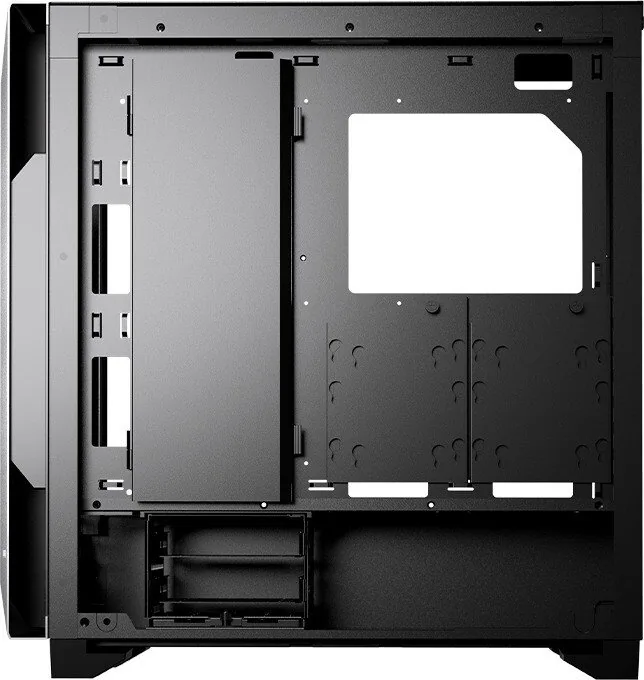
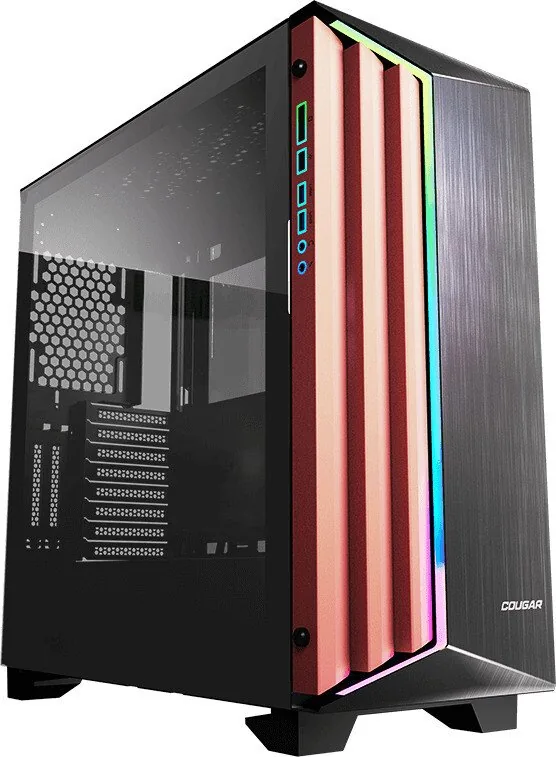
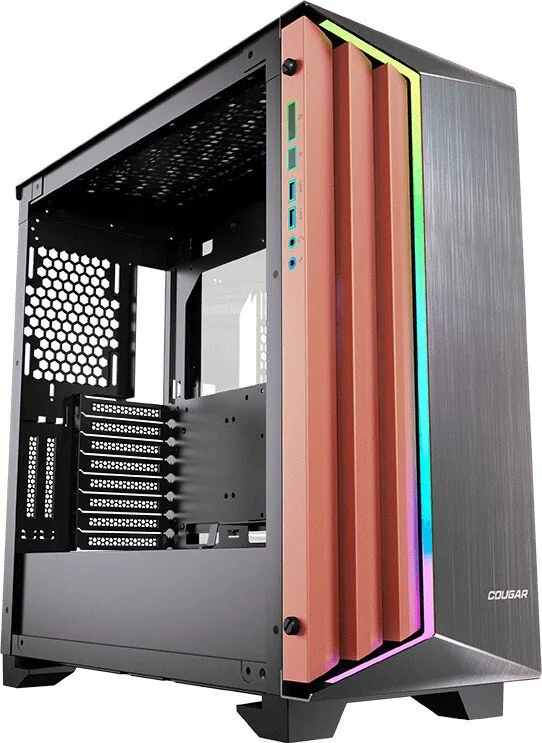
The Cougar DarkBlader-S Glass Window Manual represents the ultimate guide for users seeking a high-performance PC chassis that combines aesthetics with functionality. This full tower case is designed for enthusiasts who demand top-tier cooling solutions and ample space for high-end components. At the heart of its design lies an asymmetrical aesthetic featuring a brushed aluminum front panel that provides a modern and distinctive look. The massive visibility offered by the full tempered glass side panels allows users to proudly display their internal hardware and stunning RGB lighting effects.
Design and Lighting Features
One of the standout features of this system is the integrated lighting button. This allows for easy switching between thirteen preset lighting effects without needing external software. For those preferring deep synchronization, the case supports 5V RGB header connections to compatible motherboards for system-wide control. The cable management aspects are equally impressive, with a dedicated cable management cover and bar ensuring clean airflow and a tidy interior view. Users can also take advantage of the included graphic card holder to maintain stability for heavy GPUs.
Cooling and Installation Details
Cooling flexibility is paramount for any build, and the DarkBlader-S meets this challenge head-on. It supports up to seven fans and accommodates water cooling radiators up to 360mm in the front or top panels. This ensures that powerful components stay cool under heavy loads. Note that you must choose either front or top to install a 360mm radiator. Furthermore, the case supports motherboard types ranging from Mini ITX up to E-ATX, providing immense freedom for system designers. The drive bay section includes support for multiple 3.5-inch and 2.5-inch drives, ensuring ample storage options for your files.
Assembly and Maintenance
Assembly requires attention to detail. When installing an E-ATX motherboard, users must remove the cable bar before securing the components. The front I/O panel conveniently houses two USB 3.0 ports, HD audio jacks, and the RGB control button. Over time, maintenance becomes easier with the removable top and side panels. The warranty period is one year, covering electrical components. This ensures customers receive support if issues arise with the electrical parts.
Whether you are building a gaming rig or a workstation, the DarkBlader-S offers a robust platform. The case dimensions are substantial at roughly 232mm width by 523mm height and 518mm depth. Reviewing the Cougar DarkBlader-S Glass Window Manual ensures you maximize the potential of every feature within the box. With its superior cooling and stylish appearance, it stands out in the crowded market of computer towers. The inclusion of air filters for the bottom, top, and front panels further protects components from dust, prolonging the lifespan of your system. The graphics card holder ensures that long GPUs will not sag over time. You get exceptional value with this comprehensive case solution for advanced users looking for quality and performance in a single package.
Note: Please remove the cable bar before installing an E-ATX motherboard.
Search for 67,706 Manuals online


Type-in Brand or Model