
Cougar Conquer 2 Manual
PDF manual · 2 Pages
English



Quick check
Incorrect answer, please try again.
Chat with your Cougar Conquer 2 manual using AI
Get instant AI answers from your Cougar Conquer 2 manual
Ask anything about the Cougar Conquer 2. Answers come from this manual, with the pages they are based on.
Ask a Question
Do you recommend Conquer 2?
Yes NoFrequently Asked Questions
No, you must purchase one separately, ensuring it fits the 220mm max length limit.
Is this answer helpful?
The product comes with a one-year warranty covering electrical components.
Is this answer helpful?
Yes, it supports Mini ITX, Micro ATX, ATX, and CEB formats.
Is this answer helpful?
Fans are optional and may be included or sold separately depending on the region.
Is this answer helpful?
The maximum graphics card length supported is four hundred millimeters.
Is this answer helpful?
Yes, it supports up to 360mm radiators on the top panel.
Is this answer helpful?
It features Trelux RGB with addressable LEDs and a Core Box C option.
Is this answer helpful?
Advantages and Disadvantages
Advantages

- Innovative detachable sub chassis design for easier installation and cooling access.
- Tempered glass panels provide unobstructed views of high-end hardware.
- Supports up to 360mm radiators for advanced liquid cooling solutions.
- Integrated Trelux RGB lighting effects controllable via buttons or software.
- Versatile drive bay options allowing 2.5 inch and 3.5 inch conversions.
Disadvantages

- Large full tower dimensions require significant desk space for setup.
- Detachable sub chassis design may be complex for average users.
- Power supply length limited to 220mm requiring specific short models.
- No fans included in box which requires additional purchases later.
- Installation steps for sub chassis removal require careful handling.
Product Specification
External
N/A
Internal
2x 2.5"/3.5", 2x 2.5"
Connections
1x USB-C 3.1 (10Gb/s, 20-Pin Key-A Header), 2x USB-A 3.0 (5Gb/s), 1x 3.5mm Jack (Line-Out), 1x 3.5mm Jack (Line-In)
PCI Slots
10 (2x Riser Card)
Fan (front)
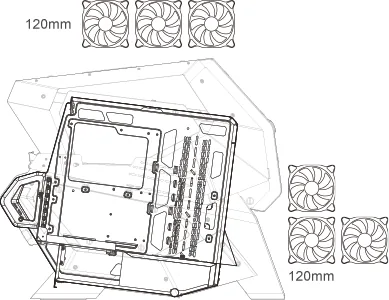
1x 4.72 in (RGB illuminated) or 2x 4.72 in (optional)
Fan (rear)
N/A
Fan (left)
N/A
Fan (right)
N/A
Fan (top)
3x 4.72 in (optional)
Fan (bottom)
N/A
Fan (other)
N/A
Radiator Sizes
4.72/9.45 in front, 4.72/9.45/14.17 in top
Motherboard
up to ATX (10.51 in wide)
Supported Motherboards
Mini-ITX (6.7"x6.7")/Micro-ATX (9.6"x9.6")/ATX (12"x9.6")/E-ATX (SSI CEB, 12"x10.5")
Power Supply
ATX (max. 8.66 in deep)
Power Supply Position
bottom
Graphics Cards
max. 15.75 in
Color
black/orange, inside black
Lighting
RGB Header 3-Pin ARGB (+5V/ DATA/GND), integrated LED controller, integrated RGB LED lighting, illuminated fans
Dimensions (WidthxHeighthDepth)
14.49 x 24.84 x 29.29 in
Volume
6.10 cu ft
Weight
39.68 lbs
Case Type
Big-Tower
Front
partially closed, partially glass, mostly vent slits
Top
partially closed, partially fan grills
Bottom
partially closed, partially fan grills
Left
partially closed, partially open, partially glass
Right
partially closed, partially open, partially glass
Back
partially closed, partially open, PCI slots (8x horizontal, 2x vertical)
Front I/O Position
Case side: top, Height: center, Position: center
Features
Aluminum case, open-frame case, motherboard sled, graphics card mountable vertically, glass viewing window
Note on E-ATX
Motherboard and case manufacturers designate different dimensions as E-ATX. Motherboards with E-ATX/SSI EEB dimensions of 12.01x12.99 in or 12"x13" may not be supported.
USB Notation
Left
Product Description
Discover the Ultimate Gaming Rig with the Cougar Conquer 2
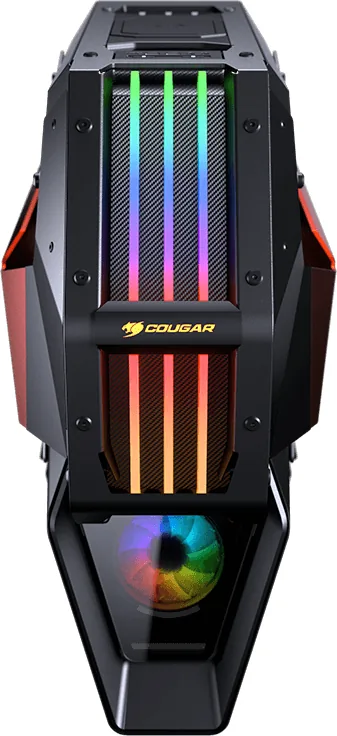
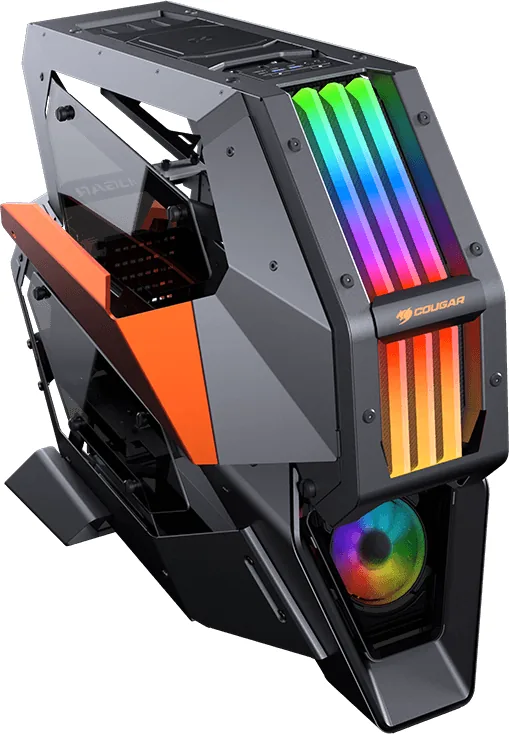
Building a high performance PC requires more than just powerful parts. It demands a chassis that complements your hard work and stands up to heavy usage without failure. The Cougar Conquer 2 Glass Window Manual offers essential insights for those ready to dive into this full tower experience. This case stands out with its innovative detachable sub chassis design. Unlike traditional boxes, this frame allows you to completely remove the inner skeleton for easier installation and superior cooling access during assembly.
Showcase Your Components with Clarity
Tempered glass panels provide unobstructed views of your high end hardware. Whether you install custom water cooling reservoirs or simple cooling blocks, the exterior remains sleek and modern. The unique metal framing adds style while supporting massive graphics cards and large power supplies. You can fit drives securely using the versatile bay options. Two point five inch slots convert from thirty five inch slots if needed. Cable management is simplified thanks to dedicated tie points.
Performance and Lighting Control Systems
Heat management is critical for stability over time and preventing thermal throttling during intense sessions. This model supports up to three hundred and sixty millimeter radiators on the top panel for advanced liquid cooling solutions. Front fans can be added for additional intake air to help push heat out efficiently. RGB lighting comes integrated with unique Trelux effects for dynamic appeal. You can control colors via the button on the front I/O panel or through motherboard software interfaces. The Core Box C controller simplifies syncing with motherboards from major brands for seamless operation.
Versatility for Custom Builders and Modders
The Cougar Conquer 2 Glass Window Manual details how to maximize this system potential for personal creativity and style. It breaks away from standard designs to invite unique layouts within the chassis. You may choose different fan configurations depending on your cooling needs or add accessories like LED strips for extra flair. The warranty covers the electrical components for one year ensuring peace of mind for buyers. Dimensions are large so ensure your desk space is adequate for this tower before purchase.
Final Thoughts
It is a fantastic choice for anyone wanting to build a visual master piece with high specs and robust features for the future. Enjoy the process of configuring your system inside this spacious and robust case.
Search for 67,706 Manuals online


Type-in Brand or Model
Alex Richter
6 months ago
Does the unique exterior design affect internal airflow and thermal performance for high-end gaming components?
Manual.ly
6 months ago
Thank you for your inquiry. While the case features a distinctive aesthetic, it is engineered with functional ventilation in mind. Independent testing suggests adequate thermal performance for most current-generation components when assembled correctly. Customers should ensure at least one intake fan and two exhaust fans are installed to maintain optimal airflow. While anecdotal reports vary regarding heat, our specifications confirm compliance with standard safety and performance guidelines. For best results, monitor internal temperatures during initial use.