
Cougar BXM Manual
PDF manual · 2 Pages
English



Quick check
Incorrect answer, please try again.
Chat with your Cougar BXM manual using AI
Get instant AI answers from your Cougar BXM manual
Ask anything about the Cougar BXM. Answers come from this manual, with the pages they are based on.
Ask a Question
Do you recommend BXM?
Yes NoFrequently Asked Questions
The product comes with a three-year limited warranty against manufacturing defects in materials and workmanship. This warranty is valid for the first end user and requires the original invoice copy. You must contact the retailer where you bought it first. If the retailer is unreachable, you can contact Compucase directly but must cover transportation costs.
Is this answer helpful?
No. Never open the PSU cover as there is potential danger of life due to high voltage inside. The PSU should only be opened by an authorized technician. If you open it yourself, the warranty will be voided. Even disconnected for a long time, dangerous voltages can remain inside. Always seek authorized specialists for repairs.
Is this answer helpful?
Yes, it supports PCI Express 3.0 graphic cards with 6+2 pin connectors. The unit is fully modular so you only connect the cables you need. Ensure you use the provided power cord and do not clog ventilation slots. Avoid the use of adapters like 4Pin Molex to 6+2Pin PCI-Express for best performance.
Is this answer helpful?
Check the power cord and wall socket to ensure they supply necessary power. Verify all internal connections are correct and components are compatible. Check for short circuits or defects within the PC. Turn on the PSU switch after ensuring it is connected to the power network. If problems persist, contact customer service.
Is this answer helpful?
The unit features Overcurrent Protection, Over Power Protection, Over Voltage Protection, Under Voltage Protection, Short-Circuit Protection, and Over Temperature Protection. These safeguards protect key system components. If temperatures get too high or loads exceed values, the PSU automatically switches off to prevent damage.
Is this answer helpful?
The unit features a Hydro Dynamic Bearing fan designed for lower noise levels. Advanced tuning technology minimizes noise through a superior fan curve. It maintains optimal cooling with a whisper-quiet operation, ensuring the system remains calm even under heavy loads at ambient temperatures up to 40 degrees Celsius.
Is this answer helpful?
Do not dispose of this product in regular household waste. It must be brought to a collection point for recycling electrical and electronic devices. This helps protect the environment as materials can be recycled. Inquire at your local administration for the appropriate location of disposal to ensure proper handling and compliance.
Is this answer helpful?
Advantages and Disadvantages
Advantages

- 80-PLUS BRONZE certified up to 87% efficiency reducing electricity costs
- Fully modular cable management reduces clutter and improves airflow
- Hydro Dynamic Bearing fan offers extended durability and lower noise
- Ultra-stable voltage outputs with DC to DC technology
- Includes comprehensive safety features like OCP, OVP, UVP, and OTP
Disadvantages

- Repair opens require authorized specialists to maintain warranty valid
- Must use supplied power cord to avoid system damage or faults
- Ventilation slots must not be covered to prevent overheating issues
- Warranty does not cover damages caused by improper installation or misuse
- Single +12V rail might not suit all high-end multi-rail preference builds
Product Specification
Fan
5.31 in
Cable Management
Semi-modular
Average Efficiency
86% (according to manufacturer), 86% (according to 80 PLUS certificate, 115V)
Dimensions (WxHxD)
5.91x3.39x6.30 in
Manufacturer Warranty
3 Years
-12V
0.3A
+5Vsb
3A
Number of 12V Rails
1
PFC
Active
Form Factor
ATX PS/2
Specification
ATX 2.4
Features
ErP Lot 6
Color
Red
Product Description
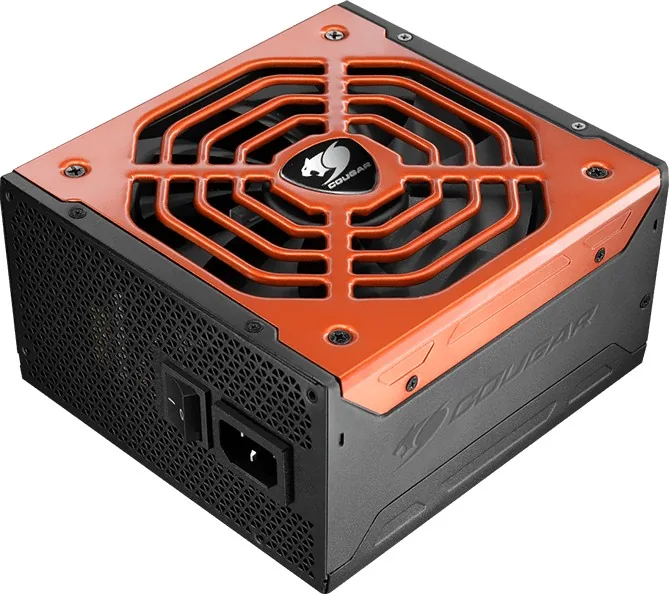
Discover the Power of Efficiency with Cougar BXM
Welcome to a new era of PC power delivery. The Cougar BXM ATX 2.4 power supply unit represents a significant leap forward for system builders who value both performance and reliability. Designed for a wide range of applications, this unit delivers consistent power flow to your critical components. It is certified as an 80 Plus Bronze power unit, ensuring that energy conversion rates reach up to 87 percent, which helps in lowering overall electricity costs for your computer setup. Users can expect universal usage across different regions due to the 100-240V input capability.
Modular Design for Clean Builds
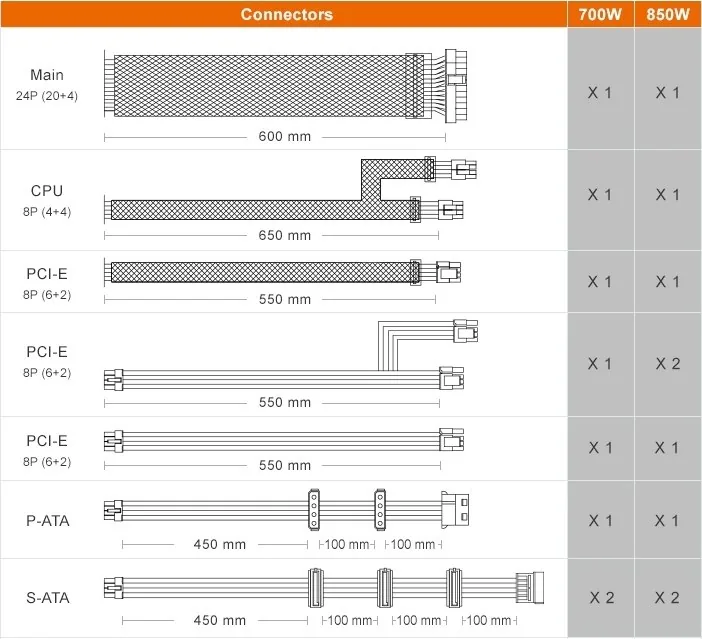
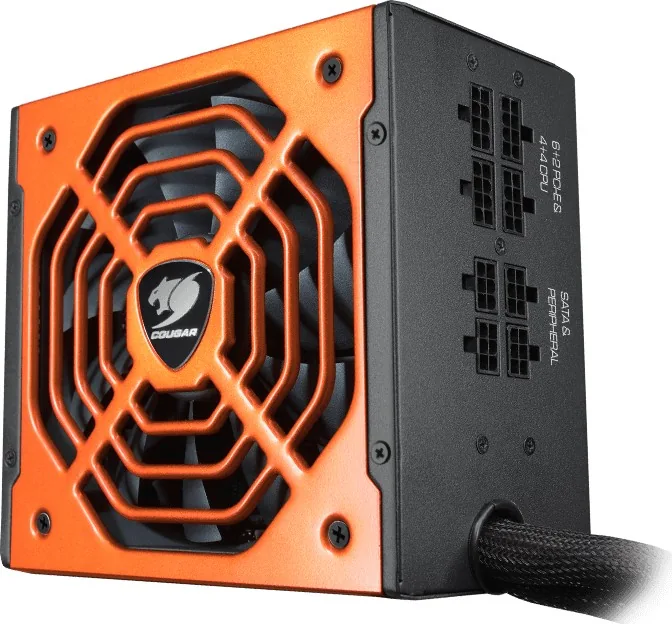
One of the standout features is its fully modular cable management system. By allowing you to connect only the cables required for your specific components, this design eliminates unnecessary wire clutter within the chassis. This reduction in cables facilitates better airflow, which contributes to lower internal temperatures and improved system longevity. Whether installing standard drives or high-end graphics cards, the adaptability makes it a favorite for custom builds. The connectors include standard 24 pin mainboard supply and specific pins for peripherals.
Optimized Cooling and Noise Levels
Maintaining a whisper-quiet computer environment is easy with this hardware. It employs a Hydro Dynamic Bearing fan that promises extended durability compared to standard fans. Through advanced tuning technology, the fan curve is optimized for noise minimization during operation. This ensures that the computer remains cool and silent even under heavy load conditions, maintaining flawless operation at ambient temperatures of up to 40 degrees Celsius. The DC to DC technology enhances voltage stability further for demanding tasks.
Comprehensive Safety Protections
Protecting your investment is a priority for engineers. The unit includes a robust suite of safety functions including overcurrent, over power, and over voltage protection. Short circuit protection and over temperature protection are also standard. These measures ensure that your valuable hardware components remain safe from electrical faults or thermal runaway situations. Multi-GPU technology support is available for modern graphics setups requiring 6 plus 2 pin connections. The single +12V DC source provides massive outputs for high power devices.
NOTE: Installation must be performed carefully. Always switch off the main voltage and disconnect the power plug during setup. Do not open the casing as internal high voltages remain dangerous. Use only the provided power cord to avoid damage to the system. Ensure ventilation slots remain uncovered.
The manufacturer provides a three-year limited warranty for BXM series items against manufacturing defects. If issues persist after checking connections, contact customer service. This warranty covers repairs or replacements for material defects. Always keep the invoice copy handy. Recycle electronic devices properly according to local regulations at the end of life. Enjoy a stable and powerful computing experience.
If the system does not start after installation, check the power cord and wall socket. Verify all internal cables are correctly connected to the motherboard and drives. Check for compatibility issues between motherboard chipsets and other components like memory or graphics cards. Never work on the PSU while it is active for repairs yourself. Contact authorized specialists if faults occur. This ensures your safety and maintains the validity of your coverage. Specifications include operating temperatures between 10 to 40 degrees Celsius.
Search for 67,706 Manuals online


Type-in Brand or Model