
Cougar Attack X3 Manual
PDF manual · 1 Pages
English


Quick check
Incorrect answer, please try again.
Chat with your Cougar Attack X3 manual using AI
Get instant AI answers from your Cougar Attack X3 manual
Ask anything about the Cougar Attack X3. Answers come from this manual, with the pages they are based on.
Ask a Question
Do you recommend Attack X3?
Yes NoFrequently Asked Questions
It uses Cherry MX Brown mechanical switches. These switches provide tactile feedback, making them a good middle ground for gaming and typing. They feel responsive without being as loud as clicky alternatives.
Is this answer helpful?
Yes. It supports N-key rollover in USB mode, which means many simultaneous key presses can be detected at once. This helps in fast games and complex key combinations.
Is this answer helpful?
Yes. The keyboard includes onboard memory for storing up to three profiles. That makes it easy to keep your preferred layout, macros, and lighting settings available on different PCs.
Is this answer helpful?
It works with COUGAR UIX™ System. The software is used for configuration, macro management, profile switching, and firmware updates. It helps users personalize the keyboard more deeply.
Is this answer helpful?
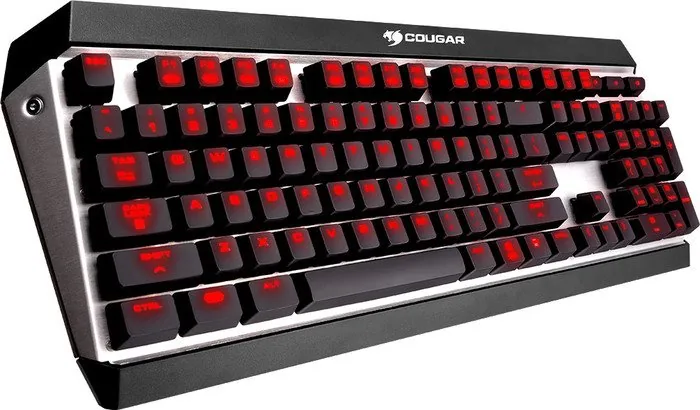
Yes, it features full-key backlighting with adjustable brightness. This improves visibility in dim environments and adds a strong gaming aesthetic to the keyboard.
Is this answer helpful?
Yes. The Brown switches and sturdy build make it suitable for both. It is aimed at users who want a keyboard that feels precise in games but still comfortable for long typing sessions.
Is this answer helpful?
Advantages and Disadvantages
Advantages

- Cherry MX Brown switches deliver tactile feedback that feels responsive for both gaming and typing.
- N-key rollover in USB mode helps every key press register, even during fast multi-key actions.
- Onboard memory stores up to 3 profiles, making it easy to move your setup between computers.
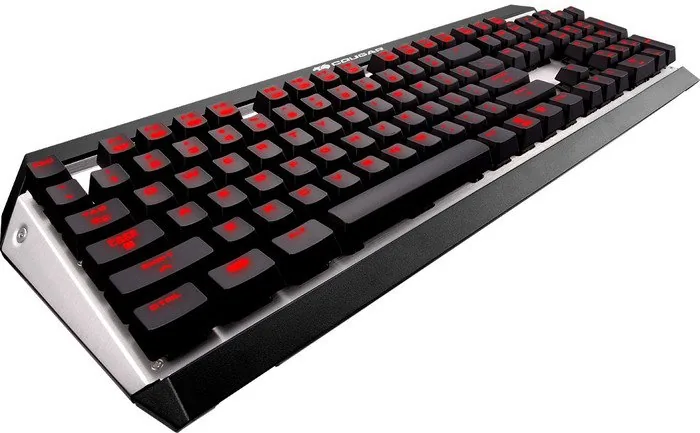
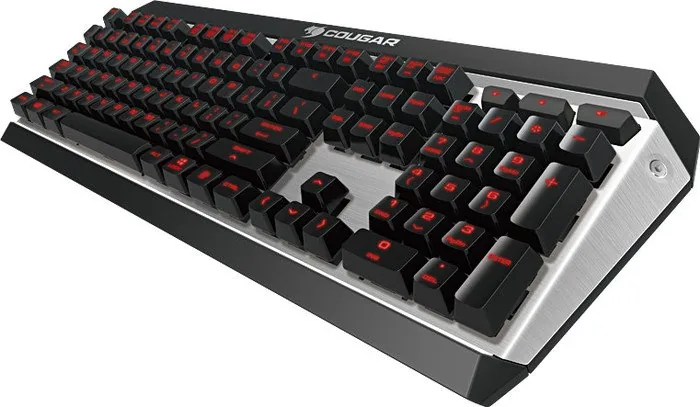
- Brushed aluminum construction adds durability and a premium look.
- Dedicated volume keys and shortcut support improve everyday convenience.
Disadvantages

- Customization depends on COUGAR UIX software, which may feel limited to Windows users.
- Only three onboard profiles may be restrictive for power users with many setups.
- Wired USB design means no wireless flexibility.
- Brown switches are versatile, but users wanting very quiet typing may prefer a different switch type.
Product Specification
Layout
US
Type
mechanical
Switch Designation
Cherry MX BROWN
Lighting
red
Keycap Level
elevated, frameless
Keycap Format
regular
Keycap Crown
concave
Numeric Keypad
Standard
Cursor Block
Standard
Control Keys
Standard
Enter Key
shortened
Delete Key
Standard
Palm Rest
N/A
Housing
Metal
Housing Color
multicolor, black/silver
Keycap Finish
monochromatic, black
Key Labeling
monochromatic, white (translucent)
Connection
wired (5.91ft), USB-A 2.0
Power Supply
USB
Dimensions (WxHxD)
18.39x1.57x6.69in
Weight
1.98lb
Special Features
3 Multimedia keys, Anti-Ghosting (N-Key-Rollover), FN-Key
Switch Manufacturer
Cherry
Switch Module
MX
Switch Model
BROWN
Switch Characteristic
tactile
Contact Feedback
none
Dampening
none
Actuation Force
0.10lbf (+/-0.04lbf Tolerance) ~ 0.10lbf (+/-0.04lbf Tolerance)
Key Travel
0.16in (-0.02in Tolerance)
Tactile Force
0.12lbf (+/-0.06lbf Tolerance) ~ 0.12lbf (+/-0.06lbf Tolerance)
Pre-travel
0.08in (+/-0.02in Tolerance)
Initial Force
0.07lbf ~ 0.07lbf
Lifespan
50 Million
Product Description
Cougar Attack X3 MX Brown USB US: Mechanical Precision for Fast-Paced Play
The Cougar Attack X3 MX BROWN USB US Manual makes one thing clear: this keyboard is designed for players who want dependable speed without sacrificing comfort. Built around Cherry MX Brown switches, it offers a tactile response that feels precise during gaming and satisfying during long typing sessions. The result is a board that works well for users who want a mechanical keyboard with a balanced, versatile character.
One of the strongest parts of the design is its exposed brushed aluminum structure. It gives the keyboard a sturdy feel and a premium look while helping it stand out on any desk setup. Combined with full-key backlighting, the Attack X3 is easy to use in darker rooms and looks sharp during late-night gaming. The layout also includes dedicated volume controls, quick FN shortcuts, and a Windows key lock function, which adds convenience when every second matters.
Performance is another highlight. With N-key rollover in USB mode, the keyboard can register many simultaneous presses, making it suitable for complex command inputs and fast action games. A 1000 Hz polling rate and 1 ms response time help keep input latency low, while onboard memory lets users save up to three profiles directly on the keyboard. That means your preferred settings can travel with you from one PC to another.
For customization, COUGAR UIX™ System support expands the experience further. It allows profile management, macro creation, and firmware updates, turning the keyboard into a flexible tool rather than just a standard input device. The combination of mechanical switches, onboard storage, and software control makes the Attack X3 appealing to gamers who like to fine-tune their gear.
Overall, the Cougar Attack X3 MX Brown USB US feels like a practical, performance-focused mechanical keyboard with enough premium touches to satisfy enthusiasts. It is built for people who value responsive typing, reliable gaming input, and a clean layout that stays useful over time.
Notes
- Best suited for gaming and everyday typing.
- Brown switches offer tactile feedback with a softer sound profile.
- Full-key backlighting improves visibility and style.
- UIX software adds macro and profile flexibility.
Search for 67,706 Manuals online


Type-in Brand or Model