
Cougar Airface Manual
PDF manual · 10 Pages
English



Quick check
Incorrect answer, please try again.
Chat with your Cougar Airface manual using AI
Get instant AI answers from your Cougar Airface manual
Ask anything about the Cougar Airface. Answers come from this manual, with the pages they are based on.
Ask a Question
Do you recommend Airface?
Yes NoFrequently Asked Questions
The case supports graphics cards up to 330mm in length. This accommodates most standard and high-end gaming cards without interference.
Is this answer helpful?
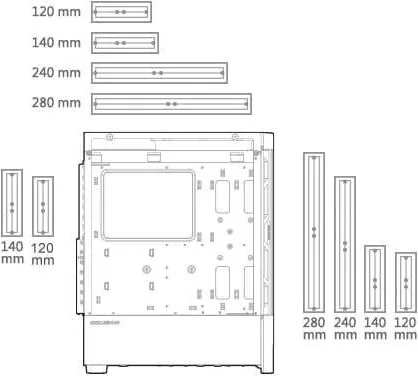
Yes, users can install water cooling radiators up to 280mm or 240mm. Note that you cannot install a 280mm radiator on both the front and top simultaneously.
Is this answer helpful?
Connect the included 5V ARGB adapter to the motherboard header. Then press and hold the RGB button for three seconds to switch to motherboard synchronization mode.
Is this answer helpful?
The product comes with a one-year warranty period. This warranty covers electrical components only according to the official warranty policy.
Is this answer helpful?
Yes, the innovative quick slide dust filter design allows for easy removal and cleaning without needing to open the side panels.
Is this answer helpful?
It supports Mini ITX, Micro ATX, ATX, CEB, and E-ATX motherboards. E-ATX support extends width up to 277mm.
Is this answer helpful?
Yes, the vertical GPU riser cable is not included. You must purchase it separately if you wish to mount the graphics card vertically.
Is this answer helpful?
Advantages and Disadvantages
Advantages

- Perforated airflow design ensures unobstructed ventilation for optimal thermal performance.
- Pre-installed ARGB fans reduce setup time and cost for immediate lighting control.
- Quick slide dust filter allows easy cleaning without removing side panels entirely.
- Supports wide EATX motherboards providing flexibility for high-end workstation builds.
- Integrated RGB system syncs with mainboard via 5V ARGB cable easily.
Disadvantages

- Vertical GPU riser cable is not included requiring separate purchase for setups.
- Radiator installation restricted so front and top cannot share 280mm support simultaneously.
- Power supply length limited to 160mm preventing use of longer modular units.
- Graphics card max length is 330mm which might block some massive cards.
- Manual references vary across languages which can confuse non-English speakers.
Product Specification
External Bays
N/A
Internal Bays
2x 3.5" (horizontal, drive rails), 2x 2.5"
PCI Slots
10 (3x Riser Card)
Fan (Rear)
1x 4.72", 1000rpm (RGB illuminated)
Fan (Left)
N/A
Fan (Right)
N/A
Fan (Bottom)
N/A
PSU Position
bottom
CPU Cooler
max. 7.48" height
Lighting
RGB Header 3-Pin ARGB (+5V/DATA/GND), integrated LED control, integrated RGB LED lighting, illuminated fans
Chassis Type
Mid-Tower
Front
Mesh, dust filter inside
Top
partially closed, mostly fan grille, dust filter outside
Bottom
partially closed, fan grille rear, dust filter outside
Left
closed, glass
Right
closed
Rear
partially closed, fan grille top right, PCI Slots (7x horizontal, 3x vertical)
Front I/O Position
Chassis Side: top, Height: middle, Position: right
Motherboard Orientation
Motherboard Orientation: left
USB Orientation
Left
Product Description
Discover the Power of The Cougar Airface Manual Experience
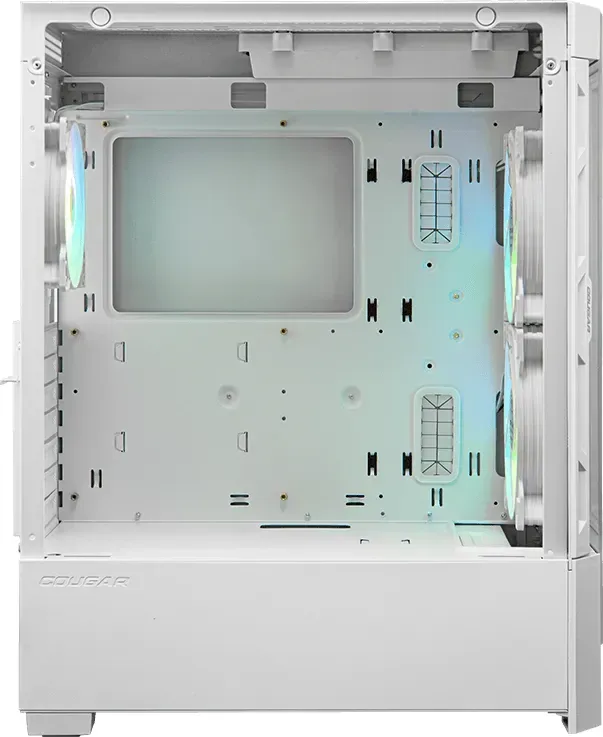
Building a high-end computer requires the right chassis to ensure stability and style. The Cougar Airface case stands out in the market with its focus on airflow and aesthetics. According to the Cougar Airface Manual, this chassis offers a perforated design that allows for unobstructed ventilation throughout the system. This feature is crucial for maintaining low temperatures during intense gaming sessions or heavy rendering tasks. The mesh front panel ensures cold air intake is maximized while the rear exhausts hot air efficiently. It is highly recommended to consult the Cougar Airface Manual before starting.
Advanced Cooling and Fan Support
Thermal performance is a top priority for enthusiasts seeking a balanced system. This unit supports up to five fans and accommodates coolers up to 190 mm in height without interference. The front panel comes with pre-installed fans for immediate performance right out of the box. Additionally, users can install water cooling radiators up to 280 mm or 240 mm depending on the specific configuration choice within the case. It is important to note that users cannot install 280 mm radiators on both the top and front simultaneously due to space constraints. The bottom panel also features an air filter to keep internal components clean from dust accumulation.
Lighting and Motherboard Integration
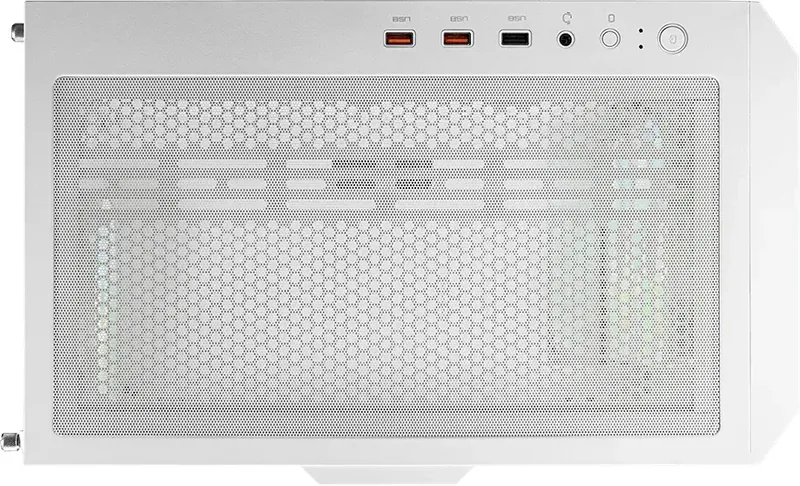
Visual customization is seamless thanks to the integrated RGB system found in this model. The Cougar Airface Manual details the 5V ARGB synchronization process clearly for new users. Connecting the ARGB header allows motherboard software control over lighting effects from a single central point. There is a dedicated RGB button on the top panel to cycle through various preset modes manually if preferred. Resetting the modes is as simple as holding the button for specific durations to return to default settings.
Compatibility and Warranty Information
Major compatibility exists with E-ATX motherboards, making it versatile for various build sizes and workstation configurations. Graphics cards up to 330 mm fit well without obstruction inside the main chamber. However, vertical GPU riser cables are not included in the package and must be purchased separately for those specific setups. The warranty period is one year for electrical components as stated in official warranty documents found online. Always refer to the Cougar Airface Manual for detailed assembly steps regarding the dust filter and drive cages. Proper maintenance and adherence to guidelines ensure longevity and peak performance for years.
Notes:
- Read the Cougar Airface Manual carefully before powering on the system first time.
- Check PSU length limits strictly before purchase to avoid fitment issues.
- Ensure motherboard sync header is 5V ARGB to prevent hardware damage risks.
- Do not force the dust filter sliding mechanism as it may break.
- Update BIOS for best ARGB compatibility and lighting stability during operation.
- Keep the Cougar Airface Manual accessible for future reference.
Search for 67,706 Manuals online


Type-in Brand or Model