Manual.ly Logo

Cougar AirBlader Tournament Manual

0.0 · 0 Ratings

PDF manual · 2 Pages

English

M: QW-35-FL
page

/ 2

Loading...
b60c1925b0b90164e04eb7ad5a5fd796ebd6 page 2
詳細保固條件
請掃描Qr Code
CAUTION
Please do not directly look into the optical beam!
All other registered trademarks belong to their
respective companies.
Tested to comply with FCC standards
FOR HOME OR OFFICE USE
MANUFACTURER CONTACT
Compucase Enterprise Co.,Ltd.
No. 225, Lane 54, An Ho Road Sec. 2 Tainan, Taiwan
Tel:+886-6-356-0606
For more information, please visit
https://cougargaming.com
Compucase Enterprise Co.,Ltd.
All rights reserved.
COUGAR USA Technical Service
Tel: (833) 256-3778
https://cougargaming.com/support/contact/upload/
Made in China
LEGAL NOTICES
GLOBAL WARRANTY POLICY
WARRANTY PERIODS OF COUGAR GAMING DEVICES
Product : COUGAR AIRBLADER TOURNAMENT gaming mouse
Warranty : Please refer to our official website.
( https://cougargaming.com/us/support/warranty/ )
保固政策:中国地区购买,请参考中国地区官方网站。
( http://cougargaming.com.cn/support/warranty/ )
This warranty gives you specific legal rights. You may also have other rights granted under local law.
ENGLISH
1. Go to the COUGAR official website.
(http://www.cougargaming.com)
2. Download the COUGAR PIX SOFTWARE_AIRBLADER
TOURNAMENT installer from the AIRBLADER
TOURNAMENT download page.
DEUTSCH
1. Gehe zur offiziellen COUGAR Homepage.
(http://www.cougargaming.com)
2. Download COUGAR PIX SOFTWARE_AIRBLADER TOURNAMENT
installer von der AIRBLADER TOURNAMENT download seite.
简 中
1. 连上COUGAR官方网站
(http://www.cougargaming.com)
2. 进入AIRBLADER TOURNAMENT的下载页面
下载COUGAR PIX SOFTWARE_AIRBLADER TOURNAMENT
繁 中
1. 連上COUGAR官方網站
(http://www.cougargaming.com)
2. 進入AIRBLADER TOURNAMENT的下載頁面
下載COUGAR PIX SOFTWARE_AIRBLADER TOURNAMENT
한국어
1. COUGAR 공식 웹사이트
(http://www.cougargaming.com)로 이동합니다.
2. AIRBLADER TOURNAMENT 다운로드 페이지에서
COUGAR PIX SOFTWARE_AIRBLADER TOURNAMENT
설치 프로그램을 다운로드합니다.
日 本
1. COUGAR 公式サイトに移動します。
(http://www.cougargaming.com)
2. COUGAR_AIRBLADER TOURNAMENT ダウンロードページから
COUGAR PIX SOFTWARE_AIRBLADER TOURNAMENTの
インストーラーをダ ウンロ ードします 。
РУССКИЙ
1. Перейдите на веб-сайт COUGAR.
(http://www.cougargaming.com)
2. Загрузите программу установки драйвера
COUGAR PIX SOFTWARE
_
AIRBLADER
TOURNAMENT
со страницы загрузок для
AIRBLADER TOURNAMENT
.
PORTUGUÊS
1. Visite o website oficial da COUGAR.
(http://www.cougargaming.com)
2. Transfira o programa de instalação
COUGAR PIX SOFTWARE_AIRBLADER TOURNAMENT
a partir da página de transferência
AIRBLADER TOURNAMENT.
FRANÇAIS
1. Allez sur le site officiel de COUGAR.
(http://www.cougargaming.com)
2. Téléchargez le programme d'installation COUGAR PIX SOFTWARE_
AIRBLADER TOURNAMENT à partir de la page de téléchargement
AIRBLADER TOURNAMENT.
ESPAÑOL
1. Vaya a la web oficial de COUGAR.
(http://www.cougargaming.com)
2. Descargue el instalador de COUGAR PIX SOFTWARE_
AIRBLADER TOURNAMENT de la página
de descarga AIRBLADER TOURNAMENT.
DOWNLOAD
Download
COUGAR PIX SOFTWARE
2
www.cougargaming.com
1
COUGAR PIX SOFTWARE is the ultimate gaming device configuration tool.
SYSTEM REQUIREMENTS
Windows 7, Windows 8, Windows 10
год и месяц изготовления продукции указаны в серийном номере продукта. (существует 2 способа
определения даты изготовления, оба способа описаны ниже)
После S/N: первые две цифры означают год, вторые две – месяц изготовления.
Например, S/N: H1702000001 означает, что товар был произведен в феврале 2017 года.
После S/N: если указаны буквы, то две буквы представляют цифры из таблицы ниже, и означают
год, последующие две цифры – месяц изготовления.
Например, S/N: DAG02REVI000001 означает, что товар был произведен в феврале 2017 года.
●
Например, AG = 17 = 2017 год
ДАТА ИЗГОТОВЛЕНИЯ ПРОДУКЦИИ
A B C D E F G H I J
1 2 3 4 5 6 7 8 9 0
A
B
DISCLAIMERS
COUGAR does not authorize or endorse the user of COUGAR products as a part of, together with, or
connected to, life support devices, medical equipment in general, military equipment, traffic or transporta-
tion-related equipment or disaster prevention systems.
COUGAR is not liable for any damage, expense, loss, cost, injury or any other result derived from the use of
COUGAR products not specifically for PC gaming in the compatible operative systems indicated by COUGAR.
COUGAR is not liable for any damage, expense, loss, cost, injury or any other result due to use of COUGAR
products not in strict accordance with the instructions provided by COUGAR in the instruction manual.
Software, instruction manuals, consumables (for example mouse pads, mouse feet, etc.), boxes or other
external packaging are not covered by the warranty.
For inquiries about the warranty, please contact us at service@cougargaming.com
This manual was created by Compucase Enterprise and may not be completely or partially copied, passed on,
distributed or stored without written consent by Compucase Enterprise.
COUGAR® is a registered brand of Compucase Enterprise Other product and company names mentioned in
this documentation may be brands or trademarks of their respective owners.
Compucase Enterprise reserves the right to make changes concerning the contents of the manual and the
technical data of the product without previous announcement.
WARRANTY AGREEMENT
If the product has defects in material or manufacture, COUGAR will provide product repair and replacement service
within the warranty period.
Our warranty service is based on the date of the invoice or warranty card (must be affixed with the store stamp).
If you lose the aforementioned evidence, we will apply the original shipping date of the product as the beginning date
of warranty period. The shipping date will be identified by the product serial number(S/N).
CONDITIONS WHERE FREE MAINTENANCE IS NOT PROVIDED
Any fault or damage caused by natural disasters (including storm, fire, flood, thunder, earthquake, etc).
Any fault or damage caused by accidental factors and man-made reasons (including hit, scrape, crash, moving,
compression, stain, corrosion, use of incurred on unsuitable voltage, computer virus, riot, misuse, malicious damage, etc).
Use in an improper operating environment (including high temperature, high humidity, water inflow, etc).
Inability to provide the product warranty card, purchase receipt or invoice to prove the product is still within the warranty
period and the shipping date of the product is out of warranty.
The warranty card or product serial number has been altered or its number is hard to identify.
The warranty period has expired.
Any fault or damage caused by non-compliance with regulations stated on the user manual or improper, rough and
careless treatment.
Any fault or damage caused by use of parts not certified by COUGAR original manufacturer.
The problem is caused by improper repair or adjustment by the buyer or any manufacturer without authorization from
COUGAR.
The product is not acquired from an authorized distributor of the company or is acquired from illicit sources.
系統需求 / 系统需求
全球保固條款 / 全球保固政策
下載 /下载
D63088
RoHS
R-R-CZZ-
AIRBLADER
TOURNAMENT

Chat with your Cougar AirBlader Tournament manual using AI

Get instant AI answers from your Cougar AirBlader Tournament manual

Ask anything about the Cougar AirBlader Tournament. Answers come from this manual, with the pages they are based on.

Ask a Question

0/1000

Do you recommend AirBlader Tournament?

Yes No

Frequently Asked Questions

A

The mouse itself weighs 62 grams without the cable. The cable is 1.8 meters long and features ultraflex material to reduce drag.

Is this answer helpful?

A

The software is compatible with Windows 7, Windows 8, and Windows 10 operating systems for full device configuration.

Is this answer helpful?

A

The switches are rated for 80 million clicks, providing high durability for extended gaming sessions.

Is this answer helpful?

A

It uses the PixArt PMW3399 Optical gaming sensor which supports up to 20000 DPI and 2000 Hz polling rate.

Is this answer helpful?

A

Grip tape is included in the package. While it is pre-attached, extra grip tapes are listed in package contents for replacement.

Is this answer helpful?

A

Yes, it features virgin grade PTFE skates designed for optimal tracking on most standard mousepad surfaces.

Is this answer helpful?

A

Register on the official website. Warranty period depends on purchase date or shipping date identified by serial number.

Is this answer helpful?

M: QW-35-FL

Advantages and Disadvantages

Advantages

  • Extremely lightweight design weighing only 62 grams without cable for reduced fatigue
  • High performance PixArt PMW3399 optical sensor supports 20000 DPI resolution
  • Durable 80 million click mechanical switches ensure longevity during intense gaming
  • Virgin grade PTFE skates provide smooth frictionless gliding on mouse surfaces
  • Bounce-on system offers improved stability and steady platform for precise aiming
VS

Disadvantages

  • Wired connection using a 1.8 meter cable limits wireless mobility options
  • Software compatibility is restricted to Windows 7, Windows 8 and Windows 10 only
  • Pre-attached grip tape prevents replacement if users prefer different textures
  • No RGB lighting features mentioned in the product specifications list
  • Requires COUGAR PIX Software installation for full customization and driver support
M: QW-35-FL

Product Specification

Hand Orientation

Right Hand

Buttons

5 (total), 2 (main), 2 (left side), 1 (scroll wheel click)

Scroll Wheel

1 x 2-way

Tracking

LED-red/IR

Resolution

20000 dpi, adjustable

Sensor

PixArt PMW 3399

Switches

mechanical switches, Kailh GM 8.0, 80 million clicks

Polling Rate

2000Hz (wired USB)

Lighting

N/A

Connection

Wired (70.87in), USB-A 2.0

Power Supply

USB

Dimensions (WxHxD)

2.47x1.49x4.61in

Approximate Volume

4.45 in^3 (approximate shape)

Weight

2.19 oz (without cable)

Features

Braided cable

Note

incl. 1x Grip-Tape Set

M: QW-35-FL

Product Description

Experience Precision with the Cougar AirBlader Tournament

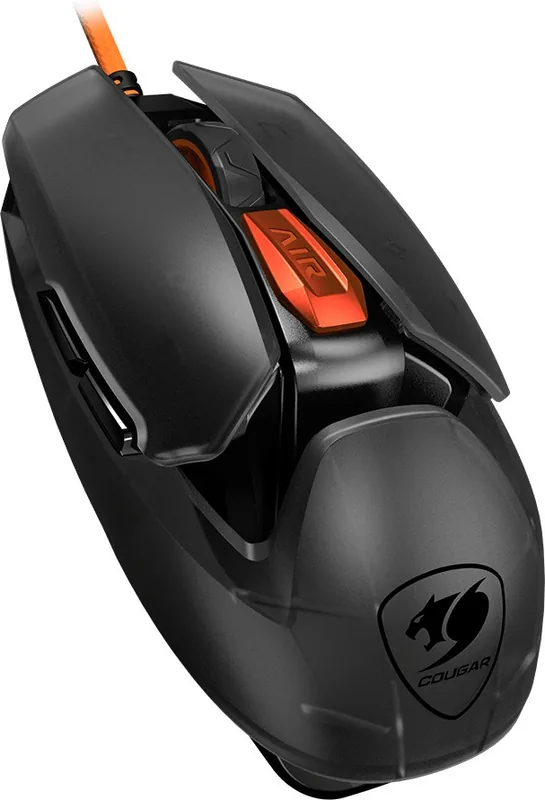
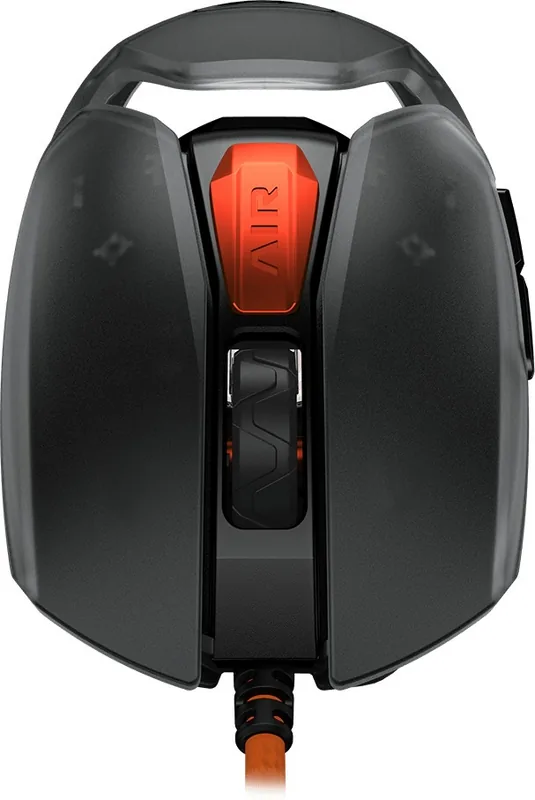
Competitive gaming demands the highest level of accuracy and speed for every single shot or play. The Cougar AirBlader Tournament gaming mouse is built specifically for players who refuse to compromise their performance. It features an incredibly lightweight body weighing only 62 grams without the cable. This significant reduction in mass allows for swift movements and reduced muscle fatigue during long marathon gaming sessions. The sensor technology is equally impressive, utilizing the PixArt PMW3399 optical sensor. It supports resolution settings up to 20000 DPI with a native polling rate of 2000 Hz. This ensures that every micro-movement is tracked instantly without any noticeable lag or jitter during competitive matches.

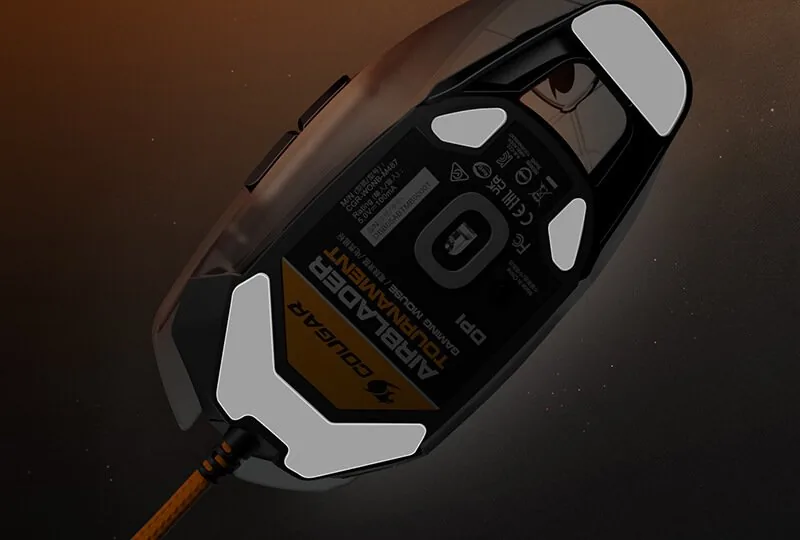
Durability is a core focus of this design philosophy for serious users. The switches are rated for 80 million clicks, guaranteeing extreme longevity even under the most intense gameplay conditions where rapid tapping occurs. The encoder provides ratcheted feedback with a lifespan of 2 million cycles. To keep movement smooth across various surfaces, virgin grade PTFE skates are attached to the base for near frictionless gliding. The cable is also high quality, measuring 1.8 meters of ultraflex material. It resists tangling and remains completely comfortable during use.

Stability during play is enhanced by the unique Bounce-on system. This mechanism prevents the mouse from shifting unexpectedly on the desk, offering a very steady platform for precise aiming. Grip tape is included and pre-attached to the sides for added control and friction. Software customization is handled through the new COUGAR PIX Software. It is primarily compatible with Windows 7, 8, and 10 operating systems. While most guides recommend checking the Cougar AirBlader Tournament Manual for specific driver configurations, the software itself offers extensive control over button assignments and sensitivity levels. Customizing key mapping allows players to execute complex actions quickly.

The dimensions measure 117mm in length, making it suitable for various grip styles like claw or palm. Maximum acceleration reaches 50 G, while tracking speed hits 650 IPS. These specs cater heavily to FPS and MOBA genres where quick snaps and reaction time matter most. The package includes the mouse unit and two grip tapes separately. Users should register their product to activate the global warranty policy properly. Proper maintenance ensures the device remains functional for years to come.

Whether you are a professional competitor or an enthusiastic gamer, this hardware meets modern high standards. The focus on weight and sensor technology places it among the top choices for e sports today. Mastery of aim requires reliable gear, and this mouse delivers on multiple fronts. Setup requires fresh software and adherence to safety guidelines found in the official manual.

Notes:

  • Ensure clean hands for best grip tape adhesion.
  • Check local warranty terms before purchasing online.
M: QW-35-FL

© Copyright 2026 Manual.ly
