
Contour Design Contour Mouse Wireless Manual
PDF manual · 10 Pages
English



Quick check
Incorrect answer, please try again.
Chat with your Contour Design Contour Mouse Wireless manual using AI
Get instant AI answers from your Contour Design Contour Mouse Wireless manual
Ask anything about the Contour Design Contour Mouse Wireless. Answers come from this manual, with the pages they are based on.
Ask a Question
Do you recommend Contour Mouse Wireless?
Yes NoFrequently Asked Questions
It is made for left-handed users who want an ergonomic, larger mouse shape that feels more natural during work, browsing, or long productivity sessions.
Is this answer helpful?
The package includes the mouse, a wireless dongle, a USB 2.0 cable adapter, a USB to Micro USB cable, and a user guide for setup and use.
Is this answer helpful?
Yes. You can continue using the mouse while it is connected to the charging cable, which makes it convenient if the battery runs low during the day.
Is this answer helpful?
The rechargeable battery is expected to last up to three months with average daily use, although actual battery life may vary depending on usage and computing conditions.
Is this answer helpful?
Press the cursor speed button to cycle through ten DPI settings, ranging from 800 to 2800. The LED lights indicate the selected speed level.
Is this answer helpful?
Connect the dongle or charging cable to a USB port and follow the pairing steps if needed. The device usually installs automatically after being plugged in.
Is this answer helpful?
Advantages and Disadvantages
Advantages

- Left-handed ergonomic shape supports a more comfortable hand position during long work sessions.
- Wireless design reduces cable clutter and improves desk flexibility.
- Adjustable DPI from 800 to 2800 helps match speed to different tasks and screens.
- Rechargeable battery lasts up to three months and can be used while charging.
Disadvantages

- Large size may feel bulky for users with smaller hands.
- Left-handed layout is specialized, so it may not suit shared workspaces.
- Battery life can vary based on usage patterns and computer conditions.
- Dismantling the device voids the warranty.
Product Specification
Hand Orientation
left hand
Buttons
5 (total), 3 (main), 1 (right), 1 (scroll wheel click)
Scroll Wheel
1x 2-way
Tracking
LED-red/IR
Resolution
2800dpi, reducible to 2400/2200/2000/1800/1600/1400/1200/1000/800dpi
Sensor
PixArt PMW 3330
Connection
wireless (2.40GHz), USB-A (USB-A receiver)
Power Supply
Battery (built-in)
Dimensions (WxHxD)
3.50x2.01x5.51in
Approximate Volume
10.13in^3 (approximate shape)
Weight
0.60lb
Product Description
Contour Design Mouse Wireless: Left-Handed Comfort for Everyday Work
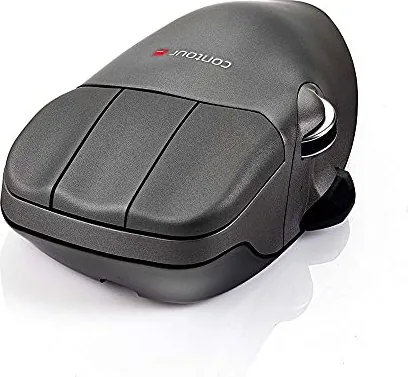
The Contour Design Mouse Wireless is built for users who want a more natural way to work without giving up precision or convenience. Designed specifically for left-handed use and sized in a large format, it gives the hand a fuller resting position that can help reduce strain during long sessions at the desk. Its wireless setup keeps the workspace clean, while the included USB receiver and charging accessories make it easy to get started right away.
This mouse focuses on practical control. The topside layout includes left click, right click, middle click, a scroll wheel with auto-scroll support, and a forward/backward toggle switch for faster navigation. On the underside, you’ll find a power switch, a sensor, a charge port, and an LED indicator that also shows cursor speed and battery status. That combination makes the mouse feel simple, but still thoughtfully engineered for daily productivity.
One of the standout features is the adjustable cursor speed. With ten DPI levels ranging from 800 to 2800, users can choose a slower setting for detailed tasks or a faster one for moving across larger displays. The battery is rechargeable and built for long use, with an expected life of up to three months under average daily conditions. When it does need power, the mouse can be charged in about two hours, and it remains usable while plugged in.
Pairing and setup are straightforward. Plug in the dongle or charging cable through USB, wait for the system to recognize the device, and the mouse is ready. If pairing is needed, holding the specified buttons near the receiver activates connection mode. The included manual supports a smooth first-time setup, and the design keeps day-to-day use accessible even for people who prefer a minimal learning curve.
Beyond comfort and convenience, the Contour Design Mouse Wireless also reflects a professional build quality. It complies with FCC and Industry Canada standards, and the warranty protects against manufacturing defects. For anyone searching for a left-handed mouse that balances ergonomic comfort, wireless freedom, and adjustable performance, this model offers a compelling mix of features.
Notes
- Best suited for left-handed users who want a larger ergonomic shape.
- Battery life depends on usage and computer conditions.
- Opening or dismantling the device can void the warranty.
Search for 67,706 Manuals online


Type-in Brand or Model