


Cisco SG220 Manual
PDF manual · 287 Pages
English



Quick check
Incorrect answer, please try again.
Chat with your Cisco SG220 manual using AI
Get instant AI answers from your Cisco SG220 manual
Ask anything about the Cisco SG220. Answers come from this manual, with the pages they are based on.
Ask a Question
Do you recommend SG220?
Yes No
Lina Weber
10 months ago
Does the product offer a comprehensive range of features, or is the functionality limited?

Manual.ly
10 months ago
Users report a very strong and broad feature set, with no major limitations in day-to-day use. The overall impression is that the product delivers the functions people expect, and several reviewers state they are fully satisfied with its capabilities.
Sofia Klein
10 months ago
Does the product offer a good range of features and work reliably, or is it limited?
Manual.ly
10 months ago
Based on customer feedback, the product has a very strong feature set and performs reliably in day-to-day use. Reviewers specifically mention being very satisfied with the functionality and overall performance. If you are unsure whether it covers your exact use case, check the product description for the included functions and settings. Should you have any questions during setup, you can reach our support team, and we will help you verify compatibility and guide you through initial configuration.
Frequently Asked Questions
Open a web browser and enter the switch IP address. The default login is usually cisco/cisco, and you will be prompted to change the password after the first sign-in.
Is this answer helpful?
The combo uplinks let you choose copper or fiber-style connectivity depending on the network design. That adds flexibility when connecting upstream switches, servers, or long-distance links.
Is this answer helpful?
Yes. The interface provides Ethernet, Etherlike, 802.1X EAP, and RMON statistics so you can review traffic volume, errors, collisions, and frame behavior.
Is this answer helpful?
Changes are applied to the running configuration first. To keep them after a reboot, copy or save the running setup to the startup configuration.
Is this answer helpful?
Yes. It can store logs in RAM and Flash, and it also supports sending syslog messages to remote servers for centralized monitoring.
Is this answer helpful?
Yes. The switch can use SNTP for automatic time sync, or it can take time from the connected PC or be set manually.
Is this answer helpful?
Advantages and Disadvantages
Advantages

- 24 Gigabit RJ-45 ports plus 2 combo RJ-45/SFP uplinks provide flexible access and uplink options.
- Web-based management makes it easier to monitor ports, logs, and system status from a browser.
- VLAN, QoS, STP, and link aggregation support more organized and resilient network design.
- SNTP, remote syslog, and detailed counters improve troubleshooting and time-based tracking.
Disadvantages

- Some configuration changes do not become active until the switch is restarted.
- Running changes can be lost if they are not saved to the startup configuration.
- Default credentials must be changed right away for better security.
- Older browser and IPv6 combinations may require extra care during access and setup.
Product Specification
Function
Switch
Type
Standalone, Rackmount (via mounting brackets)
Network ports
24x RJ-45, 2x RJ-45/SFP
Speeds
26x RJ-45 (10/100/1000Base-T), 2x SFP (100M/1Gb/s)
PoE
N/A
Backplane
52Gb/s, 38.69Mp/s, 9KB Jumboframes, 512kB packet buffer, 8K Mac addresses
Officially supported standards
802.1AX, 802.1D, 802.1Q, 802.1X, 802.1AB, 802.1p, 802.1s, 802.1w, 802.3, 802.3ab, 802.3az, 802.3u, 802.3x, 802.3z, IGMPv3, MLDv2
Configuration
Web interface, Console
Cooling
passive
Dimensions (WxHxD)
17.32x1.73x7.91in, 1U
Weight
6.20lbs
Color
black
Features
Metal housing, removable mounting brackets, firmware updates possible
Manufacturer's warranty
lifetime (10 years in AT/DE)
Note
For this device, "link aggregation" was officially specified with the obsolete standard IEEE802.3ad. Since 2008, the function is no longer managed by the IEEE "Working Group 3" (IEEE 802.3, CSMA/CD - Ethernet), but by "Working Group 1" (IEEE 802.1, High Level Interface - Internetworking) and defined technically unchanged via IEEE 802.1AX.
Product Description
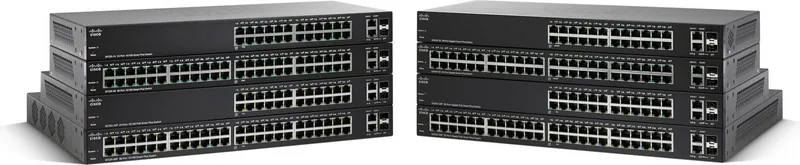
Cisco SG220 Rackmount Gigabit Smart Switch
The Cisco SG220 Rackmount Gigabit Smart Switch, 24x RJ-45, 2x RJ-45/SFP is built for small and growing networks that need dependable performance with practical management tools. Its rackmount form factor makes it a neat fit for structured cabling environments, while the 24 Gigabit RJ-45 access ports and dual combo uplinks provide the flexibility to connect everyday endpoints and higher-speed upstream devices without overcomplicating the layout.
What stands out in the Cisco SG220 family is the balance between simplicity and control. The web-based management interface gives administrators access to live statistics, logs, health status, and configuration tools in one place. That means tasks like monitoring traffic, checking port behavior, adjusting VLANs, or reviewing alerts can be handled from a browser instead of from a more complex command-driven workflow.
For network planning, the switch offers features that matter in real deployments: VLAN segmentation, link aggregation, spanning tree support, QoS controls, and discovery options that help devices work together smoothly. These tools make it easier to separate voice, data, and management traffic, while also improving resilience when multiple links or switches are involved. Security features such as user control, authentication options, SSL access, and protection settings further support a stable business network.
The administration workflow is also designed with maintenance in mind. The manual for the Cisco SG220 Rackmount Gigabit Smart Switch, 24x RJ-45, 2x RJ-45/SFP Manual emphasizes saving the running configuration, backing up files, restoring settings, and using system logs to track changes over time. That is especially useful when switches are deployed across offices, labs, or branch sites where consistency matters. Tools for SNTP time sync, remote syslog, and detailed interface counters help keep troubleshooting organized and accurate.
Overall, this switch suits teams that want a reliable access layer with smart features rather than an overwhelming enterprise platform. It is a solid choice for administrators who value visibility, structured management, and flexible uplink design in a compact rack-ready device.
Notes
- Some settings only take effect after a reboot.
- Save the running configuration before restarting.
- Change the default login credentials immediately.
- Use logs and statistics regularly to spot issues early.
Search for 67,706 Manuals online


Type-in Brand or Model
Lena Schmidt
10 months ago
Does the product offer a broad range of features, and is it reliable in everyday use?
Manual.ly
10 months ago
Based on customer feedback, the product has a very strong feature set and performs reliably day to day. Multiple reviewers mention excellent functionality and that they are completely satisfied, suggesting the core features work as expected.