
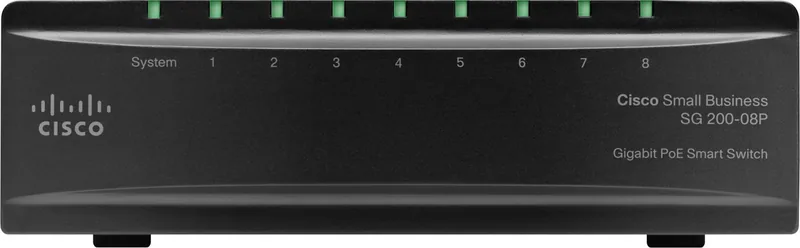
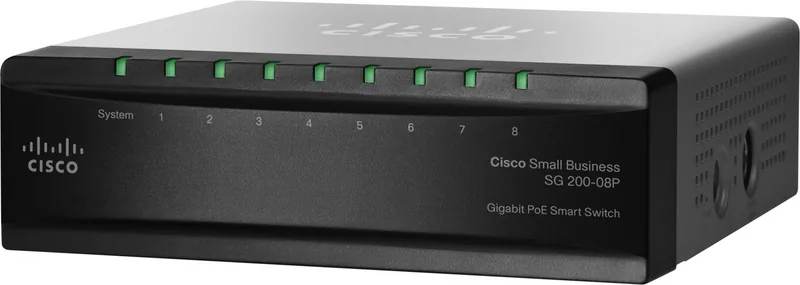
Cisco SG200 Manual
PDF manual · 175 Pages
English



Quick check
Incorrect answer, please try again.
Chat with your Cisco SG200 manual using AI
Get instant AI answers from your Cisco SG200 manual
Ask anything about the Cisco SG200. Answers come from this manual, with the pages they are based on.
Ask a Question
Do you recommend SG200?
Yes NoFrequently Asked Questions
Open a web browser and enter the default IP address 192.168.1.254. Use the default username cisco and password cisco to access the configuration utility.
Is this answer helpful?
Yes, the interface allows you to create VLANs and assign specific ports to them. This helps segment traffic and improve security.
Is this answer helpful?
Yes, this model supports Power over Ethernet. You can check Maximum Available Power settings in the system summary.
Is this answer helpful?
Navigate to File Management. You can backup the configuration file to a TFTP or HTTP server to save settings remotely.
Is this answer helpful?
Yes, you can configure IPv6 addresses and gateways for management access using the IPv6 Interface page settings.
Is this answer helpful?
Yes, QoS features allow you to map DSCP and CoS values to queues to prioritize critical application traffic.
Is this answer helpful?
System logs are stored in RAM and flash. Review them regularly to diagnose issues. The system retains logs across reboots if stored in flash.
Is this answer helpful?
Advantages and Disadvantages
Advantages

- PoE support simplifies cabling and powers IP phones directly without extra adapters.
- Web interface is accessible and easy to use for non-technical administrators.
- VLAN segmentation enhances network security by isolating different types of traffic.
- Detailed RMON statistics provide deep visibility into network performance and health.
- SNMP and 802.1X authentication ensure robust security for managing access.
Disadvantages

- No command line interface access available for automated scripting tasks.
- Session timeouts require re-login after periods of inactivity for security.
- Limited to 8 ports total on this specific desktop switch model version.
- Dependency on DHCP for auto-configuration can complicate static deployments.
- Flash log size limits the volume of historical event data stored locally.
Product Specification
Function
Switch
Type
Standalone
Network Ports
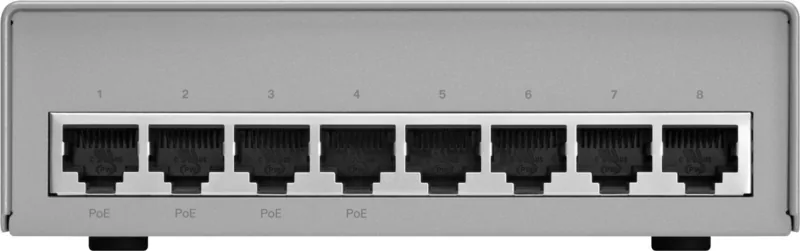
8x RJ-45
Speeds
8x RJ-45 (10/100/1000Base-T)
PoE
4x RJ-45 PoE, Total: 32W
Backplane
13.6Gb/s, 11.9Mpps, 9KB Jumboframes, 4Mb Packet Buffer, 8k MAC Addresses
Officially Supported Standards
802.1AX, 802.1D, 802.1Q, 802.1X, 802.1AB, 802.1p, 802.1w, 802.3, 802.3ab, 802.3af, 802.3az, 802.3u, 802.3x, IGMPv3, MLDv2
Configuration
Web Interface
Cooling
Passive
Dimensions (WxHxD)
5.12x1.67x5.12in, 1U
Weight
2.78lbs
Color
Black
Features
Metal enclosure, firmware updates possible, external power supply
Manufacturer Warranty
Lifetime (10 years in AT/DE)
Note
For this device, "link aggregation" was officially specified with the obsolete standard IEEE802.3ad. Since 2008, the function has not been managed by the IEEE "Task Group 3" (IEEE 802.3, CSMA/CD - Ethernet), but by the "Task Group 1" (IEEE 802.1, High Level Interface - Internetworking) and is technically unchanged, defined via IEEE 802.1AX.
Product Description
Cisco Small Business Networking Solutions
Powerful Connectivity Options
The Cisco SG200 Desktop Gigabit Smart Switch, 8x RJ-45, PoE Manual serves as a reference for deploying robust small business networks. This device integrates seamlessly into any workspace requiring reliable Gigabit connections. Whether powering IP phones, PoE capabilities streamline cabling and reduce clutter significantly. Administrators benefit from an intuitive web-based utility that simplifies configuration tasks. The interface guides users through system summaries, allowing quick checks on hardware.
Comprehensive Management Features
Network visibility is crucial for maintaining uptime and diagnosing issues quickly. This switch offers detailed system statistics and logs stored in RAM and flash memory. Remote monitoring tools allow for proactive management of traffic flows. VLAN support enables traffic segmentation to enhance security and performance across different departments. Quality of Service features ensure critical applications receive priority bandwidth allocation. Port mirroring helps technicians analyze packets in real-time for deeper insights. Link aggregation increases throughput by bonding multiple physical ports together for better load balancing. SNMP and RMON capabilities provide extensive data collection for network health analysis.
Security and Reliability
Protecting your network data is a top priority for modern business continuity. The device supports 802.1X authentication and Port Security to prevent unauthorized access attempts effectively. RADIUS integration allows centralized user management across your infrastructure for better accountability. Spanning Tree Protocol prevents loops that could cripple your local network efficiency instantly. Daily backups and firmware upgrades ensure the system stays current and secure against new vulnerabilities. Idle session timeouts add another layer of security by automatically logging out inactive users.
Easy Deployment and Maintenance
Getting started involves simple login procedures using factory default credentials provided. Users can reset passwords or add new accounts through the management interface easily. Time synchronization via SNTP ensures accurate logging for troubleshooting operational events accurately. DHCP auto-configuration helps deploy units quickly without manual IP assignment for each port. File management features allow administrators to save configurations locally or on a remote server efficiently. Redundancy options like boot code support ensure the switch can recover from failures gracefully without permanent damage. IPv6 support prepares the network for future addressing standards securely.
Conclusion on Performance
Investing in smart networking hardware pays off in stability and reduced downtime significantly. The Cisco SG200 series delivers value through its extensive feature set for connectivity. Users find peace of mind knowing that configurations persist across reboots reliably every time. Regular maintenance using file management tools keeps the system healthy over long periods. This equipment remains a solid choice for growing businesses needing scalable solutions that adapt to change. Comprehensive support resources ensure help is available when complex issues arise during installation phases.
Search for 67,706 Manuals online


Type-in Brand or Model
Hans Weber
7 months ago
Can this PoE SwitchRouter reliably power a home office setup and connected access points over long periods?
Manual.ly
6 months ago
Based on recent user feedback, this PoE SwitchRouter is highly reliable for home office setups. Users confirm it runs trouble-free since purchase and successfully powers connected devices, such as MikroTik access points, without errors.