

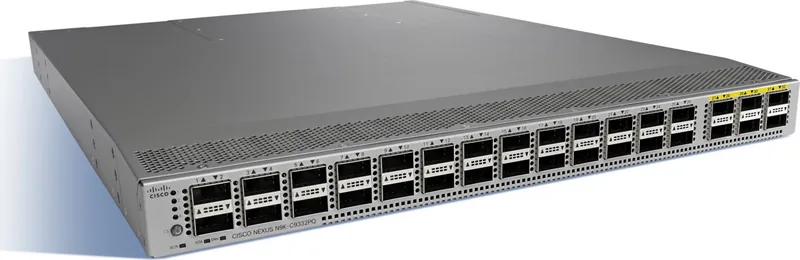

Cisco Nexus 9332PQ Manual
PDF manual · 66 Pages
English



Quick check
Incorrect answer, please try again.
Chat with your Cisco Nexus 9332PQ manual using AI
Get instant AI answers from your Cisco Nexus 9332PQ manual
Ask anything about the Cisco Nexus 9332PQ. Answers come from this manual, with the pages they are based on.
Nexus 9332PQ Maintenance Schedule
Clean connectors regularly depending on the environment and if exposed to dust or touched. Use wet or dry cleaning techniques.
Inspect routinely for dust and damage. If damage is suspected, clean and inspect fiber ends under a microscope.
Ask a Question
Do you recommend Nexus 9332PQ?
Yes NoFrequently Asked Questions
The switch provides 32 QSFP+ ports with support for 40G connectivity and dynamic breakout to 4x10G on supported downlink ports. It accepts common QSFP+ transceivers (10GBASE-SR/LR, SFP+ AOCs) and QSFP28 optics for 100G where supported by specific models and modules.
Is this answer helpful?
No. Cisco requires that you do not mix AC and DC power supplies in the same chassis. All installed power supplies must be of the same type and share identical airflow orientation to ensure safe operation and proper cooling.
Is this answer helpful?
Choose module airflow (port-side intake or exhaust) before deployment and place the switch so its air intakes face the cold aisle and exhausts face the hot aisle. All fan and power supply modules must match the selected airflow direction to avoid overheating.
Is this answer helpful?
Ensure a grounded 19" rack with required clearance (front/rear clearance for cabling and airflow), controlled ambient temperature (0–40°C), appropriate humidity (5–95% non-condensing), dedicated power circuits sized per regional codes, and EMI/RFI mitigation measures such as shielded cabling and separation from noisy power runs.
Is this answer helpful?
Yes. Fans and power supplies are field-replaceable. You can replace a single fan or power supply while the switch is operating, provided remaining modules maintain required cooling and the replacement has matching airflow. Changing the overall airflow direction requires shutting down the switch before swapping all modules.
Is this answer helpful?
Initial setup can be done via the RJ-45 RS-232 console port (VT100 emulation, 9600 baud), an out-of-band management RJ-45 Ethernet port, or USB for configuration save/restore. A first-boot setup utility guides basic configuration.
Is this answer helpful?
Handle transceivers with ESD protection (wrist strap), keep connectors capped and clean, avoid frequent removal/insertion, clean connectors per site procedures (wet or dry methods), and inspect under a microscope if damage or contamination is suspected to keep attenuation below recommended thresholds.
Is this answer helpful?
Advantages and Disadvantages
Advantages

- High port density with 32 QSFP+ ports and dynamic breakout support for flexible 10G/40G connectivity.
- Hot-swappable redundant power and fan modules with selectable port-side intake or exhaust airflow.
- Designed for ACI fabrics: supports recommended APIC leaf/spine topologies and simplified ECMP forwarding.
- Comprehensive management options: RJ-45 console, out-of-band management port, USB configuration I/O.
- Enterprise-grade environmental and safety guidance for predictable data-center deployments.
Disadvantages

- Must not mix AC and DC power supplies in the same chassis, limiting mixed-power flexibility.
- All fan and power modules require identical airflow direction—forcing coordinated module swaps.
- High power provisioning at peaks (up to ~508 W) may require careful circuit and UPS planning.
- Physical 1U form factor can complicate cable density and airflow in poorly planned racks.
- Replacement and maintenance sometimes require brief attention windows (e.g., fan swap within one minute while live).
Product Specification
Function
Switch, SAN-Switch
Type
Standalone, Rackmount (via mounting brackets)
Network ports
32x QSFP+
Speeds
32x QSFP+ (40Gb/s)
PoE
N/A
Backplane
2.56Tb/s, 720Mp/s, 25MB packet buffer, 96k MAC addresses
Officially supported standards
IGMP
Configuration
Web interface, console, serial (RJ-45, 2x USB-A 2.0), network (RJ-45, dedicated, 10/100/1000Base-T)
Cooling
active, 4x fans (1.57in, 1x hot-plug each)
Dimensions (WxHxD)
17.28x1.73x22.48in, 1U
Weight
22.05lb
Color
silver
Special features
Metal housing, removable mounting brackets, firmware updates possible, redundant power supply (redundant power input), 2x hot-plug power supply units
Manufacturer's warranty
one year
Product Description
Cisco Nexus 9300 Rackmount 40G Managed Switch, 32x QSFP+ Manual
The Cisco Nexus 9300 Rackmount 40G Managed Switch, 32x QSFP+ is a high-density, data-center-class Ethernet switch engineered for cloud-scale and ACI (Application Centric Infrastructure) deployments. Built for performance, resiliency, and predictable cooling and power in modern racks, this 1U platform provides abundant QSFP+ ports for 40G connectivity and supports breakout configurations to deliver flexible 10G or 40G topologies. Ideal for leaf or spine roles in small to large fabrics, it blends field-replaceable hardware, robust environmental tolerances, and proven Cisco NX-OS/ACI software interoperability to streamline installation and operations.
Key product highlights
This switch delivers 32 QSFP+ ports (commonly arranged as multiple 40G downlinks and uplinks) with support for dynamic breakout cables—enabling 4x10G per QSFP when needed—and common transceiver families for LR/SR and active optical cable options. The chassis supports redundant power supplies (650W AC or 930W DC variants) and four hot-swappable fan modules with selectable port-side intake or exhaust airflow, so data-center airflow and hot/cold aisle strategies remain consistent.
Beyond raw port density, the platform emphasizes manageability: an RJ-45 console port, out-of-band management interface, USB ports for configuration backup/restore, and LED indicators for chassis, fan, and power diagnostics. The hardware installation and site-prep guidance focus on grounding, EMI/RFI mitigation, temperature/humidity ranges, shock/vibration tolerance, rack clearance, and cabling practices—ensuring predictable deployments across typical enterprise and colocation environments.
Operational flexibility includes support for Cisco ACI topologies—recommended connections to APIC controllers, leaf-to-spine full-mesh uplinks, and transceiver compatibility notes—plus maintenance best practices for transceivers, LED fault interpretation, and safe hot-swap procedures for fans and power supplies. The manual’s guidance on airflow (color-coded modules), power provisioning (typical and peak wattage figures), and redundancy models (1+1, n+1, n+n) helps operators size circuits and plan UPS/grounding appropriately.
Deployment considerations
Plan rack placement so the chosen airflow orientation intakes cold air from the cold aisle and exhausts to the hot aisle; do not mix AC and DC supplies in one chassis; use industry-standard 19" racks with recommended clearances; and follow Cisco guidance for transceiver cleaning, ESD handling, and cable routing to minimize signal loss and maximize lifetime.
Notes
- Fan and power modules must all share the same airflow direction to prevent overheating.
- Typical operating temperature: 0–40°C; humidity 5–95% non-condensing.
- Keep optical connectors capped and clean; maintain attenuation under 0.35 dB.
Search for 67,706 Manuals online


Type-in Brand or Model