


Cisco Nexus 93180YC-FX Manual
PDF manual · 64 Pages
English



Quick check
Incorrect answer, please try again.
Chat with your Cisco Nexus 93180YC-FX manual using AI
Get instant AI answers from your Cisco Nexus 93180YC-FX manual
Ask anything about the Cisco Nexus 93180YC-FX. Answers come from this manual, with the pages they are based on.
Nexus 93180YC-FX Maintenance Schedule
Clean connectors regularly depending on the environment. Clean if exposed to dust or accidentally touched using wet or dry techniques.
Inspect routinely for dust and damage. If damage is suspected, clean and inspect fiber ends under a microscope.
Ask a Question
Do you recommend Nexus 93180YC-FX?
Yes NoFrequently Asked Questions
It is designed for high-density data center use, especially leaf-spine fabrics, secure networking, and environments that need compact 25G access with faster uplink aggregation.
Is this answer helpful?
It offers 48 SFP28 ports for access connectivity and 6 QSFP28 ports for uplinks, giving a strong balance between server-facing and spine-facing bandwidth.
Is this answer helpful?
MACsec adds link-level encryption, helping protect data as it crosses network links. It is useful for organizations that need stronger traffic security without changing the overall architecture.
Is this answer helpful?
Yes, the switch supports field replacement of fan modules and power supplies. The replacement part must match the installed airflow direction and power type to keep the system stable.
Is this answer helpful?
You should confirm rack depth, front and rear clearance, power receptacle access, grounding, and airflow path. The switch performs best in a properly ventilated, secure rack environment.
Is this answer helpful?
Yes. It uses two power supplies for redundancy, and the design supports continuous operation if one module fails. Proper redundancy planning depends on using compatible power sources.
Is this answer helpful?
Advantages and Disadvantages
Advantages

- 48 SFP28 ports and 6 QSFP28 uplinks provide dense, flexible connectivity in just 1RU.
- MACsec support helps secure sensitive traffic across the switching fabric.
- Hot-swappable fans and redundant power supplies improve uptime and serviceability.
- Airflow options make the switch easier to fit into hot-aisle or cold-aisle layouts.
Disadvantages

- All fan and power modules must match airflow direction, which limits mix-and-match flexibility.
- Installation requires careful rack, grounding, and power planning before deployment.
- Optical cabling and transceiver handling need strict cleanliness and ESD discipline.
- Different power-source types cannot be mixed in the same chassis.
Product Specification
Function
Switch, SAN-Switch
Type
Standalone, Rackmount (via mounting brackets)
Network ports
48x SFP28, 6x QSFP28
Speeds
48x SFP28 (1G/8G/10G/16G/25G/32Gb/s), 6x QSFP28 (10G/40G/100Gb/s)
PoE
N/A
Backplane
3.6Tb/s, 1.4Gp/s, 40MB packet buffer, 512k MAC addresses
Officially supported standards
802.1AX, 802.1D, 802.1Q, 802.1AE, 802.1p, 802.3ab, 802.3ae, IGMP
Configuration
Web interface, console, serial (RJ-45, USB-A 2.0, rear), network (RJ-45, dedicated, 10/100/1000Base-T, rear)
Cooling
active, 4x fans (1.57 in, 1x hot-plug each)
Dimensions (WxHxD)
17.28x1.73x22.48 in, 1U
Weight
17.42 lb
Color
silver
Special features
Metal housing, removable mounting brackets, firmware updates possible, redundant power supply (redundant power input), 2x hot-plug power supplies
Manufacturer's warranty
one year
Note
For this device, "link aggregation" was officially specified with the obsolete standard IEEE802.3ad. Since 2008, the function is no longer managed by IEEE "Working Group 3" (IEEE 802.3, CSMA/CD - Ethernet), but by "Working Group 1" (IEEE 802.1, High Level Interface - Internetworking) and technically unchanged defined via IEEE 802.1AX.
Product Description
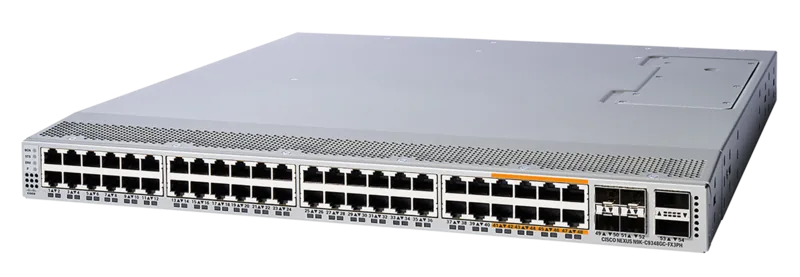
Cisco Nexus 9300-FX MACsec Rackmount 25G Managed Switch, 48x SFP28, 6x QSFP28
The Cisco Nexus 9300-FX MACsec Rackmount 25G Managed Switch is built for teams that need compact design, strong throughput, and dependable fabric performance in a single rack unit. With 48 SFP28 ports for 1/10/25G access and 6 QSFP28 uplinks for 40/100G aggregation, it fits naturally into modern leaf-spine architectures, dense server rows, and security-focused enterprise networks. MACsec support adds an important layer of protection for traffic that must stay encrypted as it moves across the infrastructure.
What makes this switch especially practical is its balance of power, cooling, and serviceability. The platform supports redundant power supplies and hot-swappable fan modules, helping reduce downtime during maintenance or component replacement. It can be deployed with either port-side intake or port-side exhaust airflow, so it adapts to hot-aisle/cold-aisle planning instead of forcing the data center to adapt around it. That flexibility matters when space is tight and airflow design has to be precise.
The 9300-FX family is also well suited for controlled environments where cabling and rack planning are taken seriously. The chassis is designed for secure rack mounting, proper grounding, and clear front and rear airflow paths. When installed correctly, it becomes a stable building block for high-performance fabrics and ACI-style deployments, where predictable connectivity and clean east-west traffic flow are essential.
For operations teams, the switch offers the kind of detail that makes life easier: visible system LEDs, a console port for initial access, and an out-of-band management interface for troubleshooting. Optical modules and cables can be maintained independently, and the hardware guidance emphasizes keeping everything clean, aligned, and matched to the correct airflow direction. These are small details, but they add up to better uptime and fewer surprises.
In short, this is a high-density managed switch designed for modern data centers that want speed, security, and resilience without wasting rack space. It is especially attractive where 25G access, 100G uplinks, and strong operational discipline all matter at once.
Notes
- Match all fans and power supplies to the same airflow direction.
- Plan rack depth, grounding, and power redundancy before installation.
- Keep transceivers and fiber connectors clean for best signal quality.
Search for 67,706 Manuals online


Type-in Brand or Model