


Cisco Nexus 3048 Manual
PDF manual · 72 Pages
English



Quick check
Incorrect answer, please try again.
Chat with your Cisco Nexus 3048 manual using AI
Get instant AI answers from your Cisco Nexus 3048 manual
Ask anything about the Cisco Nexus 3048. Answers come from this manual, with the pages they are based on.
Nexus 3048 Maintenance Schedule
Clean transceiver and fiber-optic cable connectors regularly depending on the environment. Also clean if exposed to dust or accidentally touched.
Inspect transceivers and optical cables routinely for dust and damage. If damage is suspected, clean and inspect under a microscope.
Ask a Question
Do you recommend Nexus 3048?
Yes NoFrequently Asked Questions
It is designed for high-density access switching in rack environments. The 48 RJ-45 ports handle many wired endpoints, while the SFP+ uplinks connect the access layer to faster network segments.
Is this answer helpful?
They provide faster uplinks than standard Gigabit ports, which helps reduce bottlenecks when traffic leaves the access layer. They are useful for aggregation, core links, and bandwidth-heavy workloads.
Is this answer helpful?
Yes. The text emphasizes rackmount installation, grounding, airflow direction, and environmental control, all of which fit data-center and structured-cabling environments very well.
Is this answer helpful?
No. It also covers safety, network connections, transceiver handling, module replacement, LED meanings, rack requirements, and spare parts planning, making it useful for ongoing operations.
Is this answer helpful?
Confirm that the chassis is mounted securely, grounded properly, and supplied with the correct power. Also verify that fan and power modules are installed and that airflow direction matches the rack layout.
Is this answer helpful?
Because performance and reliability depend on clean optics, proper ESD handling, correct airflow, and replacement parts that match the chassis. Small installation mistakes can affect cooling or connectivity.
Is this answer helpful?
Advantages and Disadvantages
Advantages

- 48 RJ-45 Gigabit ports provide high-density copper connectivity for access-layer deployments.
- 4 SFP+ uplinks offer a cleaner path to aggregation or higher-speed backbone connections.
- 1RU rackmount form factor saves space in crowded network cabinets and server rows.
- Managed design supports centralized control, monitoring, and smoother troubleshooting.
Disadvantages

- Best results depend on proper rack airflow, grounding, and environmental planning.
- Copper-heavy design may be less ideal for purely fiber-oriented or long-distance uplink needs.
- Single-switch deployment can still require careful power planning for redundancy.
- Installation and maintenance are more involved than with simple unmanaged switches.
Product Specification
Function
Switch
Type
Standalone, Rackmount (via mounting brackets)
Network ports
48x RJ-45, 4x SFP+
Speeds
48x RJ-45 (10/100/1000Base-T), 4x SFP+ (1G/10Gb/s)
PoE
N/A
Backplane
176Gb/s, 132Mp/s, 9KB Jumboframes, 9MB packet buffer, 128k MAC addresses
Officially supported standards
802.1AX, 802.1D, 802.1Q, 802.1AB, 802.1p, 802.1s, 802.1w, 802.3ae, 802.3z, IGMPv3
Configuration
Console, serial (RJ-45, USB-A 2.0, rear), Network (RJ-45, dedicated, rear, 10/100Base-T)
Cooling
active, 1x preparation for fan module
Dimensions (WxHxD)
17.28x1.73x19.88in, 1U
Weight
20.50lbs
Color
silver
Special features
Metal housing, removable mounting brackets, firmware updates possible, redundant power supply unit (redundant power supply), 2x power supply hot-plug capable
Note
For this device, "link aggregation" was officially specified with the obsolete standard IEEE802.3ad. Since 2008, the function is no longer managed by the IEEE "Working Group 3" (IEEE 802.3, CSMA/CD - Ethernet), but by "Working Group 1" (IEEE 802.1, High Level Interface - Internetworking) and technically defined unchanged via IEEE 802.1AX.
Product Description
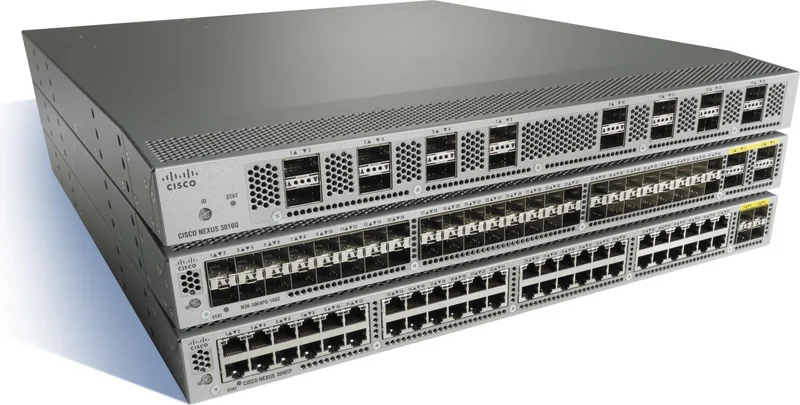
Cisco Nexus 3048 Rackmount Gigabit Managed Switch, 48x RJ-45, 4x SFP+ Manual: A Practical Look at a Reliable Access Switch
The Cisco Nexus 3048 Rackmount Gigabit Managed Switch, 48x RJ-45, 4x SFP+ Manual points to a switch built for dense wired access, predictable performance, and disciplined data-center deployment. In everyday use, this class of switch is all about giving teams a clean foundation for server aggregation, storage connections, and segmented networks without adding unnecessary complexity.
What makes the Cisco Nexus 3048 stand out is its balance of copper access and faster uplink capability. The 48 RJ-45 Gigabit ports are ideal for connecting servers, workstations, appliances, or edge devices, while the 4 SFP+ slots provide a compact path to higher-speed uplinks. That mix makes it well suited for rack environments where you want broad access capacity but still need a smooth route into the core.
The installation guidance around the Nexus 3000 family highlights how much attention Cisco gives to real-world deployment details. Airflow direction, rack clearance, grounding, power planning, and environmental limits all matter. This is a switch designed to live in structured infrastructure, where proper mounting, stable power, and clean cable management help protect performance over time. The emphasis on ESD safety, labeled LEDs, and hot-swap maintenance also reflects a platform meant for professional operation.
For administrators, the appeal is not only port count but also manageability. A console port, management interface, and status indicators make setup and troubleshooting straightforward. In a blog post context, this switch reads as a dependable rackmount option for organizations that want familiar RJ-45 connectivity, uplink flexibility, and a design that fits well into a controlled network closet or data center row.
It is also worth noting that the broader Nexus 3000 guidance favors careful preparation: match airflow to the rack layout, keep the chassis grounded, and check power and cooling before bringing the unit online. Those habits are what turn a capable switch into a stable long-term part of the network.
Notes
- Best for structured rack deployments with consistent airflow and power.
- Plan cabling and grounding before installation.
- Use the uplink ports to keep the access layer from becoming a bottleneck.
Search for 67,706 Manuals online


Type-in Brand or Model