
Cisco IE 3000 Manual
PDF manual · 32 Pages
English



Quick check
Incorrect answer, please try again.
Chat with your Cisco IE 3000 manual using AI
Get instant AI answers from your Cisco IE 3000 manual
Ask anything about the Cisco IE 3000. Answers come from this manual, with the pages they are based on.
Ask a Question
Do you recommend IE 3000?
Yes NoFrequently Asked Questions
The unit operates on DC input typically ranging from 18 to 60 volts. Dual power sources are supported for redundancy. You must use a Class 2 power source marked appropriately.
Is this answer helpful?
Yes, but an optional DIN rail adapter kit is required. Note that the standard 19-inch rack adapter will not meet environmental performance specifications for industrial use.
Is this answer helpful?
The switch supports up to two expansion modules. These add ports for more flexibility in network design and configuration.
Is this answer helpful?
You can replace the card easily during a hardware swap. The slot is located on the bottom of the switch, allowing for quick restoration of configuration settings.
Is this answer helpful?
No, the switch does not have cooling fans. This design choice reduces noise and removes a common point of failure in harsh environments.
Is this answer helpful?
Yes, the dual-purpose ports accept SFP modules. You can use field-replaceable transceivers to establish fiber-optic connections to other switches or devices.
Is this answer helpful?
Advantages and Disadvantages
Advantages

- No cooling fans reduce failure points and noise significantly
- Modular design allows for flexible port expansion
- Supports dual DC power inputs for redundancy
- Robust construction withstands harsh industrial temperatures
- Multiple mounting options include DIN rail and wall
Disadvantages

- Requires specific Class 2 DC power supply
- Expansion modules are not hot-swappable
- Console cable kit must be ordered separately
Product Specification
Function
Switch
Type
Standalone, DIN Rail, Rackmount (via optional mounting bracket), with Module Slot
Network Ports
8x RJ-45, 2x RJ-45/SFP, 2x Expansion Slots
Speeds
8x RJ-45 (10/100Base-T), 2x RJ-45 (10/100/1000Base-T), 2x SFP (100Mb/s/1Gb/s), 2x Expansion Slots
PoE
N/A
Backplane
16 Gb/s, 6.5 Mb/s, 9,018 kB Jumboframes, 8K MAC Addresses
Officially Supported Standards
802.1D, 802.1Q, 802.1X, IGMPv3
Configuration
Web Interface, Console, Serial (RJ-45), Alarm Port (Terminal Blocks), Configuration Software, Profinet V2, via Controller
Dimensions (WxHxD)
5.79x5.98x4.41 inches
Weight
4.41 lbs
Color
Dark Blue
Features
Metal housing, Terminal blocks (18-60 V), Power supply only via remote powering, redundant power supply, extended operating range (Temperature: -40 deg F to 167 deg F, Humidity: 10% to 95%), NEMA TS2, EN50121-4
Manufacturer Warranty
5 years
Product Description
Industrial Networking Solutions
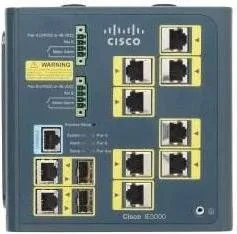
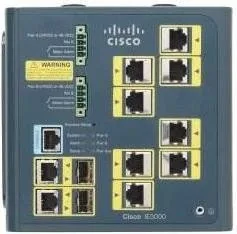
The Cisco IE 3000 LAN Base Industrial Railmount Managed Switch, 8x RJ-45, 2x RJ-45/SFP, 2x Module Slot defines reliability in challenging environments. This hardware bridges the gap between standard office networking and harsh industrial settings. Factory automation requires equipment that withstands vibration, temperature extremes, and electrical noise. This unit delivers that durability without sacrificing performance. It serves as the backbone for intelligent transportation systems and substations.
Connectivity and Expansion
Users benefit from versatile port configurations. The base model provides eight 10/100 Ethernet ports alongside two dual-purpose uplinks. These uplinks accept either copper or Small Form-Factor Pluggable modules. This flexibility allows network architects to scale bandwidth efficiently. When more ports are needed, the two module slots support various expansion cards. You can add fiber optics, more copper ports, or Power over Ethernet capability. This modularity ensures the infrastructure grows with the facility.
Installation and Power
Mounting is straightforward whether using a DIN rail or wall. The design eliminates cooling fans, reducing noise and failure points. Power requirements are met via DC input, typically ranging from 18 to 60 volts. Dual power sources improve availability. If one supply fails, the other maintains operation. Redundancy is critical for uninterrupted industrial processes. Grounding procedures must be followed strictly to protect equipment and users.
Management and Monitoring
Managing the network remotely is seamless. Tools like the Cisco Network Assistant provide a graphical interface. The Command Line Interface offers deep control for experienced technicians. LED indicators on the front panel give instant status feedback. Green lights confirm normal operation, while red alerts signal alarms or failures. This visual aid speeds up troubleshooting significantly.
Environmental Durability
Designed specifically for industrial Ethernet applications, this switch operates in polluted environments. It handles high humidity and wide temperature swings. It meets specific regulatory standards for hazardous locations. Operating ranges span from negative forty up to sixty degrees Celsius. Whether placed in a control room or outdoors within a cabinet, it performs consistently. The CompactFlash slot allows quick configuration restoration during hardware swaps. This feature saves significant time during maintenance windows. Investing in this robust platform protects against costly downtime.
Security and Compliance
Security features ensure data integrity across the local network. The switch supports standard access control mechanisms. It complies with FCC regulations for Class A devices. This ensures minimal interference with other communication systems in business settings. Installation must adhere to local electrical codes. Proper grounding prevents damage from static discharge events. Compliance with industry standards guarantees safety for all personnel working nearby.
Search for 67,706 Manuals online


Type-in Brand or Model