


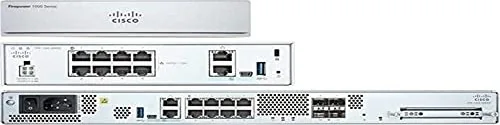
Cisco Firepower 1000 Series Manual
PDF manual · 40 Pages
English



Quick check
Incorrect answer, please try again.
Chat with your Cisco Firepower 1000 Series manual using AI
Get instant AI answers from your Cisco Firepower 1000 Series manual
Ask anything about the Cisco Firepower 1000 Series. Answers come from this manual, with the pages they are based on.
Ask a Question
Do you recommend Firepower 1000 Series?
Yes NoFrequently Asked Questions
The Firepower 1010 supports Cisco Firepower software version 6.4 and higher. It is recommended to check the compatibility guide for specific requirements.
Is this answer helpful?
No, stacking is not allowed. It interrupts airflow and causes overheating which leads to system crashes and instability.
Is this answer helpful?
You must install the Cisco Windows USB console driver before connecting. After installation, use a terminal emulator at 9600 baud.
Is this answer helpful?
No, the 200 gigabyte M.2 SATA SSD is not user accessible. It must be sent back to Cisco if it fails internally.
Is this answer helpful?
The system uses an external 115 watt AC power supply. It draws 55 watts for operation plus 60 watts for PoE services depending on load.
Is this answer helpful?
Yes, a wall mounting kit is available. You can mount the chassis oriented left, right, or upside down using the specific bracket.
Is this answer helpful?
Ports 7 and 8 are PoE+ capable but require a future software version to function as Power over Ethernet Plus ports.
Is this answer helpful?
Advantages and Disadvantages
Advantages

- Four-core Intel processor ensures high performance for security tasks
- Compact chassis allows flexible placement on desk or in rack
- Dual console ports offer versatile management connectivity options
- Supports Power over Ethernet Plus for compatible devices
- Includes Kensington lock slot for enhanced physical security
Disadvantages

- Internal SSD is not user-replaceable or accessible
- No physical power switch requires unplugging to shutdown
- Stacking units is prohibited due to heat and stability risks
- PoE Plus and L2 switch features need future software updates
- External power supply adds cabling complexity compared to internal units
Product Specification
Wireless
N/A
Additional Ports
1x USB-A 3.0, 1x USB 2.0 Mini-B, 2x RJ-45 Management
Product Description
Cisco Firepower 1000 Series Overview
Security remains a top priority for modern networks. The Cisco Firepower 1010 stands out as a robust Next-Generation Firewall designed for desktop environments. This appliance integrates powerful security features into a compact chassis. It is part of the larger Cisco Firepower family, ensuring compatibility with established security protocols. Organizations seeking streamlined protection will find this unit essential for small to medium deployments. It balances performance with physical footprint effectively.
The hardware performance is driven by a four-core Intel processor paired with eight gigabytes of DDR4 DRAM. This configuration handles traffic efficiently without lag. Storage is managed via a 200 gigabyte M.2 SATA SSD. While not user-serviceable, this component supports the core operating functions securely. The device includes eight gigabit Ethernet ports for network connectivity. Ports seven and eight offer Power over Ethernet Plus capabilities, although software updates may be required for full functionality. These ports support automatic detection of link speeds and duplex settings.
Flexibility defines the installation process. Users can place the unit on a desk, mount it on a wall, or install it in a standard rack. The chassis design includes rubber feet for cooling and ventilation when used on desks. Wall and rack options require specific kits sold separately. Proper positioning ensures airflow remains clear. Do not stack units, as heat buildup will cause instability. Environmental factors like temperature and humidity must be respected. Operation occurs between zero and forty degrees Celsius. High humidity can degrade components over time, so monitoring is essential in dense server rooms.
Management access is straightforward with dual console options. A standard RJ45 port supports serial connections, while a USB Mini-B port allows connection via modern computers. This flexibility aids in initial setup and troubleshooting. Drivers may be needed for Windows users, while Mac and Linux systems often require specific terminal commands. Consistent communication relies on correct baud rate settings, typically fixed at 9600. The USB port offers versatile connectivity for external storage devices formatted with FAT-32. This ensures easy data transfer during diagnostic procedures without needing an internet connection.
Power requirements are met by an external 115 watt power supply. This separates the appliance from bulky internal units. The system draws fifty-five watts for operation with a reserve for PoE services. Safety is paramount during installation. Grounding the unit prevents electrical shock. Always follow local electrical codes. Consultation of the Cisco Firepower 1000 Series Manual provides further technical depth regarding safe practices.
Software compatibility centers on version 6.4 or higher. Firepower Threat Defense delivers comprehensive threat protection. Future updates promise enhanced switching features. This ensures the device evolves with network demands. Protecting your infrastructure requires reliable hardware and clear guidance. This platform delivers exactly that. The Kensington lock slot adds physical security layers for high-risk environments.
Search for 67,706 Manuals online


Type-in Brand or Model