
Cisco Catalyst 4948 Manual
PDF manual · 142 Pages
English



Quick check
Incorrect answer, please try again.
Chat with your Cisco Catalyst 4948 manual using AI
Get instant AI answers from your Cisco Catalyst 4948 manual
Ask anything about the Cisco Catalyst 4948. Answers come from this manual, with the pages they are based on.
Catalyst 4948 Maintenance Schedule
Use a lint-free alcohol pad or CLETOP cassette cleaner whenever there is significant unexplained loss of light. Always clean before installing.
Keep plugs in optical bores and install protective covers on unused components to prevent contamination.
Ask a Question
Do you recommend Catalyst 4948?
Yes NoFrequently Asked Questions
The device supports both AC and DC power inputs with redundant 300 W units for reliable operation.
Is this answer helpful?
There are forty-four Gigabit Ethernet ports plus four optional modular ports for fiber connections.
Is this answer helpful?
Yes, it includes a standard rack-mount kit for 19-inch equipment racks.
Is this answer helpful?
It operates between 0 to 40 degrees Celsius in a dry clean environment with proper airflow.
Is this answer helpful?
A variable speed fan tray ensures low noise operation below 48 dB at room temperature.
Is this answer helpful?
Yes, it supports Telnet and SNMP for in-band management and out-of-band via the management port.
Is this answer helpful?
It provides 96-Gbps nonblocking full-duplex switching fabric processing 72 million packets per second.
Is this answer helpful?
Advantages and Disadvantages
Advantages

- Redundant power supplies ensure high availability for critical network links
- High switching capacity reaches 96-Gbps for fast data transmission speeds
- Supports multiple Layer 2 to Layer 4 protocols for flexible routing
Disadvantages

- Requires specific rack dimensions for proper physical installation fitting
- Environmental monitoring must be checked to prevent overheating issues
- Initial setup requires physical console connection for configuration tasks
Product Specification
Function
Switch
Type
Standalone, Rackmount (via mounting bracket)
Network Connections
44x RJ-45, 4x RJ-45/SFP
Speeds
48x RJ-45 (10/100/1000Base-T), 4x SFP (100M/1Gb/s)
PoE
N/A
Backplane
96Gb/s, 72Mp/s, 9KB Jumboframes, 32k Mac-Addresses
Officially Supported Standards
802.1AX, 802.1, 802.1D, 802.1Q, 802.1X, 802.1ag, 802.1p, 802.1s, 802.1w, 802.3, 802.3ab, 802.3ah, 802.3u, 802.3z, IGMPv3, MLD
Configuration
Console, serial (RJ-45), Network (RJ-45, dedicated, 10/100Base-T), via controller
Cooling
Active, Fan module (hot-plug)
Dimensions (WxHxD)
17.52x1.77x15.98 inches, 1U
Weight
17.42 lbs
Color
Black, Dark Blue
Features
Metal enclosure, removable mounting brackets, 2x hot-plug power supply, optional redundant power supply (redundant power)
Manufacturer Warranty
1 Year
Note
For this device, "link aggregation" was officially specified with the obsolete standard IEEE802.3ad. The function has since 2008 no longer been managed by the IEEE "Working Group 3" (IEEE 802.3, CSMA/CD - Ethernet), but by the "Working Group 1" (IEEE 802.1, High Level Interface - Internetworking) and is technically unchanged, defined via IEEE 802.1AX.
Product Description
Overview of the Cisco Catalyst 4948 Switch
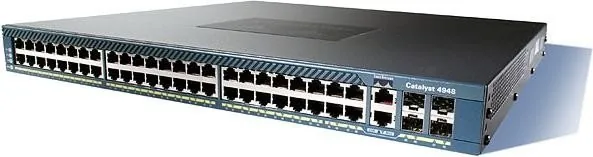
The Cisco Catalyst 4948 Enterprise Rackmount Gigabit Managed Switch, 44x RJ-45, 4x RJ-45/SFP Manual outlines a sophisticated networking device designed for high-density edge switching. This chassis delivers exceptional speed with a 96-Gbps nonblocking full-duplex switching fabric processing 72 million packets per second. The port configuration includes forty-four Gigabit Ethernet connections using standard RJ-45 interfaces. Four additional ports provide flexibility as they function as either SFP fiber ports or RJ-45 Ethernet connections with shared MAC addresses. Layer 2, 3, and 4 switching services enable advanced traffic regulation and routing capabilities. Security measures incorporate hardware-based access lists to protect network resources efficiently. Dual redundant power supplies rated at 300 Watts ensure continuous operation through fault tolerance. Users have the option to employ AC or DC power inputs depending on site availability. Maintenance is simplified by hot-swappable power units and a variable speed fan tray that operates quietly. Internal sensors continuously monitor temperature to prevent overheating. Installation demands strict adherence to environmental site planning guidelines. A rack-mount kit facilitates secure placement within standard 19-inch equipment racks. Safety precautions emphasize proper grounding to mitigate electrical hazards. The console port supports serial management for initial configuration tasks. Administrators configure IP settings using terminal emulation software to enable remote access via Telnet. Virtual LAN support extends to 4,096 IDs allowing logical segmentation of network traffic. Multicast forwarding entries optimize group communication across the infrastructure. Fiber connectivity requires careful handling and cleaning of connectors to maintain signal integrity. Troubleshooting procedures involve checking front panel LEDs for status indicators during startup. The device meets FCC Class A compliance standards suitable for commercial installations. Disposal instructions adhere to national regulations for electronic waste. This hardware integrates seamlessly with Catalyst 4500 series software for unified management. Reliable performance meets the demands of modern critical applications. Organizations deploying this model gain stability and speed for edge network requirements. Consistent availability is maintained through active monitoring of environmental conditions. Proper cable management prevents obstruction of airflow through intake vents. The management port offers out-of-band access when the system is in recovery mode. This comprehensive approach to connectivity ensures robust network infrastructure support. High availability features protect against single points of failure effectively. It weighs approximately 17.5 pounds and measures 1.75 inches in height. It includes 256-MB of SDRAM for operating memory. Network engineers value the compatibility with broader Cisco IOS software for consistent operation across the fleet. Installation guides recommend verifying power distribution to ensure circuits support the maximum load requirements.
Search for 67,706 Manuals online


Type-in Brand or Model