

Cisco Catalyst 3560-CX Manual
PDF manual · 92 Pages
English



Quick check
Incorrect answer, please try again.
Chat with your Cisco Catalyst 3560-CX manual using AI
Get instant AI answers from your Cisco Catalyst 3560-CX manual
Ask anything about the Cisco Catalyst 3560-CX. Answers come from this manual, with the pages they are based on.
Ask a Question
Do you recommend Catalyst 3560-CX?
Yes NoFrequently Asked Questions
It is a compact managed switch for edge networking, designed to connect devices like IP phones, access points, workstations, servers, and other switches in space-limited environments.
Is this answer helpful?
Yes. Supported models provide PoE+ so connected devices can receive both data and power through Ethernet cabling. The available power budget depends on the specific model.
Is this answer helpful?
Depending on the model, the switch includes SFP or SFP+ uplink slots along with copper uplink ports. This gives you flexibility for fiber or higher-speed network connections.
Is this answer helpful?
Yes. It can be placed on a desk or shelf, mounted under a surface, attached to a wall, installed in a rack, or mounted on a DIN rail with the right accessories.
Is this answer helpful?
You can use the CLI, the RJ-45 or USB console ports, Cisco Network Assistant, Device Manager, or Cisco Prime Infrastructure, depending on your preferred workflow.
Is this answer helpful?
Make sure airflow is not blocked, the ambient temperature is within limits, the power source matches the model, and the mounting method fits the environment and cable layout.
Is this answer helpful?
Advantages and Disadvantages
Advantages

- Compact design fits desks, walls, racks, and DIN rail installations.
- 240W PoE+ support can power phones, APs, and other edge devices.
- Flexible uplinks with RJ-45 and SFP/SFP+ options improve connectivity.
- Multiple management choices make setup and troubleshooting easier.
Disadvantages

- PoE budget must be shared carefully across connected devices.
- Some installations need optional brackets, trays, or cable accessories.
- Temperature and airflow limits can restrict dense or inverted mounting.
- USB console access on Windows may require a separate driver install.
Product Specification
Function
Switch
Type
Standalone, Rackmount (via optional mounting bracket), Wall mount (via mounting bracket)
Network ports
10x RJ-45, 2x SFP
Speeds
10x RJ-45 (10/100/1000Base-T), 2x SFP (100M/1Gb/s)
PoE
8x RJ-45 PoE+ (8x 30W), total: 240W
Backplane
32Gb/s, 17.9Mp/s, 9.198kB Jumboframes
Officially supported standards
802.1AX, 802.1AB, 802.1AE, 802.1D, 802.1Q, 802.1X, 802.1p, 802.1s, 802.1w, 802.1X, 802.3, 802.3ab, 802.3af, 802.3ah, 802.3at, 802.3az, 802.3u, 802.3x, 802.3z, IGMPv3
Configuration
Console, serial (USB-A 2.0, USB 2.0 Mini-B, RJ-45), Configuration software, via control unit
Cooling
passive
Dimensions (WxHxD)
10.59x1.73x9.37in, 1U
Weight
5.00lb
Color
light gray
Special features
Metal casing, Firmware updates possible, Anti-theft protection (Kensington Lock)
Manufacturer's warranty
lifetime (10 years in AT/DE)
Note
For this device, "link aggregation" was officially specified with the obsolete standard IEEE802.3ad. Since 2008, the function is no longer managed by the IEEE "Working Group 3" (IEEE 802.3, CSMA/CD - Ethernet), but by "Working Group 1" (IEEE 802.1, High Level Interface - Internetworking) and technically defined unchanged via IEEE 802.1AX.
Product Description
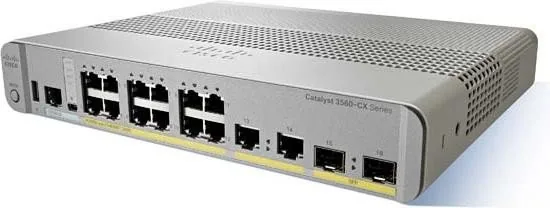
Cisco Catalyst 3560-CX Compact IP Base Desktop Gigabit Managed Switch
The Cisco Catalyst 3560-CX Compact IP Base Desktop Gigabit Managed Switch, 10x RJ-45, 2x SFP, 240W PoE+ Manual points to a versatile edge switch designed for small spaces without sacrificing enterprise-grade control. Built for desks, shelves, walls, racks, and even DIN rail placements, it fits neatly into offices, classrooms, kiosks, hospitality spaces, and other deployments where space and power are limited.
What makes this switch stand out is its blend of compact design and practical networking features. It offers Gigabit access ports for everyday devices, SFP uplinks for flexible network expansion, and PoE+ support to power phones, wireless access points, and other compatible devices through the same Ethernet cabling. With a 240W PoE budget on supported models, it is well suited for edge environments that need both data connectivity and device power in a single unit.
The installation guidance emphasizes real-world flexibility. The switch can be mounted in multiple ways, and optional accessories such as a mounting tray, power cord retainer, cable guard, or adapter bracket help tailor the setup to the environment. This makes it easy to adapt the device to clean desktop installs or more secure wall and rack deployments. The manual also highlights airflow, temperature, and cable-distance considerations, which are especially important for reliable long-term operation.
Management is equally practical. Administrators can work through the CLI, USB or RJ-45 console ports, Cisco Network Assistant, Device Manager, or Cisco Prime Infrastructure. That gives teams several ways to configure the switch, troubleshoot issues, and monitor performance. The front-panel LEDs, port-status indicators, and PoE indicators provide quick visual feedback, while Auto-MDIX and autonegotiation simplify everyday connections.
In short, this Cisco compact switch is built for organizations that want enterprise networking features in a smaller footprint. It combines flexible installation, dependable PoE delivery, and straightforward administration in a form factor that is easy to deploy at the edge.
Notes
- Best suited for compact environments with mixed data and PoE device needs.
- Check airflow and temperature limits before mounting in tight spaces.
- Match SFP or SFP+ modules and cabling to the intended uplink speed.
- Verify PoE budget when powering multiple endpoints.
Search for 67,706 Manuals online


Type-in Brand or Model