
Cisco Catalyst 2960G Manual
PDF manual · 30 Pages
English



Quick check
Incorrect answer, please try again.
Chat with your Cisco Catalyst 2960G manual using AI
Get instant AI answers from your Cisco Catalyst 2960G manual
Ask anything about the Cisco Catalyst 2960G. Answers come from this manual, with the pages they are based on.
Ask a Question
Do you recommend Catalyst 2960G?
Yes NoFrequently Asked Questions
Connect a PC via Ethernet, press the Mode button until LEDs turn green, access 10.0.0.1 in a browser, and follow the prompts to set IP and password.
Is this answer helpful?
Yes, specific models support IEEE 802.3af PoE standards to power devices like IP phones and access points automatically.
Is this answer helpful?
Cisco Network Assistant is a free tool that allows centralized configuration and monitoring of multiple Cisco devices.
Is this answer helpful?
Hold the Mode button for seven seconds until LEDs stop blinking to factory reset the device and clear all configurations.
Is this answer helpful?
Yes, Cisco offers a limited lifetime hardware warranty for the original end-user, though fans and power supplies have a five-year limit.
Is this answer helpful?
Advantages and Disadvantages
Advantages

- Supports both copper and fiber connections via RJ-45 and SFP combo ports
- Express Setup mode simplifies initial configuration for non-experts
- Includes free Cisco Network Assistant for centralized device management
- Provides Power over Ethernet capabilities on compatible models
- Reliable hardware warranty with lifetime coverage for original owners
Disadvantages

- Requires careful handling when inserting or removing SFP modules
- Limited to specific PoE wattage depending on the exact model variant
- Web interface may be less powerful than full CLI for advanced tuning
- Installation requires specific screwdrivers and rack mounting tools
- Temperature and humidity constraints must be strictly followed
Product Specification
Function
Switch
Type
Standalone, Rackmount (via mounting bracket)
Network ports
20x RJ-45, 4x RJ-45/SFP
Speeds
24x RJ-45 (10/100/1000Base-T), 4x SFP (100M/1Gb/s)
PoE
N/A
Backplane
32Gb/s, 35.7Mp/s, 9KB Jumboframes, 8k MAC addresses
Officially supported standards
802.1AX, 802.1D, 802.1Q, 802.1X, 802.1AB, 802.1p, 802.1s, 802.1w, 802.3, 802.3ab, 802.3ad, 802.3ah, 802.3u, 802.3x, 802.3z, IGMPv3, MLDv2
Configuration
Console, serial (RJ-45, rear), configuration software, via control unit
Cooling
Active
Dimensions (WxDxH)
17.72x1.73x12.91 inches, 1U
Weight
9.92 lbs
Color
Dark gray
Features
Metal enclosure, removable mounting brackets, optional external redundant power supply (redundant power input)
Note
For this device, link aggregation was officially specified with the obsolete standard IEEE802.3ad. The function has not been managed by the IEEE Working Group 3 (IEEE 802.3, CSMA/CD - Ethernet) since 2008, but rather by Working Group 1 (IEEE 802.1, High Level Interface - Internetworking) and is technically unchanged via IEEE 802.1AX.
Product Description
Discover the Cisco Catalyst 2960G LAN Base Rackmount Gigabit Managed Switch
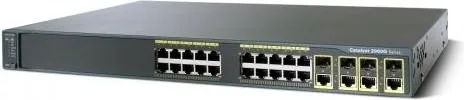
The Cisco Catalyst 2960G LAN Base Rackmount Gigabit Managed Switch represents a robust solution for modern network infrastructures requiring reliable performance and manageable connectivity. Designed for small to medium-sized businesses, this device offers a versatile array of ports including twenty RJ-45 connections and four RJ-45/SFP combo ports. This configuration allows administrators to seamlessly integrate copper Ethernet links with fiber optic uplinks, ensuring flexibility in network topology design.
Setting up this switch is straightforward thanks to the Express Setup feature. This intuitive process guides users through initial IP configuration without requiring advanced command-line knowledge. By connecting a PC directly via an Ethernet cable and accessing the web interface at 10.0.0.1, administrators can quickly assign management VLANs, set static IP addresses, and configure passwords. The built-in Device Manager provides a user-friendly graphical interface for ongoing monitoring and basic configuration tasks, making network management accessible even to those with limited technical experience.
For more complex environments, the switch supports the Cisco Network Assistant software. This free utility enables centralized management of multiple devices, offering enhanced capabilities for configuration, monitoring, and troubleshooting across a cluster of switches or routers. Additionally, the Command Line Interface (CLI) remains available for power users who prefer granular control over every aspect of the device's operation.
Physical installation is designed for standard 19-inch rack enclosures. The unit features comprehensive safety guidelines regarding temperature limits, airflow requirements, and grounding procedures to ensure long-term reliability. Power over Ethernet (PoE) support on specific models allows for the direct powering of connected devices like IP phones and wireless access points, reducing cabling complexity and costs. Whether you are expanding a local area network or enhancing security with managed features, the Cisco Catalyst 2960G stands as a dependable foundation for your network operations.
Important Notes
Ensure proper ventilation around the unit to maintain temperatures below 45 degrees Celsius. Always verify that your equipment is grounded correctly to prevent electrical hazards. When installing SFP modules, handle them carefully to avoid reducing their lifespan.
Search for 67,706 Manuals online


Type-in Brand or Model