

Cisco Catalyst 2960-L-SM Manual
PDF manual · 72 Pages
English



Quick check
Incorrect answer, please try again.
Chat with your Cisco Catalyst 2960-L-SM manual using AI
Get instant AI answers from your Cisco Catalyst 2960-L-SM manual
Ask anything about the Cisco Catalyst 2960-L-SM. Answers come from this manual, with the pages they are based on.
Ask a Question
Do you recommend Catalyst 2960-L-SM?
Yes NoFrequently Asked Questions
It is mainly used as an access-layer switch for branch offices, workgroups, and network edge deployments. It connects end devices, supports basic Layer 2 switching, and can power compatible equipment with PoE+ on supported models.
Is this answer helpful?
Yes, PoE+ models support IEEE 802.3af and 802.3at devices, including IP phones and wireless access points. The available PoE budget depends on the specific model, so power planning is important before deployment.
Is this answer helpful?
Yes. It can be rack-mounted, wall-mounted, or placed on a table or shelf. The guide also includes optional power-cord retention and bracket options to support safer and cleaner installations.
Is this answer helpful?
The series includes models with either SFP or SFP+ uplink slots. These can be used for copper or fiber connectivity, depending on the module selected and the network design requirements.
Is this answer helpful?
Initial setup can be done with the configuration wizard or through the CLI. You connect a PC, assign basic IP settings, and then access the switch through its default management address or console connection.
Is this answer helpful?
Check the cable type, link status, port LED behavior, device power, and whether the port is shut down or error-disabled. Also verify speed, duplex, and compatibility of any SFP/SFP+ module in use.
Is this answer helpful?
Advantages and Disadvantages
Advantages

- 48 Gigabit RJ-45 ports support dense access-layer connectivity for users and devices.
- Four SFP+ uplinks provide flexible high-speed upstream or fiber connections.
- PoE+ support helps power phones, APs, and other endpoints from the switch.
- Fanless design and 45°C operating support suit quieter branch or office spaces.
- Multiple mounting and console options make installation and management easier.
Disadvantages

- PoE budget can be limiting depending on the exact model and connected device load.
- Maximum operating temperature is capped at 45°C, so airflow planning is important.
- USB console setup on Windows may require driver installation and extra steps.
- SFP/SFP+ modules must be compatible, which adds planning and procurement checks.
- This is an access switch, so it is not intended for advanced core-layer use.
Product Specification
Function
Switch
Type
Standalone, Rackmount (via mounting brackets)
Network ports
48x RJ-45, 4x SFP+
Speeds
48x RJ-45 (10/100/1000Base-T), 4x SFP+ (1G/10Gb/s)
PoE
48x RJ-45 PoE+ (48x 30.8W), total: 370W
Backplane
176Gb/s, 77.38Mp/s, 10KB Jumboframes, 16k MAC addresses
Officially supported standards
802.1D, 802.1Q, 802.1X, 802.1AB, 802.1AX, 802.1p, 802.1s, 802.1w, 802.3, 802.3ab, 802.3ae, 802.3af, 802.3ah, 802.3at, 802.3az, 802.3u, 802.3x, 802.3z, IGMPv3, MLDv2
Configuration
Web interface, console, serial (USB-A 2.0, USB 2.0 Mini-B, RJ-45), via control unit
Cooling
active
Dimensions (WxHxD)
17.52x1.73x11.50in, 1U
Weight
10.01lb
Color
light gray
Special features
Metal housing, removable mounting brackets, firmware updates possible, anti-theft protection (Kensington Lock)
Manufacturer's warranty
lifetime (10 years in AT/DE)
Product Description
Cisco Catalyst 2960-L-SM: A Solid Fit for Small to Mid-Sized Networks
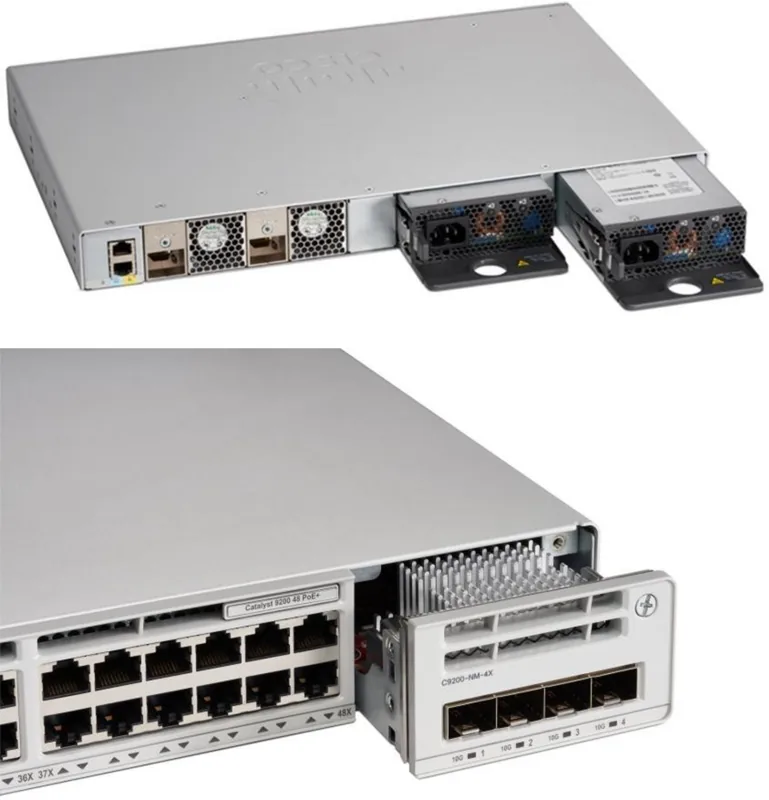
The Cisco Catalyst 2960-L-SM LAN Lite Rackmount Gigabit Smart Switch, 48x RJ-45, 4x SFP+, 370W PoE+ Manual highlights a switch family built for dependable access-layer networking. It is designed for branch offices, workspace environments, and wiring-closet deployments where stable performance, simple management, and flexible uplinks matter.
With 48 Gigabit Ethernet RJ-45 ports and four high-speed SFP+ uplinks, this model balances everyday device connectivity with room for aggregation or fiber expansion. The PoE+ version is especially useful for powering IP phones, wireless access points, and other edge devices without needing separate adapters. That makes it a practical choice for offices that want cleaner cabling and easier rollout.
One of the strongest traits of the 2960-L series is its installation flexibility. It can be rack-mounted, wall-mounted, or placed on a table or shelf, which helps in tight spaces and mixed deployment environments. The guide also shows thoughtful design details such as multiple console options, USB flash support, and clear LED indicators for status, speed, PoE, and faults. These features make setup and troubleshooting more approachable for administrators.
Reliability is another major theme. The switch supports standard startup checks, easy diagnostics through LEDs and CLI commands, and structured guidance for cabling, SFP installation, and PoE planning. Cisco also emphasizes safety, grounding, proper airflow, and environmental limits, which reflects the product’s intended use in professional installations.
For network teams looking for a straightforward access switch with strong PoE capability and fiber-ready uplinks, the Cisco Catalyst 2960-L-SM stands out as a dependable workhorse. It is not about flashy extras; it is about consistent switching, manageable power delivery, and clean integration into existing enterprise networks.
Notes
- Best suited for access-layer connectivity and edge device power delivery.
- PoE capacity and thermal limits should be checked against your deployment plan.
- SFP/SFP+ module compatibility and cabling choices matter for stable results.
Search for 67,706 Manuals online


Type-in Brand or Model