
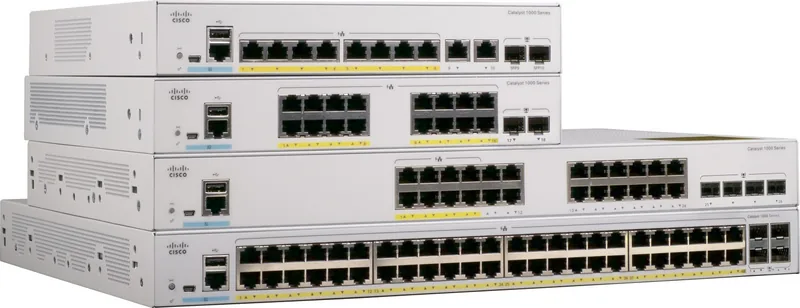
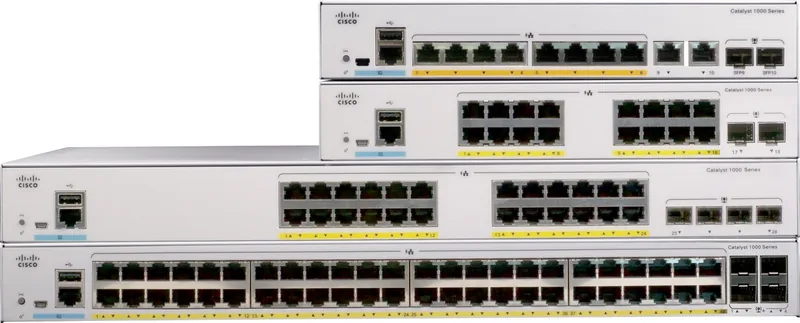
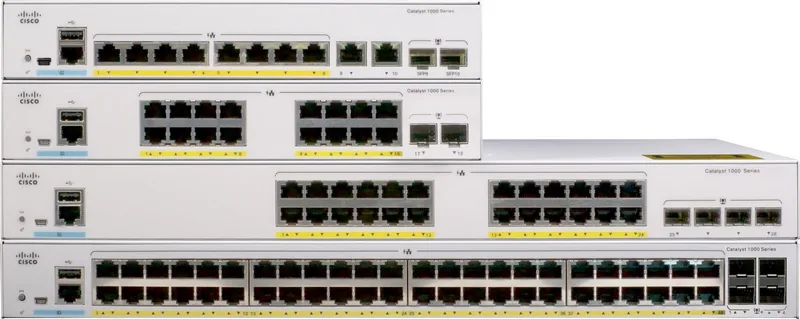
Cisco Catalyst 1000 Manual
PDF manual · 70 Pages
English



Quick check
Incorrect answer, please try again.
Chat with your Cisco Catalyst 1000 manual using AI
Get instant AI answers from your Cisco Catalyst 1000 manual
Ask anything about the Cisco Catalyst 1000. Answers come from this manual, with the pages they are based on.
Ask a Question
Do you recommend Catalyst 1000?
Yes NoVideo Manual
How to Set up a Cisco Switch in 15 MINUTES | CCNA Basics
Frequently Asked Questions
This model provides 48 RJ-45 Gigabit Ethernet downlink ports and four SFP uplink slots (supporting 1G SFP or SFP+ depending on model). Uplink modules support copper or fiber transceivers; verify module compatibility in Cisco documentation.
Is this answer helpful?
The switch offers a 370W PoE+ budget for powering PoE-capable devices. PoE is managed per port and the manual explains commands to view inline power status and global PoE budgets. Ensure total device power draw does not exceed the available budget.
Is this answer helpful?
Yes. The USB Type-A port accepts Cisco USB flash drives for file operations and emergency auto-upgrade of images/configurations. The USB mini-Type B console port provides CLI access; Windows PCs require Cisco USB console drivers, while macOS and Linux do not.
Is this answer helpful?
The switch is for indoor use only with recommended clearances around vents (minimum ~3 in.). Operating temperature ranges and altitude limits are documented; fanless models have higher ambient temperature tolerances. Follow rack-mounting and grounding safety guidelines in the manual.
Is this answer helpful?
Use only Cisco-supported SFP/SFP+ modules listed in the platform’s release notes. Observe ESD precautions, keep dust plugs until connection, and ensure TX/RX orientation and optical cleaning. Inserting mismatched 1G/10G modules may require clearing interface configuration mapping.
Is this answer helpful?
Check LED status and use show commands (for port status, PoE state, and interfaces). Verify cabling type, PoE budget, and that the port is not error-disabled or shutdown. Replace suspect cables or SFPs and confirm the powered device is standards-compliant.
Is this answer helpful?
Initial setup can use the web-based Configuration Setup wizard (via temporary DHCP mode) or the CLI accessed through the RJ-45 or USB console. The wizard guides basic device, interface, and Layer 3 settings; CLI offers full configuration control.
Is this answer helpful?
Advantages and Disadvantages
Advantages

- 48x gigabit RJ-45 ports plus 4x SFP uplinks for flexible aggregation and fiber/copper connectivity.
- 370W PoE+ budget supports multiple access points and IP phones without separate injectors.
- Fanless options and low power modes reduce noise and lower energy consumption in edge locations.
- USB Type-A port enables file system access, emergency auto-upgrade, and easy image/configuration recovery.
- Simple rack- and wall-mounting with clear installation guidance and diagnostic LED indicators.
Disadvantages

- Fixed configuration — limited scalability compared with modular chassis systems.
- PoE budget must be monitored; powering many devices can exhaust available wattage.
- Requires use of supported Cisco SFP/SFP+ modules; third-party modules may be unsupported.
- Indoor-only deployment; not suitable for outdoor or harsh environments without enclosures.
- Some features require CLI familiarity; initial USB console driver install needed on Windows.
Product Specification
Function
Switch
Type
Standalone, Rackmount (via mounting brackets)
Network ports
48x RJ-45, 4x SFP
Speeds
48x RJ-45 (10/100/1000Base-T), 4x SFP (1Gb/s)
PoE
48x RJ-45 PoE+ (48x 30W), total: 370W
Backplane
104Gb/s, 77.38Mp/s, 10KB Jumboframes, 16k MAC addresses
Officially supported standards
802.1AX, 802.1D, 802.1Q, 802.1X, 802.1AB, 802.1p, 802.1s, 802.1w, 802.3, 802.3ab, 802.3af, 802.3ah, 802.3at, 802.3az, 802.3u, 802.3x, 802.3z, IGMPv3, MLDv2
Configuration
Web interface, Console, serial (USB-A 2.0, USB 2.0 Mini-B), serial (Network, dedicated), via control unit
Cooling
active
Dimensions (WxHxD)
17.52x1.73x13.78in, 1U
Weight
11.97lb
Color
light gray
Special features
Metal housing, removable mounting brackets, firmware updates included for life + 1 year
Manufacturer's warranty
lifetime (10 years in AT/DE)
Note
For this device, "link aggregation" was officially specified with the obsolete standard IEEE802.3ad. Since 2008, the function is no longer managed by the IEEE "Working Group 3" (IEEE 802.3, CSMA/CD - Ethernet), but by "Working Group 1" (IEEE 802.1, High Level Interface - Internetworking) and technically defined unchanged via IEEE 802.1AX.
Product Description
Cisco Catalyst 1000 Rackmount Gigabit Managed Switch — Overview
The Cisco Catalyst 1000 Rackmount Gigabit Managed Switch, 48x RJ-45, 4x SFP, 370W PoE+ Manual presents a practical, entry-level Layer 2 solution for small to medium enterprise and branch deployments. Built as a fixed-configuration rackmount switch, this model combines 48 gigabit RJ-45 downlink ports with four SFP uplink slots and a 370W PoE+ budget to power IP phones, wireless access points, and other powered devices without external injectors.
What makes it fit for purpose
Designed for simple, reliable access switching, the Catalyst 1000 emphasizes ease of installation and low operational overhead. It supports line-rate forwarding, PoE+ on many ports (with Perpetual PoE behavior), and multiple uplink options via SFP modules for copper or fiber connectivity. Fanless variants and reduced-power operation make it suitable for quieter or constrained-edge environments, and the autoranging internal power supply simplifies deployment across regions.
Key features highlighted in the manual
The manual outlines physical layout and handling details: front-panel LEDs and console options (RJ-45 and USB mini-B), a USB Type-A port for file and image operations, SFP/SFP+ slot guidance, and rack- or wall-mounting hardware. It covers PoE behavior, port mapping, auto-MDIX, and recommended cabling, plus POST checks, thermal and environmental limits, and safety warnings. Installation and maintenance sections include SFP handling, power-cord retainer usage, and troubleshooting tips for link, PoE, and module issues.
Operational and management notes
Management is accessible via CLI or web-based setup wizard; the switch supports initial configuration through a setup wizard (local DHCP-assisted mode) and console access for detailed CLI work. The USB Type-A port can host Cisco USB flash drives for file system tasks and emergency auto-upgrade of images/configurations. LED indicators and show-commands are the primary diagnostics tools described for day-to-day troubleshooting.
Deployment considerations
The manual emphasizes indoor installation, adequate airflow clearance, correct rack placement and anchoring, and adherence to PoE power budgets. Use only supported Cisco SFP/SFP+ modules, follow ESD precautions when handling transceivers, and ensure cabling meets Category 5/5e/6 or appropriate fiber specifications. Safety and regulatory notices (thermal limits, FCC classes, and laser warnings) are presented throughout.
Notes
- The switch is targeted at branch and small enterprise edge deployments requiring managed LAN access with PoE+ support.
- Use the documented CLI or configuration wizard for initial setup and ensure USB drivers are installed on Windows PCs for USB-console access.
- Observe PoE budgets and SFP compatibility to avoid power or link issues.
Search for 67,706 Manuals online


Type-in Brand or Model