

Cisco C921 Manual
PDF manual · 46 Pages
English



Quick check
Incorrect answer, please try again.
Chat with your Cisco C921 manual using AI
Get instant AI answers from your Cisco C921 manual
Ask anything about the Cisco C921. Answers come from this manual, with the pages they are based on.
Ask a Question
Do you recommend C921?
Yes NoFrequently Asked Questions
Depending on the exact C921 SKU, you can place it on a desk or shelf, mount it in a 19-inch rack using the appropriate bracket kit, or use supported wall-mount orientations for select models. The guide also stresses planning for access to both front and rear panels and sufficient ventilation.
Is this answer helpful?
The installation approach emphasizes trained and qualified personnel, ESD prevention, and correct grounding. Always ensure the router chassis is electrically connected to ground, use an ESD-preventive wrist strap connected to an unpainted chassis surface, and avoid touching exposed PCB areas during SIM servicing. If no wrist strap is available, ground yourself by touching a metal part of the chassis.
Is this answer helpful?
For console access, common default terminal parameters include 9600 baud, 8 data bits, 1 stop bit, and no parity. The guide also notes there is no hardware flow control. Use the router's RJ-45 console port for EIA/TIA-232 style access or USB 2.0 with a serial terminal emulator on the host system.
Is this answer helpful?
Yes. The Cisco 900 Series routers are fanless and can run warm to the touch, so adequate clearances are essential. Plan spacing in racks (including at least 1RU above and below each router) and ensure enclosed racks have proper ventilation so heat is removed and ambient air stays within the specified operating ranges.
Is this answer helpful?
Power off the router and disconnect power before inserting or removing the SIM. Then remove the SIM cover plate by depressing the latch, insert the Micro SIM with the correct orientation (an icon helps guide alignment), and replace the cover plate. Avoid touching exposed internal PCB areas when the SIM cover is removed.
Is this answer helpful?
ROMMON is the bootstrap program used during startup. If the router cannot load a valid Cisco IOS system image, it enters ROMMON mode. From a terminal connected to the console, you can set the config-register for the next boot, boot a valid IOS image, and use ROMMON features to bypass NVRAM settings for password recovery.
Is this answer helpful?
Advantages and Disadvantages
Advantages

- High-performance SOHO router platform with Internet access, comprehensive security, and optional wireless services such as LTE Advanced.
- Multiple mounting options (desk, shelf, rack, and select wall mounting) to fit common deployments.
- Fanless design simplifies maintenance, relying on ventilation clearances for reliable thermal operation.
- Convenient administrative access via RJ-45 console and USB 2.0 console options.
- Operational visibility through clear LED indicators for system, VPN, LAN, WAN, and cellular link status.
Disadvantages

- Installation should be handled by trained personnel and follows strict safety practices, including ESD prevention.
- Requires careful site planning for airflow, ambient temperature limits, and rack ventilation to avoid overheating.
- Console ports have no hardware flow control, which may require compatible terminal settings.
- Power setup differs by SKU, and external PSU models require customer-provided mounting tray solutions.
- SIM installation requires powering off and following strict handling guidance around internal PCB access.
Product Specification
Modem
N/A
WAN
2x 1000Base-T
LAN
4x 1000Base-T
Ports
1x USB-A 3.0
Power consumption
no information (consumption, operation), no information (max. power supply output)
Dimensions
9.02x1.69x9.49in
Weight
2.65lbs
Special features
Metal casing, 150Mb/s VPN throughput
Product Description
Cisco 900 Series C921 Integrated Services Router: Deployment-Ready Connectivity for SOHO and Branch Networks
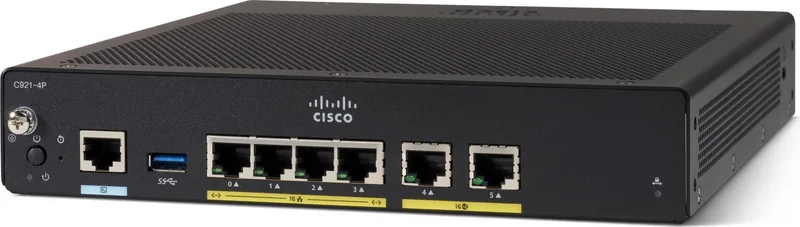
If you are planning reliable routing for a small office, a mid-size business, or a managed-services deployment, the Cisco 900 Series C921 Integrated Services Router stands out as a high-performance, easy-to-deploy platform built around Cisco IOS Software. Often chosen for customer premises and enterprise branch scenarios, it brings Internet access, comprehensive security, and wireless capabilities such as LTE Advanced 3.0, plus Wireless WAN and Wireless LAN options depending on the SKU. The Cisco 900 Series C921 Integrated Services Router Manual is a practical companion for getting the hardware up and running safely and correctly.
Built for Practical, Real-World Installation
The C921 is designed to fit multiple environments, with flexible mounting approaches such as desktop or shelf placement, rack mounting, and select wall-mount orientations. Because the router is fanless, it relies on ventilation clearances and proper airflow management to maintain stable operation. During setup, attention to site layout matters: access to front and rear panels, heat dissipation in enclosed racks, and adequate ambient temperature all help prevent shutdowns and performance issues.
Power, Grounding, and Safety You Can Actually Follow
Before connecting power and cabling, installation guidance emphasizes trained personnel, proper electrostatic discharge (ESD) practices, and chassis grounding to reduce risk and avoid intermittent failures. Power requirements vary by model, but typical external power options include 100-240 VAC input with 12 VDC system output. The guide also highlights not overloading circuits and ensuring short-circuit protection is handled by the building installation.
Connectivity Details That Speed Up Setup
For initial administration, the router provides local console access using an EIA/TIA-232 RJ-45 console port and a USB 2.0 serial console option. Default console settings commonly include 9600 baud, 8 data bits, 1 stop bit, no parity, and no hardware flow control, which is helpful when you are bringing up a new installation. LED indicators also provide clear operational signals, including system status and VPN activity, making it easier to confirm link establishment and detect issues.
Key Takeaways (Most Important Results)
- SOHO and branch-ready routing that combines Internet access, security, and optional LTE wireless services.
- Fanless hardware makes ventilation and rack spacing critical for long-term stability.
- Console access via RJ-45 and USB supports straightforward configuration using standard terminal emulators.
- Safety-first installation guidance covers ESD prevention, grounding, and circuit protection expectations.
- ROMMON provides boot troubleshooting capabilities such as loading a valid IOS image and password recovery workflows.
Notes
- Dust and debris can affect cooling, so periodic inspection and cleaning are recommended at least every six months.
- For rack builds, plan at least 1RU spacing between routers and ensure adequate heat removal.
Pros and Cons (Quick View)
- Pros are detailed in the Pros list below.
- Cons are detailed in the Cons list below.
Search for 67,706 Manuals online


Type-in Brand or Model