
Cisco Business 250 Manual
PDF manual · 268 Pages
English



Quick check
Incorrect answer, please try again.
Chat with your Cisco Business 250 manual using AI
Get instant AI answers from your Cisco Business 250 manual
Ask anything about the Cisco Business 250. Answers come from this manual, with the pages they are based on.
Ask a Question
Do you recommend Business 250?
Yes NoFrequently Asked Questions
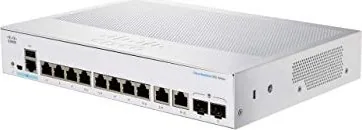
This model provides eight Gigabit RJ-45 ports for end devices and two combo RJ-45/SFP uplink ports so you can use either copper or SFP modules for fiber uplinks. Some CBS 250 SKUs offer 10G SFP+ support; verify the specific SKU for 10G compatibility.
Is this answer helpful?
Yes. The switch supports an easy web-based GUI with Basic and Advanced modes for different user needs and a console CLI for advanced management. Default credentials are username 'cisco' and password 'cisco'; you are required to change them on first login.
Is this answer helpful?
PoE capability depends on the exact SKU. The DC-powered CBS 250 desktop model may not include PoE. Cisco lists PoE-capable CBS 250 models separately; if PoE is required choose a CBS 250 SKU with PoE in its model number.
Is this answer helpful?
It includes built-in diagnostics such as Virtual Cable Tester (TDR) for copper links, SFP/SFP+ optical monitoring (DOM), RMON statistics, SPAN port mirroring, CPU and port utilization charts, and tech-support output generation for troubleshooting.
Is this answer helpful?
Factory default IP is 192.168.1.254/24 and DHCP is enabled by default. To access the web GUI initially, set a PC to the same subnet (e.g., 192.168.1.2–.253), open a browser, and connect to http://192.168.1.254. Change admin credentials on first login.
Is this answer helpful?
The switch supports Cisco SFP modules (MGBSX1, MGBLX1, MGBLH1, MGBT1) and notes compatibility with other brands; however, using Cisco-certified modules is recommended for full interoperability and support.
Is this answer helpful?
The 8-port model supports desktop placement with rubber feet and wall-mounting using a screw template and two mounting screws. Rack-mount brackets are provided for larger/rackable SKUs; follow Cisco’s mounting instructions for stability and airflow.
Is this answer helpful?
Advantages and Disadvantages
Advantages

- Compact desktop form factor with optional wall- or rack-mounting for flexible deployments.
- Eight Gigabit RJ-45 ports plus two RJ-45/SFP combo uplinks for copper or fiber connectivity.
- Intuitive web GUI with Basic/Advanced modes, plus console CLI for advanced configuration.
- Layer 2 features with Layer 3 static routing, QoS, ACLs, SPAN, and RMON monitoring.
- Diagnostic tools: copper cable tester, optical module monitoring, tech-support output and logs.
Disadvantages

- DC-powered variant may lack integrated PoE — confirm SKU if PoE is required.
- Some advanced features and port behaviors (10G, SFP+) differ across CBS 250 SKUs.
- Running diagnostics (copper test) brings ports down temporarily, interrupting traffic.
- TCAM and hardware resource limits require planning for large ACL/QoS rule sets.
- Console/advanced debug interfaces intended for support use; misuse can risk configuration.
Product Specification
Function
Switch
Type
Standalone, Rackmount (via mounting brackets)
Network ports
8x RJ-45, 2x RJ-45/SFP
Speeds
10x RJ-45 (10/100/1000Base-T), 2x SFP (1Gb/s)
PoE
N/A
Backplane
20Gb/s, 14.88Mp/s, 9.216KB Jumboframes, 1.5MB Packet buffer, 8K Mac addresses
Officially supported standards
802.1AX, 802.1D, 802.1Q, 802.1X, 802.1p, 802.1s, 802.1w, 802.3, 802.3ab, 802.3ad, 802.3az, 802.3u, 802.3x, 802.3z, IGMPv3, MLDv2
Configuration
Web interface, Console, Serial (RJ-45, USB 2.0 Micro-B, USB-A 2.0)
Cooling
passive
Dimensions (WxHxD)
10.55x1.73x7.28in, 1U
Weight
3.75 lb
Color
grey
Special features
Metal housing, removable mounting brackets, firmware updates possible, external power supply
Manufacturer's warranty
lifetime (10 years in AT/DE)
Note
For this device, "link aggregation" was officially specified with the obsolete standard IEEE802.3ad. Since 2008, this function is no longer managed by the IEEE "Working Group 3" (IEEE 802.3, CSMA/CD - Ethernet), but by "Working Group 1" (IEEE 802.1, High Level Interface - Internetworking) and technically defined unchanged via IEEE 802.1AX.
Product Description
Cisco Business 250 Desktop Gigabit Smart Switch, 8x RJ-45, 2x RJ-45/SFP, DC-Version
The Cisco Business 250 Desktop Gigabit Smart Switch (8x RJ-45, 2x RJ-45/SFP, DC-Version) is a compact, feature-rich switch designed for small business and branch-office networks that need reliable Gigabit connectivity with advanced management and power options. Combining eight Gigabit RJ-45 ports and two combo RJ-45/SFP uplink ports, this DC-powered variant brings flexible deployment possibilities where AC power may be limited or where UPS/DC infrastructure is preferred.
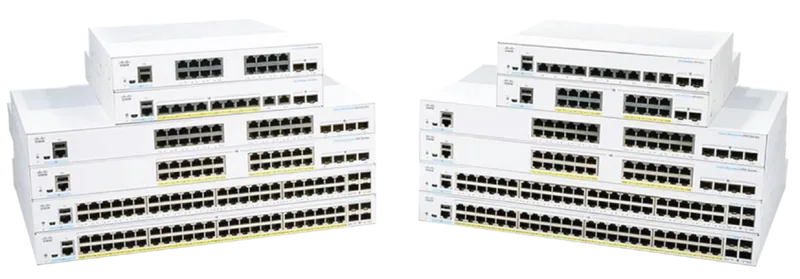
Built as part of Cisco’s CBS 250 family, the switch balances simplicity and capability. It offers an intuitive web-based GUI with Basic and Advanced modes, optional console access for CLI-savvy administrators, and Smart Network Application compatibility for simplified deployment. The device supports Layer 2 features plus Layer 3 static routing, VLANs, ACLs, QoS, SPAN/port mirroring, RMON statistics, and SNTP time synchronization —making it suitable for segmented office networks, VoIP deployments, IP cameras, and wireless access point backbones.
PoE considerations are central to many CBS 250 models; while this specific DC variant may not include PoE, the series documentation highlights PoE-capable SKUs and best practices such as disabling PoE on ports that connect to other PSE devices and sequencing power-up to avoid false PD detection. For environments needing fiber or longer uplinks, the two combo SFP ports accept standard Cisco SFP modules or supported third-party modules, and the SFP+ copper cable options support short 10G links where applicable to other CBS 250 SKUs.
Physical deployment is flexible: the unit supports desktop placement with rubber feet, wall-mounting (detailed screw-template procedure for the 8-port model), or rack-mounting in 19-inch racks using supplied brackets. Front-panel indicators give clear status on system, per-port link/activity, speed (Gigabit/10G where present), PoE, and stacking/ID behavior for stacked units. Management features include user account roles (read-only to full admin), password complexity enforcement, idle session timeouts, and detailed logging (RAM/flash/syslog), with popup syslog notifications on the web UI.
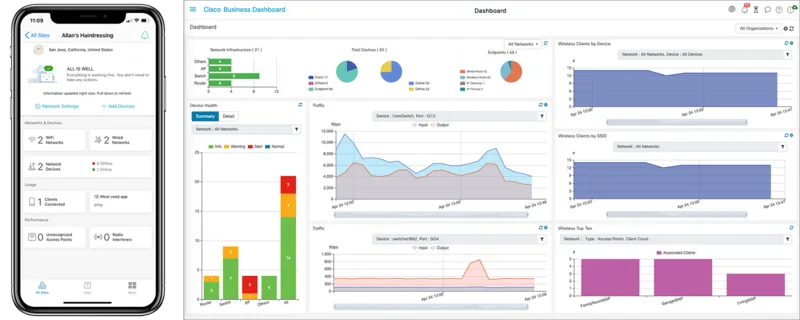
The switch includes diagnostic tools such as copper cable testing (VCT/TDR), optical module monitoring (SFP/SFP+ DOM stats), tech-support output generation, RMON-based monitoring and alerts, and SPAN/monitoring sessions for traffic analysis. Hardware resource pages show TCAM and ACL usage, and a dashboard allows customization of monitoring modules like system health, resource utilization, PoE usage, traffic errors, and port utilization.
Overall, the CBS 250 desktop DC model is a practical choice for small networks demanding a blend of simplicity, robust Layer 2+ features, clear diagnostics, and flexible physical/power deployment.
Notes
- Supports both web GUI and console CLI access; default creds: cisco / cisco (change on first login).
- Factory default IP: 192.168.1.254/24; DHCP enabled by default.
- Use Cat5e+ for Gigabit; Cat6a required for 10G links.
- Some features (PoE, SFP+, 10G support) vary by SKU — check specific model capabilities.
Search for 67,706 Manuals online


Type-in Brand or Model