
Cisco Aironet 3702i Manual
PDF manual · 42 Pages
English



Quick check
Incorrect answer, please try again.
Chat with your Cisco Aironet 3702i manual using AI
Get instant AI answers from your Cisco Aironet 3702i manual
Ask anything about the Cisco Aironet 3702i. Answers come from this manual, with the pages they are based on.
Ask a Question
Do you recommend Aironet 3702i?
Yes NoFrequently Asked Questions
Priming sets the AP’s regulatory domain and country configuration to define allowed channels and transmit power for the deployment country. It ensures radio operation complies with local regulations and prevents illegal channel/power usage.
Is this answer helpful?
You can prime a 3702i manually using the Cisco AirProvision smartphone app (iOS, Android, Windows Phone) while connected to the AP’s SSID, or automatically via Cisco NDP if a nearby AP is already primed. Autonomous APs require manual priming.
Is this answer helpful?
AirProvision supports iPhones with iOS 7.0+, Android 4.0+, and Windows Phone 8.0+. Devices must not be jailbroken/rooted, need internet access (Wi‑Fi or cellular), and GPS or cellular tower info improves location accuracy.
Is this answer helpful?
Resetting the AP to factory defaults clears its regulatory domain to ‘-UX’, making it unprimed. You must re‑prime the AP (manual or automatic where applicable) before it can operate with country‑specific settings.
Is this answer helpful?
Automatic priming accelerates deployment once at least one AP in the RF neighborhood is manually primed. However, it only applies to lightweight APs and may fail if NDP messages are blocked or no primed APs are nearby, requiring manual priming.
Is this answer helpful?
On a WLC, the AP’s country code appears in the GUI/CLI and priming status shows ‘Web App’ or ‘NDP’. In AirProvision the Configure/Audit buttons disable and the AP shows ‘Primed’ with the configured country and domain. LED states also indicate priming success.
Is this answer helpful?
Universal APs are supported in most countries where Cisco WLCs are supported, but you must confirm regulatory approval for the specific AP model in the destination country before deployment.
Is this answer helpful?
Advantages and Disadvantages
Advantages

- Universal hardware supports multiple regulatory domains, easing global inventory and deployment.
- Integrates with Cisco AirProvision for fast manual priming using smartphones (iOS/Android/Windows).
- Supports automatic priming (NDP) for lightweight APs to speed multi‑AP rollouts after one manual prime.
- Controller-based operation with WLC visibility: country codes and priming status available via GUI/CLI.
- Enterprise wireless performance and security (WPA2‑AES recommended) with centralized management.
Disadvantages

- Automatic priming only works for lightweight APs; autonomous APs require manual priming.
- AirProvision will not run on rooted or jailbroken devices, limiting some field devices.
- Initial setup requires WLC configuration (dedicated WLAN/AP group) and correct WLAN ID constraints.
- Resetting the AP clears priming, requiring manual re‑priming when relocated to another country.
- Some countries may require additional regulatory approval even for universal AP models.
Product Specification
LAN
1x 1000Base-T (PoE)
Wireless
WLAN 802.11a/b/g/n/ac/h (Wi-Fi 5)
Transfer rate
450Mbps (2.4GHz), 1300Mbps (5GHz)
Security
WPA, WPA2
Antennas
internal
Ports
1x RJ-45 Management Port
Power consumption
16W (consumption, operation), no information (max. power supply output)
Dimensions
8.70x8.70x2.13in
Special features
TPC/DFS
Band capability
Dual Band
Manufacturer's warranty
lifetime (10 years in AT/DE)
Frequencies
universal
Product Description
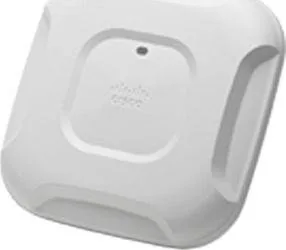
Cisco Aironet 3702i Controller-based AP Universal Domain Manual
The Cisco Aironet 3702i Controller-based AP is a robust universal access point designed to adapt to global regulatory requirements by dynamically setting its regulatory domain and country configuration. Built for enterprise wireless deployments, the 3702i supports controller-based operation and works seamlessly with Cisco Wireless LAN Controllers (WLCs) to deliver secure, manageable Wi‑Fi coverage. Its universal model designation allows the same hardware to be deployed in different countries and primed to local radio rules, enabling flexible inventory management and streamlined field deployment.
Priming is the essential step for universal APs: it configures the valid channels and allowed transmit power for the country where the AP is installed. The 3702i can be primed manually using the Cisco AirProvision smartphone app or automatically via Cisco’s Neighbor Discovery Protocol (NDP) when adjacent primed APs are present. Manual priming requires a smartphone (iOS, Android, or Windows Phone) connected to the AP’s SSID and authenticated with admin credentials; AirProvision then determines location via GPS and mobile network information to set the correct regulatory domain. Automatic priming benefits larger deployments by propagating encrypted regulatory data from an already primed AP to nearby unprimed lightweight APs, speeding rollouts once at least one AP in the RF neighborhood is primed.
Deployment with the 3702i emphasizes careful preparation: for manual priming administrators often create a dedicated WLAN and AP group on the WLC to isolate unprimed universal APs, ensure WPA2‑AES security, and enable Universal AP Admin support. Autonomous-mode units require web or CLI preparation prior to priming. After successful priming, APs reboot and join the controller with country codes visible in controller GUI or CLI; LED indicators reflect priming state (for example blinking colors during provisioning and solid/errant signals on failure).
The Cisco Aironet 3702i blends enterprise-grade RF performance, flexible regulatory support, and integration with Cisco provisioning tools to simplify global deployments. Whether priming a single AP onsite or rolling out dozens across a campus, the 3702i’s universal capability reduces SKU complexity and supports compliant wireless operation across varied regulatory regions.
Notes
- Manual priming via AirProvision requires non‑rooted/non‑jailbroken smartphones and internet access (Wi‑Fi or cellular).
- Automatic priming works only for lightweight APs and depends on a nearby primed AP broadcasting secure NDP beacons.
- Resetting an AP returns it to unprimed state (‘-UX’) and requires re‑priming for new country deployments.
- Ensure the universal AP model is authorized for the target country before deployment.
Search for 67,706 Manuals online


Type-in Brand or Model