
Cisco 4331/K9 Manual
PDF manual · 216 Pages
English



Quick check
Incorrect answer, please try again.
Chat with your Cisco 4331/K9 manual using AI
Get instant AI answers from your Cisco 4331/K9 manual
Ask anything about the Cisco 4331/K9. Answers come from this manual, with the pages they are based on.
Ask a Question
Do you recommend 4331/K9?
Yes NoFrequently Asked Questions
It is suited for branch offices, regional aggregation, remote access, and edge routing where modular connectivity and reliable performance are important.
Is this answer helpful?
Yes. The platform supports compatible network interface modules and service modules, allowing businesses to extend connectivity and services as needs grow.
Is this answer helpful?
Confirm power availability, grounding, rack space, ventilation, cable planning, and ESD protection before mounting and powering the device.
Is this answer helpful?
Yes. The platform supports voice-related hardware options, including digital signal processor modules in supported configurations.
Is this answer helpful?
Grounding helps protect users and equipment from electrical hazards, reduces static damage risk, and supports safe operation during normal use.
Is this answer helpful?
The router offers console connectivity through standard serial access and USB console options, depending on the model and platform design.
Is this answer helpful?
Its organized slot layout, LED status indicators, and modular components make inspection, troubleshooting, and replacement tasks more efficient.
Is this answer helpful?
Advantages and Disadvantages
Advantages

- Modular design supports NIMs, SM-X modules, storage, and voice expansion.
- Multiple connectivity options simplify branch and edge network deployment.
- Clear LED indicators and labeling help speed up installation and troubleshooting.
- Built for enterprise and service-provider branch use with flexible routing roles.
Disadvantages

- Installation requires careful grounding, airflow, and ESD precautions.
- Some components and power options vary by model, which can complicate planning.
- Qualified personnel are recommended for setup, upgrades, and maintenance.
- Environmental and rack requirements may limit placement in smaller spaces.
Product Specification
Modem
N/A
WAN
3x 1000Base-T
LAN
shared
Phone
N/A
Ports
2x USB 2.0
Power Consumption
42W (consumption, operation), no specification (max. power supply output)
Dimensions
17.24x17.24x1.77 in
Special Features
IPv6, VPN passthrough (IPSec, L2TP), VLAN, rackmountable, IP Base
Product Description
Cisco 4331/K9 Integrated Services Router: A Practical Look at a Branch Networking Workhorse
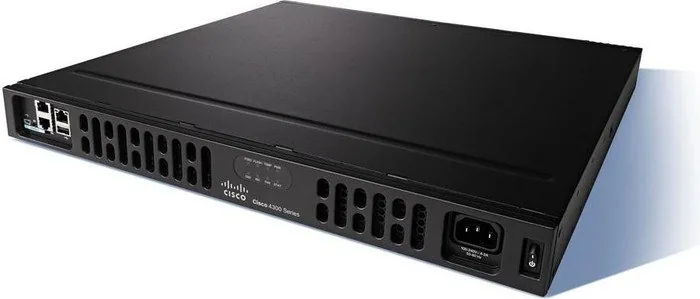
The Cisco 4331/K9 Integrated Services Router Manual highlights a platform built for organizations that need dependable routing, flexible expansion, and strong connectivity in one compact system. The Cisco 4331/K9 sits within the Cisco 4000 Series ISR family, designed to serve branch offices, regional hubs, and business networks that rely on secure WAN aggregation, LAN access, and voice-ready performance.
What makes the Cisco 4331/K9 appealing is its modular approach. Instead of forcing every deployment into a fixed layout, Cisco gives administrators room to tailor the router with network interface modules, service modules, storage options, and voice capabilities. That flexibility is especially useful in environments where network needs change over time. A router can start with core connectivity and later grow into a richer edge platform with added interfaces or processing resources.
The platform also emphasizes operational practicality. Built-in Gigabit Ethernet ports, management access, console connectivity, and support for SFP-based media help simplify deployment across mixed network designs. For many teams, this means fewer external devices and a cleaner path from installation to configuration. The router’s LED indicators, chassis labeling, and slot numbering conventions are designed to make maintenance easier, which is valuable when troubleshooting under pressure.
Safety and preparation are major themes throughout the Cisco 4331/K9 experience. Proper grounding, ESD protection, airflow planning, and power validation are all essential before installation. Cisco also stresses the importance of working with qualified personnel and observing environmental limits. These precautions are not just formalities; they help protect hardware, reduce downtime, and support reliable long-term operation.
From a business perspective, the Cisco 4331/K9 is a strong fit for teams looking for a balance of performance and manageability. It supports common branch-office tasks such as WAN aggregation, remote access, and integrated services, while still leaving room for hardware expansion. Whether you are refreshing an older edge router or designing a new branch deployment, this model delivers a blend of resilience and adaptability that remains relevant in modern network planning.
Notes
- Verify power, rack, and cooling requirements before deployment.
- Use grounded cables and ESD-safe handling during upgrades.
- Check module compatibility when adding storage, voice, or interface cards.
- Keep the chassis clean and inspect airflow paths regularly.
Search for 67,706 Manuals online


Type-in Brand or Model