
Celly Pro Manual
PDF manual · 15 Pages
English



Quick check
Incorrect answer, please try again.
Chat with your Celly Pro manual using AI
Get instant AI answers from your Celly Pro manual
Ask anything about the Celly Pro. Answers come from this manual, with the pages they are based on.
Ask a Question
Do you recommend Pro?
Yes NoFrequently Asked Questions
It is a portable solar charger with a USB port. It uses sunlight to provide DC 5V/2A output for compatible USB-powered devices.
Is this answer helpful?
Unfold the charger on a flat, dry surface, point the solar panels toward sunlight, connect your cable to the device, and plug the USB cable into the charger. Charging starts when sunlight is sufficient.
Is this answer helpful?
The stated output is DC 5V/2A. Confirm that your device and cable are compatible before connecting them.
Is this answer helpful?
No. Do not use it in rain, humid rooms, or with wet hands. If it contacts water or other liquids, do not use it.
Is this answer helpful?
The electronic board with the USB port should be protected from direct sunlight to help avoid excessive overheating during operation.
Is this answer helpful?
Disconnect all cables first. Wipe it with a damp cloth if needed and let it dry completely. Use a clean, soft long-bristled brush for dust on connectors. Do not use solvents, alcohol, or corrosive cleaners.
Is this answer helpful?
Advantages and Disadvantages
Advantages

- Lightweight 220 g construction supports convenient carrying for outdoor activities and travel.
- USB output of DC 5V/2A provides charging capability for compatible devices in sufficient sunlight.
- Stated 22% conversion efficiency helps make effective use of available solar energy.
- Simple fold-out setup requires only sunlight, a compatible device, and a USB cable.
- CE marked and compliant with RoHS 2011/65/EU and 2015/863/EU requirements.
Disadvantages

- Charging begins only with sufficient sunlight, so performance can vary with weather, shade, and placement.
- Not suitable for rain, humid rooms, water exposure, or use with wet hands.
- The electronic board and USB port need protection from direct sunlight to limit overheating.
- The housing can become hot during operation and should not be left unattended.
Product Specification
Note
Prices partially include 0% VAT rates for Austria and Germany
Type
Solar panel
Power
10 W
USB output
1x USB-A (10 W)
Features
waterproof (IP67)
Product Description
Celly Pro Solar Panel 10W - Read, Download & Print Free
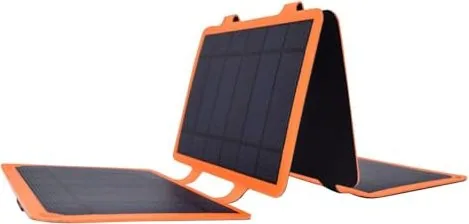
The Celly Pro Solar Panel 10W is a compact USB solar charger designed for people who want a practical way to power compatible devices when sunlight is available. With its lightweight 220 g design and fold-out solar-panel format, it is suited to outdoor breaks, travel, camping, and everyday backup charging needs. The panel delivers DC 5V/2A output and has a stated conversion efficiency of 22%, helping it turn available sunlight into useful USB power.
Portable solar charging for everyday gear
Using the Celly Pro Solar Panel 10W is straightforward. Unfold the panel on a flat, dry surface and orient the solar cells toward the sun. Connect a USB cable to the device, then connect the cable to the charger's USB port. When sunlight is sufficient, charging begins. This simple setup makes the charger a helpful companion for compatible USB-powered equipment when a mains outlet is unavailable.
The product is designed with portable use in mind, but careful placement matters. The solar panels should receive sunlight, while the electronic board containing the USB port should remain protected from direct sun exposure. This helps reduce overheating during use and supports dependable operation in suitable conditions.
Key specifications and thoughtful use
The Celly Pro Solar Panel 10W operates within a temperature range of 0 to 40 degrees C. Its DC 5V/2A output is intended for compatible USB charging requirements, while actual charging performance depends on the strength and consistency of sunlight. For the best results, place the panel where it can receive clear, direct light and avoid shade, moisture, and excessively hot surfaces.
Built for outdoor convenience, this solar charger should always be handled with care. Do not use it in rain, humid spaces, or after contact with water. Avoid drops, crushing, punctures, and high pressure. The housing may become warm during operation, so it should not be left unattended and should be allowed to reach room temperature after moving from a cold environment to a warm one.
Care notes
Disconnect all cables before cleaning. Use a damp cloth when needed, let the charger dry fully, and remove connector dust with a clean soft-bristled brush. Avoid alcohol, solvents, corrosive cleaners, and immersion in water. Store the Celly Pro Solar Panel 10W in a dry location away from heat sources. It carries CE marking and complies with RoHS 2011/65/EU and 2015/863/EU requirements.
Search for 67,732 Manuals online


Type-in Brand or Model