
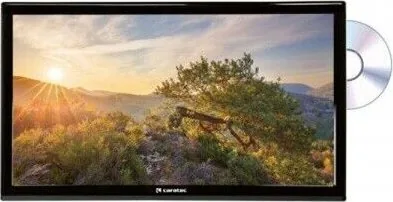

Caratec Vision CAV220P-D Manual
PDF manual · 136 Pages
English



Quick check
Incorrect answer, please try again.
Chat with your Caratec Vision CAV220P-D manual using AI
Get instant AI answers from your Caratec Vision CAV220P-D manual
Ask anything about the Caratec Vision CAV220P-D. Answers come from this manual, with the pages they are based on.
Ask a Question
Do you recommend Vision CAV220P-D?
Yes NoFrequently Asked Questions
Yes, USB ports support video, music, photo files like MP4, MP3, JPG.
Is this answer helpful?
Connect to the DVB-S2 input and use the setup menu to run an automatic channel search.
Is this answer helpful?
No, the stand is not included in the box and must be purchased separately as an optional accessory.
Is this answer helpful?
Yes, it has a CI+ slot compatible with common interface modules and smart cards for encrypted content.
Is this answer helpful?
The screen resolution is 1920 by 1080 pixels, classified as Full HD for sharpness.
Is this answer helpful?
Yes, a DVD player is located on the side of the television set for integrated playback.
Is this answer helpful?
Go to the main menu, select the Setup tab, and choose the Language option to change settings.
Is this answer helpful?
Advantages and Disadvantages
Advantages

- Full HD resolution delivers sharp picture quality for clear media playback.
- Built-in DVD player eliminates need for an external disc drive unit.
- CI+ slot enables decryption of encrypted pay TV via smart card modules.
- USB media ports support diverse file formats like pictures and audio files.
- DVB-T2 HD tuner ensures compatibility with modern digital terrestrial broadcasts.
Disadvantages

- Display size is limited to 21.5 inches which suits smaller rooms only.
- Stand foot is optional and must be purchased separately as accessory.
- Device lacks integrated Smart TV capabilities or Wi-Fi wireless connectivity.
- External power adapter required for mains voltage 230V wall outlet usage.
- Component video requires extra adapter for connection to older devices.
Product Specification
Diagonal
22 in (56 cm)
Resolution
1920x1080
Panel
LCD
Backlight
LED, Edge-lit
HDR
No
Brightness
250 cd/m2
Contrast
3,000:1 static
Viewing Angle
178 deg / 178 deg (H/V)
3D
No
Tuner
1x DVB-T/T2/S/S2 HEVC (H.265)
Video Connections
2x HDMI, Component Video, SCART, Composite Video
Audio Connections
Digital Audio Out (optical), Headphones (3.5mm Jack)
Other Connections
2x USB-A 2.0, 1x CI+ 1.3
Total Audio Power
6 W (2 x 3 W)
Features
Integrated DVD player, Power switch
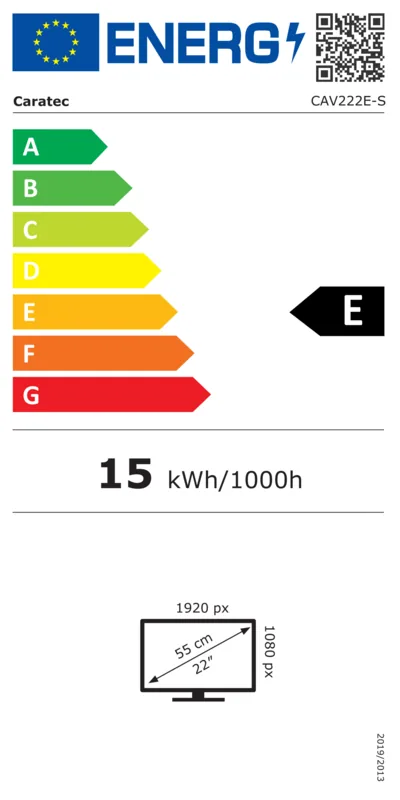
SDR Energy Efficiency Class
E (A to G)
SDR Energy Consumption
14 kWh / 1000 h
Legacy Energy Efficiency Class
A (A+++ to D)
Annual Consumption
31 kWh
Power Consumption
21 W typical, 0.5 W standby
Color
Black
VESA
100x100
Stand
Centered
Dimensions without Stand
20.1 in x 12.1 in x 1.8 in (WxHxD)
Weight without Stand
7.05 lbs
Note
Information regarding DVB-T2 reception in Austria. Information regarding DVB-T2 reception in Germany
Product Description
Discover the Caratec Vision CAV220P-D Entertainment Experience
The Caratec Vision CAV220P-D brings a compact yet powerful viewing solution for modern homes. This sleek television set features a 21.5-inch Full HD display that ensures crisp visuals for movies and sports. Users who consult the Caratec Vision CAV220P-D Manual will discover a wide array of connectivity options designed for flexibility. Whether you prefer satellite or cable, the integrated DVB-S2 and DVB-T2 HD tuners handle digital broadcasts effortlessly alongside traditional analog signals. It captures the essence of a functional second screen unit without compromising on basic performance standards.
Versatile Connectivity and Media Playback
Multimedia is a key focus with this unit. It includes a built-in DVD player located on the side, offering a convenient way to watch discs without extra hardware. USB ports allow for direct playback of photos, music, and video files from external drives. The device supports various formats including MP4, MKV, and MP3. Additionally, two HDMI inputs enable seamless connection to game consoles or streaming devices. Users can easily switch inputs using the remote control button. The remote also features dedicated keys for favorites and program guides, enhancing the viewing experience significantly for daily use.
Easy Setup and Operation
Setting up the device is straightforward. The guide helps users through mounting options, including VESA compatibility for wall installation. Navigation through the on-screen menus covers sound, picture, and language settings. Users can customize picture modes to Standard, Dynamic, or Personal preferences. Sound settings include surround options and hearing impaired modes for accessibility. The time menu allows for sleep timers and automatic switch-on schedules, adding convenience for daily routines. Installation involves connecting the antenna or power supply appropriately depending on the environment.
Energy Efficiency and Safety
Power consumption is optimized with an energy efficiency class rating. Safe operation is prioritized with warnings regarding heat, moisture, and condensation. The standby light indicates power status clearly, while the on/off switch reduces power draw significantly. Remember to follow the Caratec Vision CAV220P-D Manual for safety guidelines regarding ventilation and cleaning. Regular maintenance ensures longevity, particularly regarding dust accumulation in ventilation slots. Always disconnect power before cleaning the screen surface to avoid damage.
Final Notes
This model is ideal for bedrooms or secondary viewing areas. It combines traditional TV functionality with disc playback in a space-saving chassis. Proper ventilation is essential to prevent overheating during extended use. The CI slot also supports encrypted programs via smart cards for premium content access. Overall, it serves as a reliable companion for entertainment needs.
Search for 67,732 Manuals online


Type-in Brand or Model