
Caratec Vision CAV190B Manual
PDF manual · 124 Pages
English



Quick check
Incorrect answer, please try again.
Chat with your Caratec Vision CAV190B manual using AI
Get instant AI answers from your Caratec Vision CAV190B manual
Ask anything about the Caratec Vision CAV190B. Answers come from this manual, with the pages they are based on.
Vision CAV190B Maintenance Schedule
Disconnect the power cable before cleaning. Use only a soft damp cloth or special cleaning product for flat screens.
If moved from a cool area to a warmer one, leave the device unplugged for at least one hour before use.
Ask a Question
Do you recommend Vision CAV190B?
Yes NoFrequently Asked Questions
The CAV190B includes DVB-S2 (satellite), DVB-T2 (terrestrial, H.265 compatible) and DVB-C (cable) tuners, plus a CI/CI+ slot for conditional-access modules to receive encrypted pay-TV.
Is this answer helpful?
USB playback supports common formats: video (*.mpg, *.mkv, *.mp4, *.avi, *.mov, *.vob, *.flv, *.asf, *.wmv), audio (*.mp3, *.wav, *.wma, *.aac, *.ac3) and images (*.jpg, *.jpeg, *.png, *.bmp). Text files (*.txt) are also supported.
Is this answer helpful?
Connect the satellite cable to the DVB-S2 input, power on the TV, follow the First Time Installation wizard to select language and country, choose Satellite as input and run Auto Tuning. You can load a preset ASTRA/HOTBIRD list or scan manually.
Is this answer helpful?
Yes—VESA 100×100 mounting is supported. When using M4 screws ensure they project into the set by no more than 8 mm to avoid damage. Use a wall bracket rated for the TV’s size and weight.
Is this answer helpful?
Place the update files on a USB stick, insert it into the TV’s USB port, then use the Configuration menu’s Software Update (USB) option to apply the update. Follow on-screen instructions and do not power off during the update.
Is this answer helpful?
The media player offers play/pause, stop, rewind/fast-forward, previous/next, repeat modes, A-B repeat, zoom, slow motion, goto time, playlist and on-screen file info. Navigation uses the remote control buttons.
Is this answer helpful?
Check antenna or satellite cable connections, ensure the correct input source is selected, confirm antenna power (enable 5V for active DVB-T aerials if needed), and re-run the automatic channel scan in the Channel or Setup menu.
Is this answer helpful?
Advantages and Disadvantages
Advantages

- Multiple tuners (DVB-S2, DVB-T2 H.265, DVB-C) and CI/CI+ slot for pay-TV.
- Wide connectivity: HDMI, USB media player, VGA, SCART, YPbPr, SPDIF and headphone jack.
- Compact, low-power HD-ready panel ideal for caravans, bedrooms and secondary setups.
- Comprehensive menu: picture/sound presets, timers, EPG, teletext and satellite DiSEqC support.
- USB firmware updates and media playback for video, audio, photo and text files.
Disadvantages

- Only one HDMI port and limited to HD-ready (1366×768) on the CAV190B model.
- Basic internal speakers (2×3 W) may require external audio for richer sound.
- Optional adapters and external PSU sold separately (additional cost).
- No advanced smart-TV platform or app ecosystem—media via USB only.
- Smaller screen size may not suit primary living-room viewing for some users.
Product Specification
Diagonal
19"
Resolution
1366x768
Panel
LCD
Backlight
LED, Edge-lit
HDR
no
Brightness
250 cd/m²
Contrast
3,000:1 static
Viewing Angle
178°/178° (h/v)
3D
no
Tuner
1x DVB-T/-T2/-S/-S2 HEVC (H.265)
Video Connectors
1x HDMI, VGA, Component Video, SCART, Composite Video
Audio Connectors
Digital Audio Out (optical), Headphones (3.5mm jack)
Other Connectors
1x USB-A 2.0, 1x CI+ 1.3
Total Audio Power
6W (2x 3W)
Special Features
Power Switch
Energy Efficiency Class SDR
E (A to G)
Energy Consumption SDR
12 kWh/1000 h
Old Energy Efficiency Class
A+ (A+++ to D)
Annual Consumption
19 kWh
Power Consumption
13 W typical, 0.5 W Standby
Color
black
VESA
100x100
Stand
central
Dimensions without Stand
17.32x10.35x1.89 in (WxHxD)
Weight without Stand
5.07 lb
Note
Information on DVB-T2 reception in AustriaInformation on DVB-T2 reception in Germany
Product Description
Caratec Vision CAV190B — Practical Guide and Manual Overview
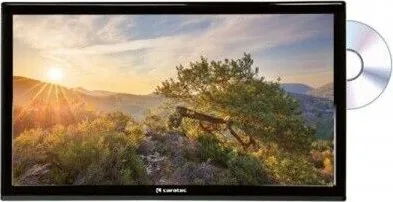
The Caratec Vision CAV190B is a compact HD-ready LED television designed for flexible use at home, in vehicles or in lightweight installations. Rugged yet slim, it offers core modern TV features—DVB-S2 satellite, DVB-T2/DVB-C reception, a CI/CI+ slot for conditional access, USB media playback, HDMI and legacy SCART/YPbPr connections—making it a versatile choice for secondary screens or small living spaces.
Key features and usage
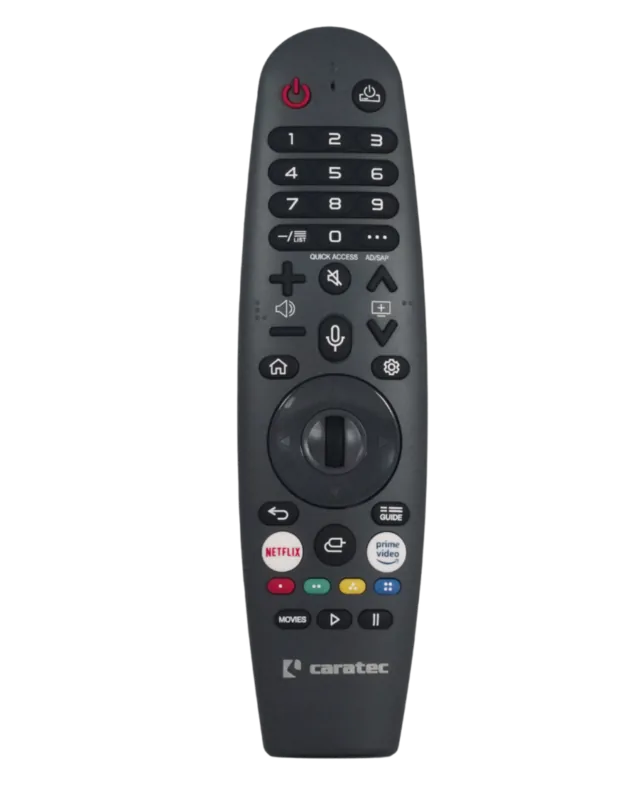
Out of the box the CAV190B comes with the TV unit, a remote control (2× AAA), a 12 V car cable and a DVB-T magnetic antenna. Optional accessories include a detachable stand, an external power supply, and video adapters. Setup is straightforward: attach the stand or wall mount (VESA 100×100), connect the chosen antenna or cable source, power on, and follow the First Time Installation wizard to set language, country and perform an automatic channel search (satellite or DVB-C/T).
Connectivity is broad for a compact set: one HDMI, USB for media playback and software updates, VGA/PC audio, coaxial SPDIF, a headphone jack, and mini AV/YPbPr adapters. The CI/CI+ slot supports pay-TV modules and smartcards. The on-device control buttons cover basic functions while the remote unlocks full menu navigation, EPG, teletext and multimedia controls.
Picture and sound menus provide preset profiles (Standard, Mild, Dynamic, Personal), with manual adjustments for contrast, brightness, color, sharpness, color temperature and noise reduction. Sound options include treble/bass, balance, auto volume and surround/SRS modes. Timers, sleep settings, auto standby, and on/off scheduling are available in the Time menu. The Configuration menu handles language, subtitle and teletext settings, software updates (via USB) and factory reset.
The Channel menu supports automatic and manual scans, editing/send management (move, delete, skip, favorites), satellite/transponder configuration, DiSEqC settings and 5V antenna power for active aerials. Multimedia playback supports common file formats (MP4, MKV, MPG, MP3, WAV, JPEG, PNG, TXT) with basic player controls and slideshow options.
Special functions include channel list filtering (DTV, Radio, Free/Encrypted), favorites, on-screen channel info, subtitle language selection, EPG, radio mode with screen-off audio, and teletext. The manual also covers safety, cleaning, transport, recycling and troubleshooting tips for no-signal, no-picture or no-sound conditions.
Who it’s for
The CAV190B suits users needing an affordable, feature-rich small display for caravans, secondary rooms, workshops or as a compact satellite-capable TV. It balances legacy connector support with modern digital tuners and media playback, making it practical for mixed setups.
Notes
- Supports HD-ready resolution 1366×768, 16:9 format.
- Built-in tuners: DVB-S2, DVB-T2 (H.265) and DVB-C.
- Factory PIN: 0000 for menu locks.
- Recommended: observe ventilation and avoid moisture; allow 1 hour after temperature changes before powering on.
Search for 67,732 Manuals online


Type-in Brand or Model
Hans Müller
11 months ago
Will the Caratec TV work reliably in a VW California, and what should I do if the stored radio/TV station list is outdated?
Manual.ly
11 months ago
Yes, users report the Caratec TV fits and works well with a VW California setup. If the pre-saved station list is outdated (especially for radio stations), you typically need to run a fresh channel scan and then sort the stations. In the TV menu, go to Settings or Tuner/Channels, choose the correct input/signal type (TV or Radio), start Channel Search/Auto Search, and let it complete. After the scan, use the Sort or Favorite/Edit option to arrange your preferred stations. This usually fixes the outdated list without changing hardware.