
Canyon Sulaco GM-4 Manual
PDF manual · 20 Pages
English



Quick check
Incorrect answer, please try again.
Chat with your Canyon Sulaco GM-4 manual using AI
Get instant AI answers from your Canyon Sulaco GM-4 manual
Ask anything about the Canyon Sulaco GM-4. Answers come from this manual, with the pages they are based on.
Ask a Question
Do you recommend Sulaco GM-4?
Yes NoFrequently Asked Questions
The mouse supports four DPI levels: 1000, 1600, 3200, and a maximum of 4200 DPI.
Is this answer helpful?
Yes, the mouse is fully compatible with Windows 10, 8, 7, and Mac OS systems.
Is this answer helpful?
It features seven programmable buttons, including left, right, middle, forward, back, fire, and DPI.
Is this answer helpful?
The braided USB cable is 1.65 meters long and includes a ferrite ring to protect against signal loss.
Is this answer helpful?
Yes, it comes with a 24-month limited warranty from the date of purchase.
Is this answer helpful?
Yes, there are six different RGB backlight effect modes that can be customized via the software.
Is this answer helpful?
Try connecting to a different USB port, restarting the computer, or testing on another device.
Is this answer helpful?
Advantages and Disadvantages
Advantages

- High-performance PixArt 3519 sensor with up to 4200 DPI
- Seven programmable buttons for advanced macro capabilities
- Durable braided cable with ferrite ring for signal stability
- RGB lighting with six customizable effects
- Canyon Twin Surface coating for enhanced grip and comfort
Disadvantages

- Requires specific driver installation which may conflict with others
- Limited color options available in the standard model
- Software customization may have a learning curve for beginners
- Not suitable for extreme cold environments below 0 degrees
- Warranty requires proof of purchase from authorized sellers
Product Specification
Suitability
right hand
Keys
7 (total), 2 (main), 1 (top), 3 (left), 1 (scroll wheel click)
Scroll Wheel
1x 2-way
Scanning
LED red/IR
Resolution
4200dpi, reducible to 2400/1600/800dpi
Sensor
PixArt PAW 3519
Polling Rate
1000Hz, adjustable to 500/250/125Hz (wired USB)
Lighting
RGB
Connection
wired (6.5ft), USB-A 2.0
Power Supply
USB
Dimensions (WxHxD)
2.95x1.57x4.92in
Approximate Volume
5.98in³ (approximated shape)
Weight
4.94oz
Color
solid, black
Features
thumb rest, onboard memory, non-slip surface (side/top rubberized), fabric cable
Product Description
Elevate Your Gaming with the Canyon Sulaco GM-4
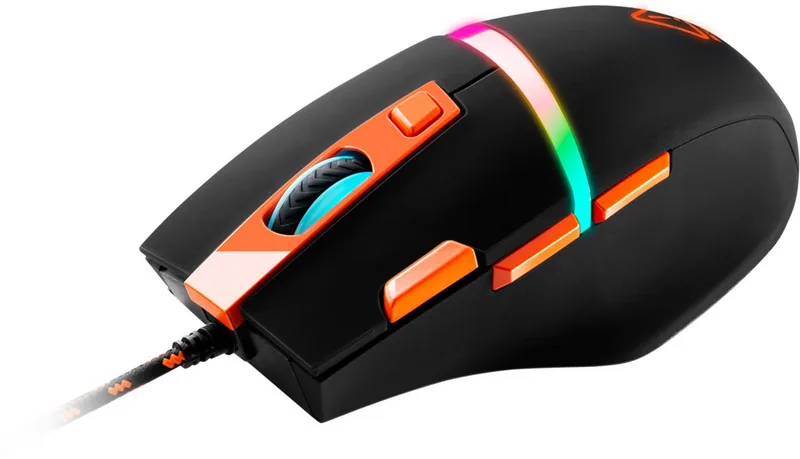
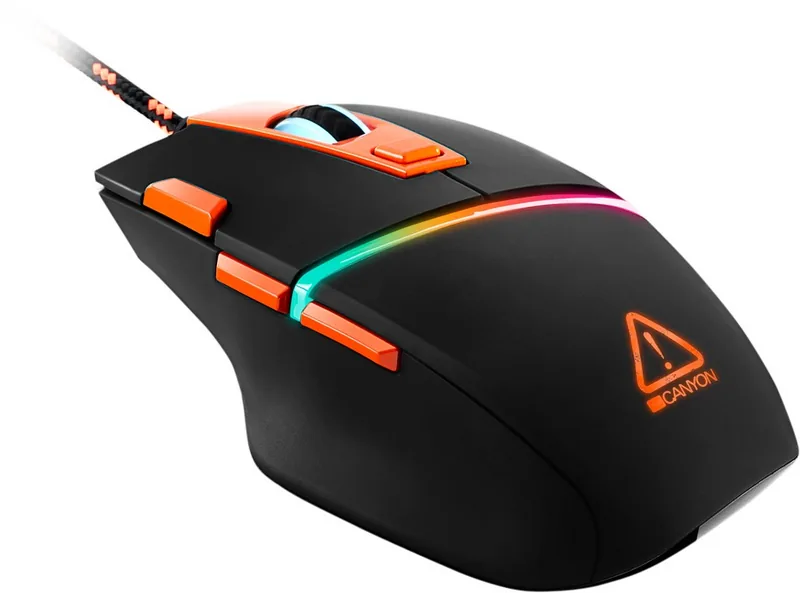
The Canyon Sulaco GM-4 Gaming Mouse in striking black and orange is a perfect blend of aggressive design and cutting-edge technology. Designed for gamers who demand precision, this device features a high-quality PixArt 3519 optical sensor capable of reaching up to 4200 DPI. Whether you are engaging in fast-paced shooters or strategic RPGs, the adjustable DPI settings ensure that your cursor movement matches your intent perfectly.
One of the standout features of the Sulaco GM-4 is its customizability. With seven programmable buttons, including dedicated forward, backward, and fire keys, you can map complex commands to a single click. The mouse also boasts an RGB backlight system with six different modes, allowing you to customize your setup to match your room's aesthetic or team colors. The braided USB cable, measuring 1.65 meters, includes a ferrite ring to prevent signal loss, ensuring a stable connection during intense gaming sessions.
Durability is at the core of Canyon's philosophy. The mouse utilizes Canyon Twin Surface coating technology for a comfortable grip that withstands long hours of use. The buttons are rated for five million clicks, guaranteeing longevity even for the most demanding users. Supported on both Windows and Mac OS, the Sulaco GM-4 comes with dedicated customization software to fine-tune every aspect of your experience.
Why Choose the Sulaco GM-4?
This mouse represents the latest trends in technical design, backed by a rigorous quality control system. It offers a polling rate of up to 1000Hz for ultra-low latency and a scanning frequency of 3000 FPS, ensuring no frames are missed. The ergonomic shape fits naturally in the hand, reducing fatigue during marathon gaming sessions.
Important Notes
- Always uninstall previous mouse drivers before installing the new driver to avoid conflicts.
- Do not disassemble the product or expose it to liquids.
- Keep the operating temperature between 0 and 40 degrees Celsius.
- The product includes a 24-month limited warranty.
Search for 67,732 Manuals online


Type-in Brand or Model