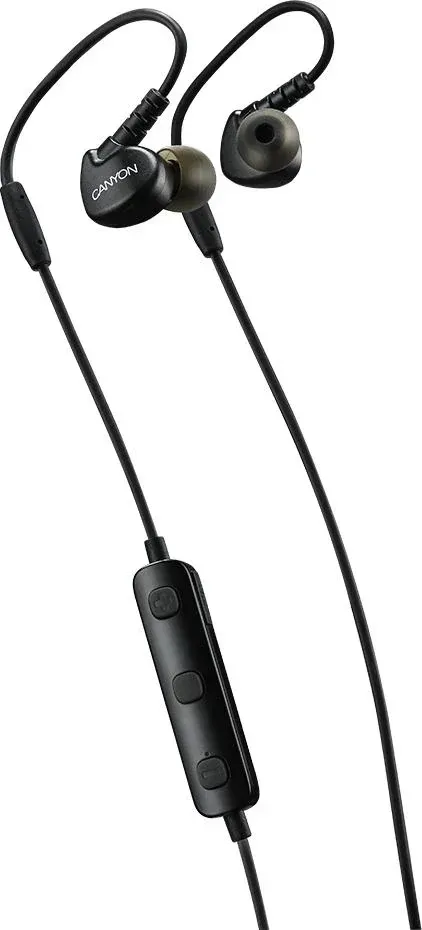
Before use, charge fully the battery using the attached USB cable
The LED is on shows that the battery is charging; after full battery charging this LED
switches off.
The sound alarm is provided for the low battery voltage.
Switching ON/OFF
Switching ON: Press the central button for more than 2 seconds.
Switching OFF: Press the central button for more than 3 seconds.
Reset for factory settings: When the earphones is ON, press the central button and “-“ button
for more than 4 seconds.
/2
%
Quick check
I'm not a robot
Incorrect answer, please try again.
Chat with your Canyon CNS-SBTHS1 manual using AI
Get instant AI answers from your Canyon CNS-SBTHS1 manual
Ask anything about the Canyon CNS-SBTHS1. Answers come from this manual, with the pages they are based on.
Ask a Question
0/1000
Do you recommend CNS-SBTHS1?
YesNo
Frequently Asked
Questions
A
They use Bluetooth 4.1, which allows wireless pairing with phones, tablets, and other compatible audio devices. The connection range is listed as up to 10 meters under normal conditions.
Is this answer helpful?
A
The earphones can work for up to 6 hours after being fully charged. Actual battery life may vary depending on volume level, call use, and wireless conditions.
Is this answer helpful?
A
Turn the earphones on by holding the central button, then open Bluetooth settings on your device and select Canyon BT headset. If a password is needed, enter 0000.
Is this answer helpful?
A
Yes. The built-in microphone supports hands-free calls. You can answer or end a call with a short press of the center button, reject a call by holding it for 2 seconds, and redial the last number with two presses.
Is this answer helpful?
A
Press the center button to play or pause music. Use the plus and minus buttons to move to the next or previous track with a short press, or change volume with a long press.
Is this answer helpful?
A
Check whether the battery is charged, make sure Bluetooth is enabled on your device, remove the earphones from the paired list, then reconnect. Restarting the earphones may also help.
Is this answer helpful?
A
Keep the earphones away from water, dust, and heat. Clean them with a dry cloth only, and avoid listening at high volume for long periods because it may damage hearing.
Is this answer helpful?
M: OA-GPT-54-NAN
Advantagesand
Disadvantages
Advantages
Bluetooth 4.1 provides easy wireless pairing and a stable connection for everyday use.
Up to 6 hours of working time supports workouts, commuting, and casual listening.
Built-in microphone and call controls make hands-free use convenient.
Extra ear cushions and a clip help improve comfort and fit during movement.
VS
Disadvantages
Micro-USB charging feels dated compared with newer USB-C accessories.
Battery life is useful, but not ideal for very long travel days without recharging.
Sound quality may drop if the connection is weak or there is wireless interference.
The sporty design focuses on basics, so advanced features are limited.
M: OA-GPT-54-NAN
Product
Specification
Type
Earbuds (In-Ear)
Form Factor
Earhook, Neckband
Acoustic design
closed
Microphone
Cable microphone
Wireless
Bluetooth 4.1
Controls
3-button remote control
Operating time
6h
Battery
USB Micro-B charging port
Frequency range
20Hz-20kHz
Impedance
16Ω
Sensitivity
95dB
Weight
0.17 lb
M: OA-GPT-54-NAN
Product
Description
Canyon Wireless Bluetooth Sporty Earphones
The Canyon Wireless Bluetooth Sporty Earphones are built for people who want simple wireless comfort during workouts, commutes, and everyday listening. With a lightweight sporty design, they aim to stay secure while you move, making them a practical choice for running, gym sessions, and hands-free calls.
At the core of these earphones is Bluetooth 4.1, which offers quick pairing and a stable connection within a range of up to 10 meters. That makes them easy to use with a phone, tablet, or other Bluetooth audio device without being tied down by cables. The integrated microphone adds extra convenience for calls, voice chats, and on-the-go communication.
Battery life is another useful highlight. The earphones can work for up to 6 hours on a full charge, which is enough for a typical day of mixed music and calls. Charging is handled through a micro-USB connection at 5 V, 500 mA, and the LED indicator helps show when the battery is charging and when it is ready to use.
The control scheme is straightforward and practical. A central button handles play, pause, call answering, call ending, and redial functions, while the plus and minus buttons manage track skipping and volume adjustment. This makes the earphones easy to operate while walking, training, or driving.
What also stands out is the included accessory set. Along with the earphones, users get a USB cable, extra ear cushions, a quick guide, and a clip for a more secure fit. These small additions make the experience more flexible and user-friendly, especially for active use.
If you are looking for a compact wireless audio companion, the Canyon Wireless Bluetooth Sporty Earphones Manual points to a device that is simple, functional, and focused on everyday convenience. It offers the essential features many users need without adding complexity, which is often exactly what sporty earphones should do.
Notes
Charge fully before first use.
Keep the earphones away from moisture, heat, and dust.