Manual.ly Logo

Canmore GT-730 Manual

4.4 · 104 Ratings

PDF manual · 4 Pages

English

M: OA-GPT-54-NAN
page

/ 4

Loading...
1fa1afbc861a1268fda05484ae51ee8f4dd2 page 2
These operating instructions are a publication by Conrad Electronic SE, Klaus-Conrad-Str. 1,
D-92240 Hirschau (www.conrad.com).
All rights including translation reserved. Reproduction by any method, e.g. photocopy, microfi lming,
or the capture in electronic data processing systems require the prior written approval by the editor.
Reprinting, also in part, is prohibited.
These operating instructions represent the technical status at the time of printing. Changes in
technology and equipment reserved.
© Copyright 2013 by Conrad Electronic SE.
Getting Started
a) Charging the battery
The battery needs to be charged for approx. 4 hours before fi rst use, subsequent charging
usually lasts about 2 hours.
Connect the GT-730 to a USB port of at least 500 mA load capacity. This can be done either
with a USB power supply or a USB interface of your PC.
During the charging process, the status LED (3) lights green. This goes off after a successful
charging process and the device is fully operational. When the rechargeable battery is empty,
the status LED (3) lights red.
b) Switch on/off
Switch the device on or off using the on/off switch (1) by moving the switch to the position
labelled with a dot.
It is recommended to place the GPS logger outside for approx. 15 - 20 minutes before fi rst
use, to ensure the GPS logger recognises all the satellites. This is indicated by the status
indicator (4).
Status LED (4):
steady blue = position not recognised
fl ashes blue (slowly) = position recognised
fl ashes blue (fast) = position data are being recorded
c) Installation of the software / USB driver
Insert the software CD in the CD drive.
Run the fi le named CanWay Installer.exe and follow the instructions on the screen.
When the installation is complete, connect the GT-730 to a free USB interface of your system
and switch it on using the on/off switch (1). The GPS data logger is recognised.
Now start the application.
After a successful installation, an extensive description of how to use the software
can be found in the installation directory.
d) Recording data / data tag
Switch the GT-730 on using the on/off switch (1).
It is recommended to place the GPS logger outside for approx. 15 - 20 minutes before fi rst use,
to ensure the GPS logger recognises all the satellites. This will be indicated by the GPS status
LED (4) (see description under “b) Switch on/off”).
To fi x the position, press the data tag key (2). The blue status LED (4) fl ashes rapidly.
Maintenance and Cleaning
You do not need to service the product, apart from occasional cleaning.
Use a soft, antistatic and lint-free cloth for cleaning.
Do not use abrasive or chemical cleaners.
Disposal
Electronic devices are recyclable waste and must not be disposed of in the house-
hold waste! Please dispose of the device when it is no longer of use, according to
the current statutory requirements.
Declaration of conformity
The manufacturer hereby declares that this product is in accordance with the fundamental
requirements and the other relevant guidelines of the 1999/5/EG Directive.
The declaration of conformity for this product can be found at www.conrad.com.
OPERATING INSTRUCTIONS www.conrad.com
GPS data logger GT-730
Item no. 37 36 86
Version 10/13
Intended Use
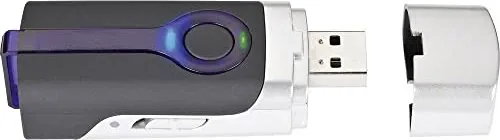
The USB GPS data logger GT-730 is a GPS receiver with SIRF-4 chipset for position location
and recording up to 256000 values.
The GPS receiver is fi tted with an integrated (non-removable) lithium polymer battery. This
facilitates operation without external power supply.
For data read-out and charging the battery, the GT-730 can be connected to a free USB inter-
face on a PC.
This product complies with the applicable National and European requirements. All names of
companies and products are the trademarks of the respective owner. All rights reserved.
Package Contents
• GPS dongle
• Protective cap
• CD with driver/software
• Operating Instructions
System requirements
• Notebook or desktop PC with a free USB socket
• CD-ROM drive
• Approx. 55 MB free hard disk space
• Operating system: Windows 2000 or later
Description of the Parts
1 ON/OFF switch
2 Data tag key for position marking
3 Status indicator and loading status
4 GPS status indicator / memory status
Explanation of Symbols
The exclamation mark indicates specifi c risks associated with handling, function and
use.
The "Hand" symbol indicates special tips and operating information.
Safety Instructions
The warranty will be void in the event of damage caused by failure to observe
these safety instructions! We do not assume any liability for any consequen-
tial damage!
Nor do we assume any liability for material and personal damage caused by
improper use or non-compliance with the safety instructions! The warranty
will be void in such cases.
• The unauthorised conversion and/or modifi cation of the unit is not permitted because of
safety reasons.
• The product is not a toy and should be kept out of the reach of children!
• Protect the product from extreme temperatures, direct sunlight, strong vibrations and com-
bustible gases, vapours and solvents, and moisture.
• Never expose the product to mechanical stress.
• Handle the product with care. The product can be damaged if crushed, struck or dropped,
even from a low height.
If in doubt about how to connect the device correctly, or should any questions arise that are
not answered in these operating instructions, please contact our technical advisory service or
another specialist.

Chat with your Canmore GT-730 manual using AI

Get instant AI answers from your Canmore GT-730 manual

Ask anything about the Canmore GT-730. Answers come from this manual, with the pages they are based on.

Ask a Question

0/1000

Do you recommend GT-730?

Yes No
0
User Pic

Marta Weber

9 months ago

Will the GT-730 work with Windows 10, and do I need to install special USB drivers or update the Canway software to avoid errors?

0
User Pic

Manual.ly

9 months ago

Yes, but you should plan for the USB driver and software version. Many users report the bundled CD is outdated or unstable on newer systems. We recommend downloading the latest Canway software and the current USB (VCP) driver from the manufacturer website, then update the logger firmware if needed. Typical workaround steps: power on the logger, plug it into the PC via USB, wait a few seconds for Windows to detect the device, and only then start the Canway app and use it to read/export logs (GPX). If your antivirus flags the download, double-check the file is from the manufacturer site and that the version matches the device model. Once updated, the logger is generally stable on Windows 10.

M: OA-GPT-5-NAN
M: OA-GPT-5-NAN

Frequently Asked Questions

A

It is designed to record GPS positions and mark specific locations during travel, outdoor work, or route tracking. The device stores movement data so you can review where you have been later on a PC.

Is this answer helpful?

A

The logger can store up to 256,000 recorded values. That makes it suitable for repeated trips, longer sessions, or projects that need a larger amount of location data.

Is this answer helpful?

A

It uses an integrated lithium-polymer battery. You charge it through a USB port, and it can also run while connected to a PC or USB power source.

Is this answer helpful?

A

The status LED gives clear feedback. A steady blue light means no position fix yet, slow blue blinking means the position has been found, and fast blue blinking means position data is being recorded.

Is this answer helpful?

A

Yes. The included CanWay software is used to install the driver and access the recorded GPS data on a Windows computer. After setup, the tracks can be viewed and managed through the application.

Is this answer helpful?

A

Charge the battery for about four hours, then leave the logger outdoors for 15 to 20 minutes so it can recognize satellites properly. This helps the device start logging positions more reliably.

Is this answer helpful?

M: OA-GPT-54-NAN

Advantages and Disadvantages

Advantages

  • Stores up to 256,000 position values for long tracking sessions.
  • USB charging and data transfer keep daily use simple.
  • Clear LED indicators make status easy to understand.
  • Data Tag button helps mark locations instantly.
VS

Disadvantages

  • Needs time outdoors before first use to get a stable GPS fix.
  • Works best with Windows-based systems, limiting compatibility.
  • Built-in battery is not removable or expandable.
  • Older software-and-CD setup feels less convenient today.
M: OA-GPT-54-NAN

Product Specification

Type

Other

M: OA-GPT-54-NAN

Product Description

Canmore GT-730 GPS Logger Manual: Compact GPS Tracking for Everyday Recording

The Canmore GT-730 GPS Logger is a small USB GPS receiver built for users who want straightforward position recording in a portable form. With a built-in lithium-polymer battery and a SiRF-4 chipset, it can store up to 256,000 location values, making it a practical choice for travel routes, field notes, outdoor activities, and simple movement tracking.

What makes the GT-730 appealing is its easy, no-fuss operation. A physical on/off switch keeps the device simple to control, while the Data Tag button lets you mark a specific position instantly. The LED indicators are especially useful: they show when the logger is searching for satellites, when a position has been found, and when data is actively being recorded. That gives the device a very clear, hands-on feel.

Setup follows a familiar workflow. The battery should be charged before first use, and the logger can be powered and recharged through USB, so no special charger is required. Once connected to a Windows PC, the included software helps read out saved tracks and manage logged data. The package also includes the dongle, protective cap, driver/software CD, and operating instructions, covering the basics needed to get started.

For best results, the GT-730 should spend some time outdoors before its first session so it can lock onto satellites properly. After that, the status light shows whether the unit has a fix and whether tracking is underway. This makes the device especially useful for users who want a simple way to capture routes without dealing with complicated menus or advanced configuration.

The Canmore GT-730 GPS Logger Manual points to a product that favors reliability and simplicity over extra features. It suits anyone who needs a compact logger for occasional use, easy USB access, and clear status feedback. If your goal is to record positions and mark important spots with minimal effort, this logger delivers a focused and practical experience.

Notes

  • Best performance comes after an initial open-sky satellite lock.
  • Compatible with Windows 2000 or newer systems.
  • Keep the device dry and protect it from shocks.
  • Clean with a soft, antistatic, lint-free cloth.
  • Battery charging and data transfer both work through USB.
M: OA-GPT-54-NAN

© Copyright 2026 Manual.ly