
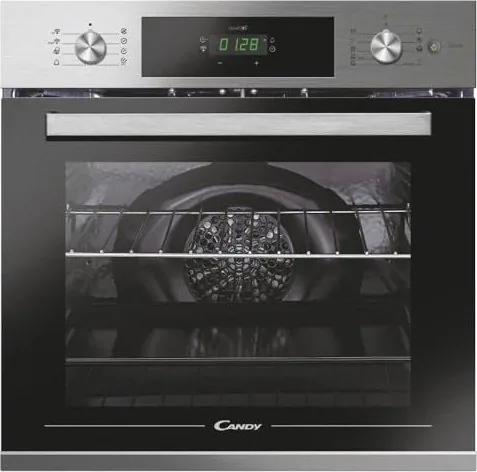
Candy FCTS886XWFDE Manual
PDF manual · 24 Pages
English



Quick check
Incorrect answer, please try again.
Chat with your Candy FCTS886XWFDE manual using AI
Get instant AI answers from your Candy FCTS886XWFDE manual
Ask anything about the Candy FCTS886XWFDE. Answers come from this manual, with the pages they are based on.
FCTS886XWFDE Maintenance Schedule
Wipe the glass window with an absorbent kitchen towel after every use. Use a detergent-soaked sponge for stubborn stains.
Remove water from the cavity bottom and clean the drip tray after every cooking cycle to prevent residue buildup.
Remove the pan after grilling, pour out hot fat, and wash with hot water and soap. Never put a dirty pan back in the oven.
Clean accessories with a wet, soapy sponge before rinsing and drying them. Avoid using abrasive detergents.
If the seal is dirty, clean it with a slightly damp sponge. Keep seals clean to avoid heat dispersal.
Ask a Question
Do you recommend FCTS886XWFDE?
Yes NoFrequently Asked Questions
Fill the bottom of the cold oven cavity with up to 150 ml of water. Close the door, select a cooking function, set the temperature, wait five minutes for preheating, and then press the steam button.
Is this answer helpful?
First, ensure the clock is set correctly as the oven will not operate otherwise. Check that a cooking function and temperature have been selected. If condensation is on the panel, wipe it with a microfiber cloth.
Is this answer helpful?
Yes, if the model is supplied without a plug, it must be connected directly to the mains by a qualified electrician using an omnipolar breaker compliant with local safety legislation.
Is this answer helpful?
You should clean the drip pan after every cooking cycle, especially after using the grill, to prevent grease buildup and potential fire hazards.
Is this answer helpful?
Children under eight years old should not use the oven unless continuously supervised. Older children can use it only if instructed on safe operation and risks.
Is this answer helpful?
The Aquactiva function uses steam generated inside the oven to loosen fat and food particles, making the interior easier to clean manually afterward.
Is this answer helpful?
Advantages and Disadvantages
Advantages

- Advanced steam function preserves moisture and nutrients in food
- Wi-Fi connectivity allows remote control via smartphone app
- Aquactiva self-cleaning cycle reduces manual scrubbing effort
- Multiple cooking modes including grill, convection, and defrost
- Child safety lock prevents unauthorized adjustments
Disadvantages

- Requires professional electrical installation if no plug is included
- Steam function adds water to the cavity which must be emptied manually
- Initial use may produce smoke from insulation glue burning off
- Glass door requires careful cleaning to avoid scratches
- Higher energy consumption when using steam functions compared to standard modes
Product Specification
Energy efficiency class
A
Color
stainless steel, black
Capacity
70l
Number of programs
10
Programs
Defrost, Eco, Grill, Hot air (steam), Top/bottom heat, Convection, Convection with grill, Convection with bottom heat, Keep warm
Door system
Door hinge at the bottom
Drawer system
No
Steam system
Yes
Cleaning
coated oven walls (enamel)
Display
Yes
Features
Touch control, Timer, Clock display, Cool front, Child lock
Smart home
App control
Hob control
No
Energy consumption conventional heating
0.96kWh/cycle
Energy consumption convection/hot air
0.8kWh/cycle
Niche dimensions
23.6x23.6in (WxD)
Product Description
Discover the Candy FCTS886XWFDE Oven with Steam Support
The Candy FCTS886XWFDE Oven with Steam Support represents a significant leap in modern kitchen technology, designed for those who demand precision and versatility. This built-in oven combines traditional cooking methods with advanced steam functionality, allowing users to achieve professional-grade results at home. Whether you are baking delicate pastries, roasting succulent meats, or steaming fresh vegetables, this appliance adapts to your culinary needs with ease.
One of the standout features is the Aquactiva function, which utilizes steam to gently clean the oven cavity after use, removing stubborn grease and food residues without harsh chemicals. The steam support system ensures that foods retain their natural moisture and nutrients, preventing dryness during long cooking cycles. Users can alternate between steam cooking and traditional modes like convection or grill to perfect every dish.
Connectivity is another key aspect of this model. With built-in Wi-Fi and Bluetooth capabilities, the oven connects seamlessly to the hOn app on your smartphone. This allows for remote control, enabling you to start cooking or monitor progress from anywhere. The intuitive digital display simplifies operation, offering clear settings for time, temperature, and specific cooking programs like Eco mode or Super mode for faster heating.
Safety is paramount in the design of the FCTS886XWFDE. It includes a child lock feature to prevent accidental changes to settings and warnings about hot surfaces. The oven requires proper installation by a qualified professional, especially regarding electrical connections, to ensure compliance with safety standards. Regular cleaning and maintenance are straightforward, with removable racks and glass panels that can be easily accessed for washing.
This oven is ideal for families and cooking enthusiasts who value efficiency and health. By integrating steam technology with smart features, it transforms the daily routine of meal preparation into an enjoyable and efficient experience.
Search for 67,706 Manuals online


Type-in Brand or Model