
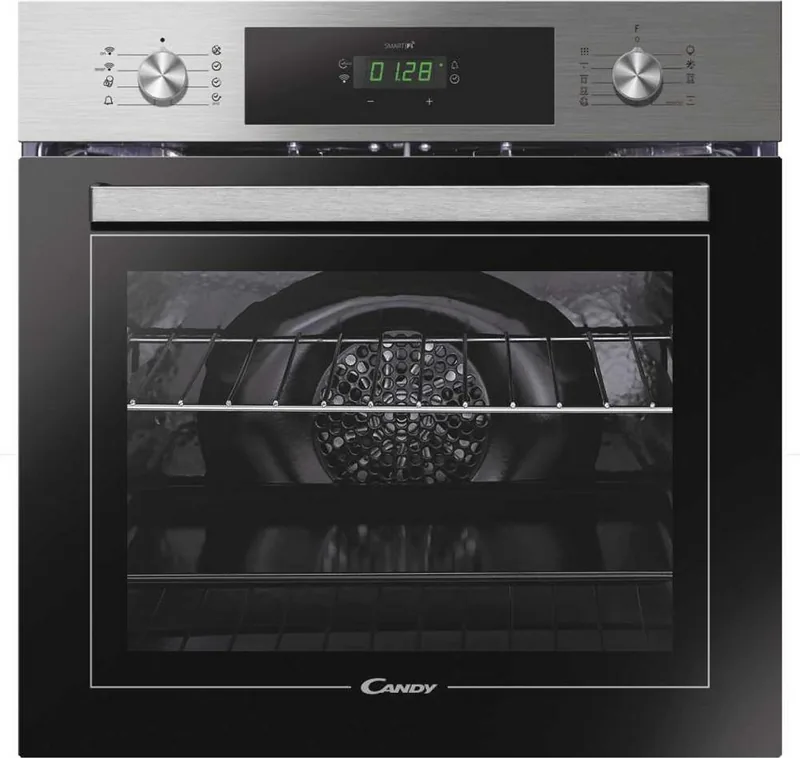

Candy FCT886XWIFI Manual
PDF manual · 137 Pages
English



Quick check
Incorrect answer, please try again.
Chat with your Candy FCT886XWIFI manual using AI
Get instant AI answers from your Candy FCT886XWIFI manual
Ask anything about the Candy FCT886XWIFI. Answers come from this manual, with the pages they are based on.
Ask a Question
Do you recommend FCT886XWIFI?
Yes NoFrequently Asked Questions
It includes keep-warm, grill, fan-assisted grill, grill with turnspit, Super Grill, and cleaning modes. These settings support tasks such as reheating, defrosting, grilling, roasting poultry, preparing gratins, and cooking medium-sized roasts.
Is this answer helpful?
Select a cooking function, set the required cooking duration, and optionally set an end time. When both values are programmed, the oven calculates when to begin cooking and switches off automatically once the chosen finish time is reached.
Is this answer helpful?
Eco Pyroclean is intended for a moderately soiled cavity and runs for 90 minutes. Super Pyroclean is intended for heavier buildup and runs for 120 minutes. Both use high heat to break down food residue.
Is this answer helpful?
Pour 300 ml of potable or distilled water into the designated cavity area, select the relevant heating function and Aquactiva setting, then run it for 30 minutes. Let the oven cool completely before wiping interior surfaces with a cloth.
Is this answer helpful?
Yes. The child lock disables oven use and displays "STOP" when active. It is enabled and disabled through the child-lock selector position and the plus button, helping prevent unintended operation.
Is this answer helpful?
The controls include a Wi-Fi indicator and reference Candy Simply-Fi connectivity. Compatible connected features depend on setup and the specific appliance configuration. Consult the Candy Simply-Fi guidance for connection and usage details.
Is this answer helpful?
Advantages and Disadvantages
Advantages

- Multiple cooking modes support grilling, roasting, reheating, defrosting, and turnspit cooking.
- Programmable duration and end-time settings can automatically stop cooking.
- Pyrolytic Eco and Super cycles help remove baked-on food residue.
- Aquactiva steam cleaning offers a lighter 30-minute cleaning option.
- Child lock, door lock, minute minder, and silence mode improve convenience and safety.
Disadvantages

- Pyrolytic cleaning requires removal of accessories, racks, grease, and large food deposits.
- The oven door remains locked until the cavity cools after pyrolytic cleaning.
- Keep-warm mode is fixed at 60 C and does not allow temperature adjustment.
- Clock setup is required after installation or a power outage before normal operation.
- Some functions and accessories may vary according to the specific model configuration.
Product Specification
Energy efficiency class
A
Color
stainless steel, black
Usable capacity
73.97 qt
Number of programs
11
Programs
Defrost, Eco, Grill, Grill with rotisserie, Top/bottom heat, Super, Super Grill, Convection, Convection with grill, Convection with bottom heat, Keep warm
Door system
bottom-hinged door
Pull-out system
no
Steam system
no
Cleaning
coated oven walls (enamel), hydrolysis (Aquaactiva), pyrolysis
Display
yes
Special features
touch controls, timer, clock display, cool front, child lock
Smart home
app control
Cooktop control
no
Energy consumption - conventional heating
0.96 kWh/cycle
Energy consumption - convection/hot air
0.8 kWh/cycle
Built-in dimensions
23.62 x 23.62 in (W x H)
Product Description
Candy FCT886XWIFI Oven - Read, Download & Print Free
The Candy FCT886XWIFI Oven is a built-in cooking appliance designed for home cooks who want flexible heating options, practical controls, and easier maintenance. Its feature set supports everyday baking, roasting, grilling, reheating, and defrosting, while the connected Simply-Fi capability adds a modern touch for compatible smart-home use.
Flexible Cooking Functions
This oven offers several useful modes for different dishes. Fan-assisted grilling circulates hot air around larger cuts such as poultry and roasts, while the standard grill is suitable for gratins, kebabs, fish fillets, and toasted finishes. A grill-and-turnspit setting helps create evenly browned traditional-style roasts without preheating.
For quick warming and gentle defrosting, the keep-warm function maintains a fixed 60 C temperature. The Super Grill setting provides increased power, rated at 3000 W, and includes five grill levels from L1 to L5. These options make the oven adaptable for both weekday meals and more ambitious cooking.
Timed Cooking and Safety Controls
The control system includes clock setting, minute minder, cooking duration, and end-of-cooking programming. Users can set a recipe duration and a desired finish time, allowing the oven to start automatically at the appropriate time and switch off when cooking is complete. A silence mode can mute the minute minder signal when needed.
A child safety lock disables oven operation and shows "STOP" on the display when active. The appliance also uses a safety door lock during high-temperature cleaning. These functions support safer use in busy family kitchens, although children should always be kept away from hot surfaces.
Cleaning Made Simpler
The Candy FCT886XWIFI Oven includes two cleaning approaches. The Aquactiva function uses 300 ml of water and steam to loosen grease and food residue over a 30-minute cycle. Once the oven has cooled, the cavity can be wiped clean with a soft cloth.
For heavier buildup, pyrolytic cleaning burns away residue at very high temperatures. Eco Pyroclean runs for 90 minutes for moderate dirt, while Super Pyroclean runs for 120 minutes for more stubborn deposits. Accessories, racks, large spills, and excess grease should be removed before starting this cycle. The door locks automatically while temperatures remain high.
Notes
- Set the clock after installation or a power interruption, as cooking operation depends on it.
- Use grilling and turnspit functions with the door closed.
- Installation and electrical connection should be completed by a qualified professional.
- Avoid lining the oven cavity with aluminum foil, as it may damage the enamel surface.
Search for 67,706 Manuals online


Type-in Brand or Model