
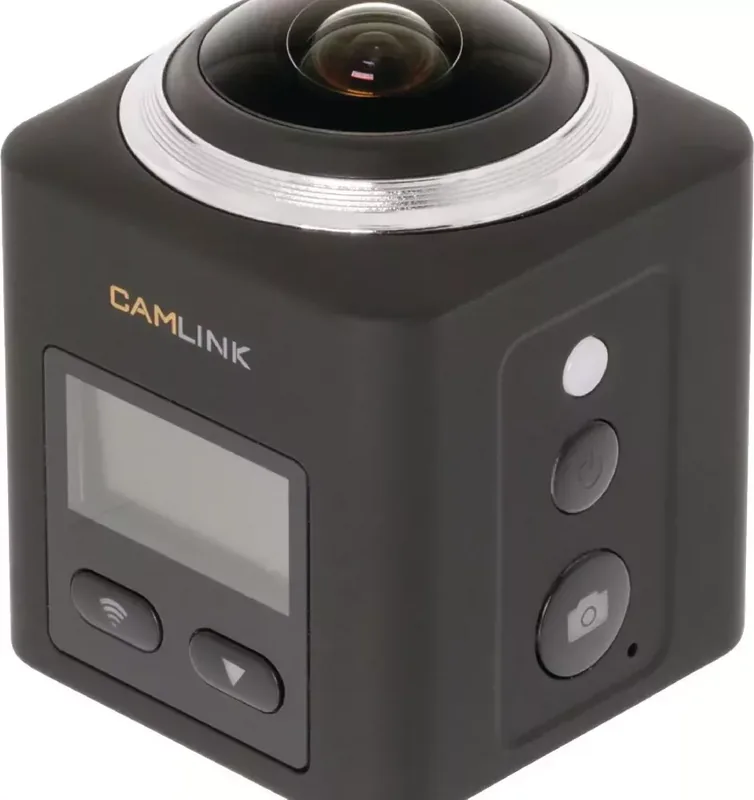
Camlink CL-AC360 Manual
PDF manual · 2 Pages
English



Quick check
Incorrect answer, please try again.
Chat with your Camlink CL-AC360 manual using AI
Get instant AI answers from your Camlink CL-AC360 manual
Ask anything about the Camlink CL-AC360. Answers come from this manual, with the pages they are based on.
CL-AC360 Maintenance Schedule
Batteries are prone to leakage when fully discharged. Remove the batteries when leaving the product unattended for longer periods of time.
Clean the outside of the device using a soft, damp cloth. Do not use cleaning solvents or abrasives and do not clean the inside.
Ask a Question
Do you recommend CL-AC360?
Yes NoFrequently Asked Questions
Download the Camlink 360° Cam app, turn on the device, enable Wi-Fi, select CL-AC360 Cam, and enter the password 12345678.
Is this answer helpful?
The camera supports video resolutions up to 2448p at 30 frames per second for high-quality recording.
Is this answer helpful?
You must use microSD or microSDHC cards with a Class 6 or Class 10 speed rating, with a maximum capacity of 128GB.
Is this answer helpful?
Recording time varies by resolution but can reach up to 100 minutes on a full charge depending on the settings used.
Is this answer helpful?
No, the device is not waterproof. Do not expose it to water or moisture to avoid damage.
Is this answer helpful?
Press and hold the settings button to toggle Wi-Fi on or off. It disables automatically if no connection is made in 30 seconds.
Is this answer helpful?
Advantages and Disadvantages
Advantages

- Supports high-resolution video up to 2448p for crystal clear footage
- Built-in Wi-Fi enables live streaming via the dedicated mobile app
- Includes multiple shooting modes like slow motion and photo capture
- Compatible with large capacity microSD cards up to 128GB
- Features an intuitive button layout for easy navigation
Disadvantages

- Battery capacity may limit continuous recording at highest resolutions
- Requires specific Class 10 memory cards for optimal performance
- Wi-Fi connection drops if no link is established within 30 seconds
- Cannot be repaired internally if components fail or break
- Not waterproof and must be kept away from moisture and water
Product Specification
Effective Megapixel
16.0 Megapixels
Sensor
CMOS
Video Function
MPEG-4, 2448x2448@30p (1:1)
Photo Resolution
JPEG
Field of View
220 degrees
Digital Zoom
No
Display
0.96 inch LCD
Waterproof
Up to 98 feet with case
Removable Storage
microSD/microSDHC/microSDXC
Connectivity
USB 2.0, HDMI
Wireless
Wi-Fi (WLAN)
Power Supply
Li-Ion Battery
Features
360-degree recordings
Color
Black
Weight
2.82 oz
Product Description
Discover the Camlink CL-AC360 Manual Experience
The Camlink CL-AC360 represents a leap forward in immersive photography and videography. Designed for enthusiasts who crave a complete 360-degree view, this device transforms how you capture your world. Whether you are exploring rugged terrains or documenting a vibrant event, the manual guides you through every feature to ensure optimal performance.
At the heart of this camera lies its versatile lens system, capable of capturing stunning high-resolution footage. The device supports multiple modes including standard video, crisp photos, and dramatic slow-motion sequences. With resolutions reaching up to 2448p at 30 frames per second, users can expect professional-grade clarity. The included manual details how to navigate between these modes effortlessly using the intuitive button layout.
Connectivity is seamless with built-in Wi-Fi capabilities. By downloading the dedicated Camlink app, you can stream live feeds directly to your mobile device. The setup process is straightforward: simply enable Wi-Fi on the camera, select the CL-AC360 Cam network, and enter the default password. This feature allows for real-time monitoring and instant sharing of your adventures without needing physical cables.
Powering the unit is a rechargeable lithium battery that offers substantial endurance. Depending on the resolution settings, recording times vary, providing flexibility for long sessions. The charging indicator provides clear visual feedback, flashing red during the charge and lighting solid red when fully ready. A micro USB port facilitates both data transfer and power replenishment, ensuring you stay connected wherever life takes you.
Durability is a key consideration for this handheld marvel. The robust design accommodates various memory cards, supporting capacities up to 128GB. For best results, use Class 10 speed-rated microSD cards to handle high-bitrate streams. The device also features a standard tripod mount, allowing for stable shots when placed on a stand. Always refer to the safety guidelines regarding temperature ranges and moisture exposure to maintain longevity.
Key Features Overview
The interface combines functionality with simplicity. Buttons control zoom, menu navigation, and mode switching. The operation indicator lights blue when active, giving you immediate status updates. Cleaning is easy; just use a soft damp cloth to wipe the exterior. Avoid harsh chemicals or attempting internal repairs to keep the device in top condition.
Important Notes
Ensure the battery compartment is securely closed before operation. When not in use for extended periods, remove the batteries to prevent leakage damage. The device automatically powers off after a preset idle time to conserve energy.
Search for 67,706 Manuals online


Type-in Brand or Model