Manual.ly Logo

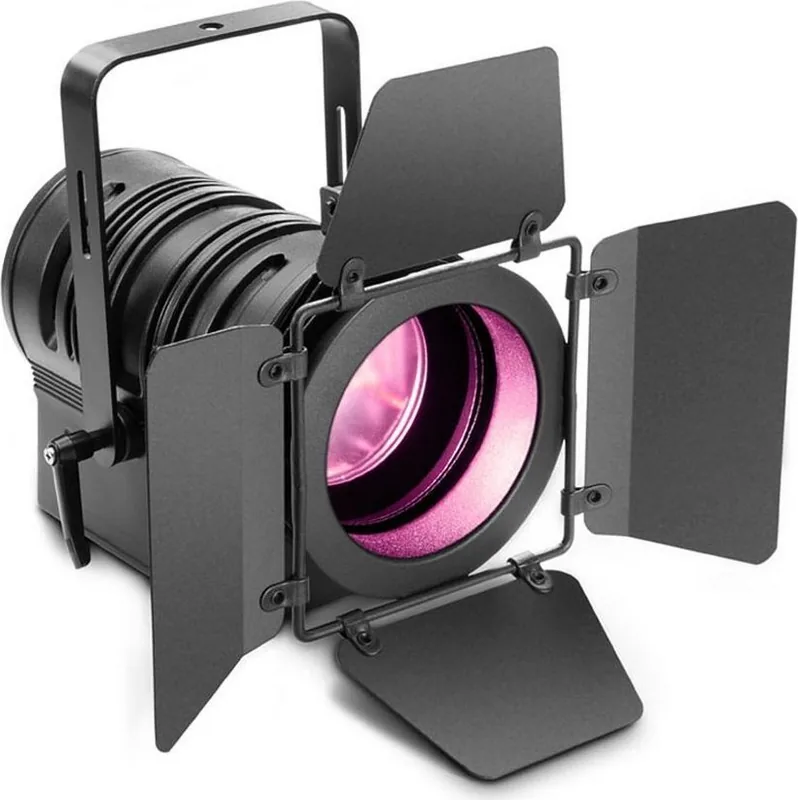
Cameo TS 60 RGBW Manual

0.0 · 0 Ratings

PDF manual · 92 Pages

English

M: QW-35-FL
page

/ 92

Loading...
05cfd9f34f24d9155c2a75f001f5323d1247 page 3
ITALIANO
POLSKI
ESPAÑOL
FRANCAIS
DEUTSCH
ENGLISH
3
DMX
ENGLISH
YOU‘VE MADE THE RIGHT CHOICE!
We have designed this product to operate reliably over many years. Please read this User‘s Manual carefully, so that you can begin making
optimum use of your Cameo Light product quickly. Learn more about Cameo Light on our website WWW.CAMEOLIGHT.COM.
PREVENTIVE MEASURES
1. Please read these instructions carefully.
2. Keep all information and instructions in a safe place.
3. Follow the instructions.
4. Observe all safety warnings. Never remove safety warnings or other information from the equipment.
5. Use the equipment only in the intended manner and for the intended purpose.
6. Use only sufficiently stable and compatible stands and/or mounts (for fixed installations). Make certain that wall mounts are properly installed and
secured. Make certain that the equipment is installed securely and cannot fall down.
7. During installation, observ e the applicable safety regulations for your country.
8. Never install and operate the equipment near radiators, heat registers, ovens or other sources of heat. Make certain that the equipment is
always installed so that is cooled sufficiently and cannot overheat.
9. Never place sources of ignition, e.g., burning candles, on the equipment.
10. Ventilation slits must not be blocked.
11. This appliance is designed exclusively for indoor use, do not use this equipment in the immediate vicinity of water (does not apply
to special outdoor equipment - in this case, observe the special instructions noted below). Do not expose this equipment to flammable
materials, fluids or gases.
12. Make certain that dripping or splashed water cannot enter the equipment. Do not place containers filled with liquids, such as vases or
drinking vessels, on the equipment.
13. Make certain that objects cannot fall into the device.
14. Use this equipment only with the accessories recommended and intended by the manufacturer.
15. Do not open or modify this equipment.
16. After connecting the equipment, check all cables in order to prevent damage or accidents, e.g., due to tripping hazards.
17. During transport, make certain that the equipment cannot fall down and possibly cause property damage and personal injuries.
18. If your equipment is no longer functioning properly, if fluids or objects have gotten inside the equipment or if it has been damaged in
anot her way, switch it off immediately and unplug it from the mains outlet (if it is a powered device). This equipment may only be repaired
by authorized, qualified personnel.
19. Clean the equipment using a dry cloth.
20. Comply with all applicable disposal laws in your country. During disposal of packaging, please separate plastic and paper/cardboard.
21. Plastic bags must be kept out of reach of children.
FOR EQUIPMENT THAT CONNECTS TO THE POWER MAINS:
22. CAUTION: If the power cord of the device is equipped with an earthing contact, then it must be connected to an outlet with a protective
ground. Never deactivate the protective ground of a power cord.
23. If the equipment has been exposed to strong fluctuations in temperature (for example, after transport), do not switch it on immediately.
Moisture and condensation could damage the equipment. Do not switch on the equipment until it has reached room temperature.
24. Before connecting the equipment to the power outlet, first verify that the mains voltage and frequency match the values specified on the
equipment. If the equipment has a voltage selection switch, connect the equipment to the power outlet only if the equipment values and the
mains power values match. If the included power cord or power adapter does not fit in your wall outlet, contact your electrician.
25. Do not step on the power cord. Make certain that the power cable does not become kinked, especially at the mains outlet and/or power
adapter and the equipment connector.
26. When connecting the equipment, make certain that the power cord or power adapter is always freely accessible. Always disconnect the
equipment from the power supply if the equipment is not in use or if you want to clean the equipment. Always unplug the power cord and
power adapter from the power outlet at the plug or adapter and not by pulling on the cord. Never touch the power cord and power adapter
with wet hands.
27. Whenever possible, avoid switching the equipment on and off in quick succession because otherwise this can shorten the useful life of
the equipment.
28. IMPORTANT INFORMATION: Replace fuses only with fuses of the same type and rating. If a fuse blows repeatedly, please contact an
authorised service centre.
29. To disconnect the equipment from the power mains completely, unplug the power cord or power adapter from the power outlet.
30. If your device is equipped with a Volex power connector, the mating Volex equipment connector must be unlocked before it can be re-
moved. However, this also means that the equipment can slide and fall down if the power cable is pulled, which can lead to personal injuries
and/or other damage. For this reason, always be careful when laying cables.
31. Unplug the power cord and power adapter from the power outlet if there is a risk of a lightning strike or before extended periods of disuse.
32. The device must only be installed in a voltage-free condition (disconnect the mains plug from the mains).
33. Dust and other debris inside the unit may cause damage. The unit should be regularly serviced or cleaned (no guarantee) depending on
ambient conditions (dust etc., nicotine, fog) by qualified personnel to prevent overheating and malfunction.
34. Please keep a distance of at least 0.5 m to any combustible materials.
35. Power cables to power multiple devices must have a cross-section of at least 1.5 mm². Within the EU, the cables must correspond to
H05VV-F, or similar. Suitable cables are offered by Adam Hall. With these cables, you can connect multiple devices via the power OUT con-
nection to the power IN connection of an additional device. Make sure that the total current consumption of all connected devices does not
exceed the specified value on all connected devices (label on the device). Make sure to keep power cable connections as short as possible.

Chat with your Cameo TS 60 RGBW manual using AI

Get instant AI answers from your Cameo TS 60 RGBW manual

Ask anything about the Cameo TS 60 RGBW. Answers come from this manual, with the pages they are based on.

TS 60 RGBW Maintenance Schedule

Regularly (based on ambient conditions)
Service or clean the unit to remove dust and debris

Dust and debris inside may cause damage. The unit should be regularly serviced or cleaned by qualified personnel depending on ambient conditions (dust, nicotine, fog) to prevent overheating.

Before use or after transport
Allow device to reach room temperature before switching on

If exposed to strong temperature fluctuations, do not switch on immediately. Moisture and condensation could damage the equipment. Wait until it reaches room temperature.

M: qwen/qwen3.8-flash

Ask a Question

0/1000

Do you recommend TS 60 RGBW?

Yes No

Frequently Asked Questions

A

No. The device is designed exclusively for indoor use. Do not expose it to weather or moisture.

Is this answer helpful?

A

Press Menu, select DMX Addr, use Up/Down keys, and confirm with Enter.

Is this answer helpful?

A

The refresh rate is 3,600 Hz, ensuring smooth operation for camera recording.

Is this answer helpful?

A

No. It supports Master/Slave, Auto, Sound, and Static standalone modes.

Is this answer helpful?

A

The unit consumes 65 Watts operating voltage 100-240V AC.

Is this answer helpful?

A

Yes, it includes a mounting bracket, winged barndoor, and filter frame.

Is this answer helpful?

M: QW-35-FL

Advantages and Disadvantages

Advantages

  • High power 60W RGBW COB LED provides excellent brightness.
  • RDM enabled for remote device management and status queries.
  • Multiple standalone modes offer flexibility without controllers.
  • Manual zoom allows precise beam angle control from 10 to 41 degrees.
  • High refresh rate prevents flicker in video recordings.
VS

Disadvantages

  • Overhead installation requires trained personnel for safety.
  • Fixed power cord cannot be easily replaced if damaged.
  • Device is designed only for indoor use, not weatherproof.
  • Requires specific 120 ohm terminator for the last device in DMX chain.
  • Fan noise might be noticeable in quiet environments.
M: QW-35-FL

Product Specification

Base

LED (1x RGBW)

Max Power Consumption

65 W

DMX Control

yes (5 channels)

Housing Color

black

Features

DMX Out

Dimensions

5.71x8.07x9.45in (WxHxD)

Weight

7.94 lbs

M: QW-35-FL

Product Description

Elevate Your Stage Setup Today

Discover the Potential of Cameo TS 60W RGBW Black

When looking for versatile lighting solutions for events, the Cameo TS 60W RGBW Black stands out as a powerful choice for technicians. This unit combines high performance capabilities with user-friendly controls found in the Cameo TS 60W RGBW Black Manual documentation. Whether you are a professional technician looking for reliability or a hobbyist wanting creativity, understanding the operational modes is key to maximizing performance and safety finding the ideal tool for your setup needs.

Comprehensive Features Overview

The spotlight utilizes a high-power 60 W RGBW COB LED system to deliver exceptional brightness and color saturation. This allows for extensive color mixing capabilities without requiring additional gels. The beam angle ranges from 10 to 41 degrees, offering manual zoom functionality for both wide washes and tight spots. It features a high refresh rate of 3,600 Hz, ensuring smooth video recording without flicker issues during live broadcasts. The device includes a backlight LC display for easy status monitoring and settings adjustments.

Advanced Control Modes

Operation is flexible and adapts to various scenarios seamlessly for different event needs. You can control the device via DMX-512 protocol with RDM enabled for advanced remote management capabilities. Standalone functions include Master/Slave modes, allowing multiple fixtures to sync without needing an external controller. There is also a Sound Control mode that reacts to music pulses, and an Auto Program mode for automatic scene creation. Static mode allows direct adjustment from the device interface for individual scene setups.

Operational Safety and Setup

Safety is paramount when installing high-powered lighting equipment. Ventilation slits must remain clear to prevent overheating during extended use. Always secure overhead installations with safety ropes to prevent falls. Do not operate near flammable materials or store liquids nearby. The device is designed for indoor use exclusively. Wait ten minutes for cool down after use before handling to avoid burns.

Technical Specifications and Support

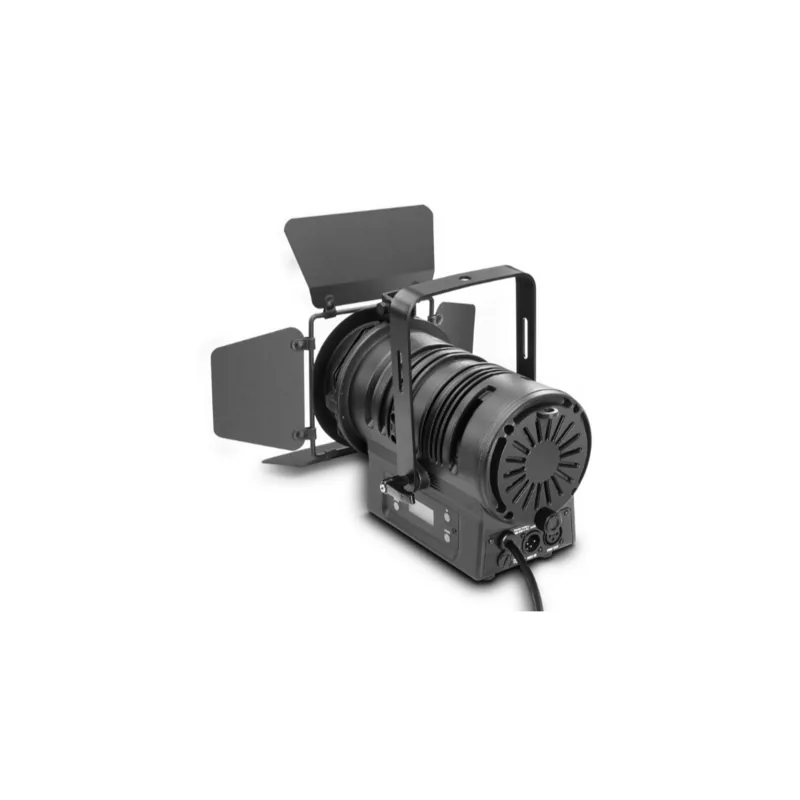
Connectivity options support standard XLR connectors for robust signal transmission links. The system consumes 65 Watts of power and includes a mounting bracket and winged barndoor. It supports multiple DMX modes ranging from 3-channel up to 13-channel depending on the function selected. Users can adjust dimmer curves to match human perception or specific lamp styles. Various color macros are pre-programmed for quick selection during live shows and practice. The unit operates reliably across a wide voltage range and frequency settings for global use.

Conclusion

This light fixture provides reliability and creativity for theater and event technology applications worldwide. Mastering the Cameo TS 60W RGBW Black Manual ensures optimal performance and longevity. Enjoy consistent results with this professional tool designed for longevity and complete user satisfaction.

M: QW-35-FL

© Copyright 2026 Manual.ly