
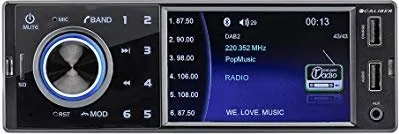
Caliber RMD402DAB-BT Manual
PDF manual · 20 Pages
English



Quick check
Incorrect answer, please try again.
Chat with your Caliber RMD402DAB-BT manual using AI
Get instant AI answers from your Caliber RMD402DAB-BT manual
Ask anything about the Caliber RMD402DAB-BT. Answers come from this manual, with the pages they are based on.
Ask a Question
Do you recommend RMD402DAB-BT?
Yes No
Oscar Rose
7 months ago
Is the installation process difficult for someone without technical skills?
Frequently Asked Questions
Press the MODE button to open Bluetooth. On your phone, search for devices named RMD402DAB-BT_CALIBER. Enter the password 0000 if prompted. Once connected, BT ON will appear on the screen.
Is this answer helpful?
The unit supports MP3 and WMA audio files. Both USB sticks and Micro SD cards can hold up to 32GB of data each for playback.
Is this answer helpful?
Yes, the unit features built-in Bluetooth for hands-free calling. You can answer incoming calls directly through the unit's controls.
Is this answer helpful?
Use a non-metallic pointed object to press and hold the reset button for five seconds. The unit will return to default factory configurations.
Is this answer helpful?
Yes, the Caliber RMD402DAB-BT includes active DAB+ antenna support for receiving digital radio broadcasts alongside standard FM signals.
Is this answer helpful?
Yes, there is a 3.5mm AUX jack located on the front panel for connecting external audio systems or older devices via cable.
Is this answer helpful?
Advantages and Disadvantages
Advantages

- Supports high-quality DAB+ digital radio for superior sound
- Versatile media options including USB, Micro SD, and Bluetooth
- Intuitive controls with clear LCD display for easy navigation
- Built-in hands-free calling enhances driver safety
- Comprehensive audio customization with full EQ settings
Disadvantages

- Requires a separate antenna connection for optimal performance
- Micro SD and USB capacity limited to 32GB maximum
- Reset procedure requires a specific non-metallic tool
- No explicit mention of Apple CarPlay or Android Auto support
- Manual tuning can be slower compared to fully automated systems
Product Specification
Type
Digital Receiver, 1-DIN
Display
2.7", LCD
Navigation
No
TMC
No
Tuner
FM, AM, DAB, DAB+
Media
USB drive, Memory card
Audio Formats
MP3, WMA
Power
4x 75W Peak
Connections
2x Pre-out, 1x AUX In (Front), 1x Video In, 1x Video Out, 1x USB (Front), Card reader (microSD/microSDHC), Bluetooth
Features
Hands-free device, 4-band equalizer
Product Description
Caliber RMD402DAB-BT: The Ultimate Multimedia Experience
The Caliber RMD402DAB-BT stands as a pinnacle in modern vehicle audio integration, offering a seamless blend of digital radio clarity and versatile media playback. Designed for the discerning driver, this unit transforms the cabin into a personal concert hall with its robust support for DAB+ digital broadcasting alongside traditional FM reception. Whether you are commuting through city traffic or embarking on a long highway journey, the crystal-clear audio ensures every note is heard without static interference.
At the heart of this system lies an intuitive control interface featuring a bright LCD display that keeps all essential information at your fingertips. The rotary volume knob offers tactile precision, allowing for quick adjustments without taking your eyes off the road. Beyond radio, the device excels in handling local media files via USB and Micro SD card slots, supporting formats up to 32GB. This means your favorite MP3 and WMA tracks travel with you, ready to play instantly upon insertion.
Connectivity is effortless thanks to built-in Bluetooth capabilities. Pairing your smartphone unlocks hands-free calling and wireless music streaming, keeping distractions to a minimum. The unit automatically reconnects to your last paired device, ensuring continuity every time you start your engine. For those who prefer wired connections, the 3.5mm AUX input provides a reliable backup for older devices. The integrated antenna power supply simplifies installation, eliminating the need for external power sources for the antenna itself.
Customization is key to a great listening experience. The advanced audio menu allows users to fine-tune bass, treble, balance, and fader settings to match their specific preferences or vehicle acoustics. Features like shuffle, repeat, and intro scanning add layers of enjoyment to your playlist management. With preset stations and smart seeking functions, finding your favorite content has never been easier.
Key Highlights
- Digital Clarity: Superior DAB+ reception for crisp, static-free audio.
- Versatile Playback: Supports USB, Micro SD, and Bluetooth streaming.
- Smart Controls: Intuitive buttons and rotary dial for easy operation.
- Hands-Free Safety: Built-in Bluetooth for secure phone calls while driving.
- Audio Customization: Full EQ controls to tailor sound to your taste.
Important Notes
Always ensure volume levels remain within safe limits to protect hearing. When using the reset function, remember to use a non-metallic tool to avoid electrical damage.
Search for 67,732 Manuals online


Type-in Brand or Model
Chanel O'Connell
5 months ago
Does this radio interfere with the electronics in a Kia Pro Ceed?
Manual.ly
5 months ago
Our devices are designed to meet all standard automotive electrical specifications and should not cause interference. If you experience issues such as erratic behavior in your vehicle's electronics, please contact our support team immediately for troubleshooting assistance or a potential replacement.