
Caliber RMD051DAB-BT Manual
PDF manual · 20 Pages
English



Quick check
Incorrect answer, please try again.
Chat with your Caliber RMD051DAB-BT manual using AI
Get instant AI answers from your Caliber RMD051DAB-BT manual
Ask anything about the Caliber RMD051DAB-BT. Answers come from this manual, with the pages they are based on.
Ask a Question
Do you recommend RMD051DAB-BT?
Yes NoFrequently Asked Questions
Enable Bluetooth on your phone, search for available devices, select "RMD051DAB-BT_CALIBER" and enter PIN 0000 if prompted. Once paired, the display shows "BT ON"; if pairing fails it shows "NO CON" and returns to the previous mode.
Is this answer helpful?
No. The active DAB+ antenna is powered through the center core of the antenna cable (+5V), so a separate power lead for the antenna is not required. Ensure the antenna uses the correct SMA connection and the unit supplies the antenna power.
Is this answer helpful?
The unit supports MP3 and WMA playback via USB and Micro SD card slots. Both inputs accept storage devices up to 32GB and will automatically switch to the corresponding source when media is inserted.
Is this answer helpful?
Use a non-metallic pointed object to press and hold the reset button for about five seconds. The unit will revert to factory default settings and previously stored presets will be lost.
Is this answer helpful?
The Audio menu lets you adjust Bass, Treble, Balance, Fader, Loudness, EQ, DX/LOCAL and Stereo/Mono settings. Use these controls to fine-tune sound staging and tonal balance for your vehicle environment.
Is this answer helpful?
Yes. One of the front USB ports functions as a 5V charge output so you can charge compatible mobile devices while using the receiver for playback or Bluetooth.
Is this answer helpful?
You can answer incoming calls via the unit's controls; the call audio will route through the system. If you reject the call using the designated button, the receiver will return to the previous audio mode and resume playback.
Is this answer helpful?
Advantages and Disadvantages
Advantages

- DAB+ reception with active antenna power through the antenna core (+5V) eliminates separate power wiring.
- Automatic source switching for USB and Micro SD (up to 32GB) provides seamless media playback.
- Comprehensive audio menu (Bass, Treble, Balance, Fader, EQ, Loudness) for tailored sound tuning.
- Bluetooth hands-free and streaming with auto-reconnect and simple pairing (PIN 0000).
- Physical controls and rotary volume knob offer intuitive in-car operation and quick navigation.
Disadvantages

- Limited to single-DIN form factor which may lack advanced touchscreen features.
- USB and SD support capped at 32GB, restricting larger modern flash drives.
- No mention of advanced codecs or aptX for higher-quality Bluetooth audio.
- Factory reset erases presets and settings; requires non-metallic pointed tool to execute.
- Basic display and controls may feel dated compared with modern infotainment systems.
Product Specification
Type
Digital Receiver, 1-DIN
Display
LCD
Navigation
no
TMC
no
Tuner
FM, DAB+
Media
USB storage, memory card
Audio formats
MP3, WMA
Power
4x 75W Peak
Connections
4x preamplifier output, 1x AUX In (Front), 2x USB (Front), Card reader (SD/SDHC), Bluetooth
Special features
Hands-free system, remote control, variable illumination, USB charging function (1A)
Product Description
Caliber RMD051DAB-BT Manual: Overview and Features
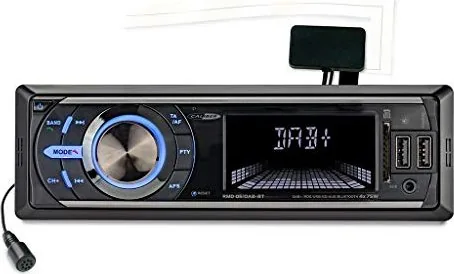
The Caliber RMD051DAB-BT is a compact car media receiver designed to combine modern connectivity with straightforward in-vehicle audio controls. It supports DAB+ digital radio, FM/RDS, Bluetooth hands-free and streaming, USB and Micro SD playback for MP3/WMA, an AUX input, and a 5V USB charge port. The unit offers four 75W outputs and convenient front-panel controls including a rotary volume knob, band and mode buttons, track seek and fast-forward/rewind functions, plus an LCD display and preset channel storage.
What this unit offers
The RMD051DAB-BT brings DAB+ reception with an active antenna feed supplied through the antenna core (+5V), removing the need for a separate antenna power lead. It automatically switches to USB or SD mode when a compatible storage device (up to 32GB) is inserted. Playback options include repeat, intro-scan, and shuffle for flexible listening. The audio menu provides Bass, Treble, Balance, Fader, Loudness, EQ, DX/Local and Stereo/Mono settings so you can tailor sound to the vehicle interior.
Bluetooth pairing is simple: enable Bluetooth on your phone, select RMD051DAB-BT_CALIBER and enter PIN 0000 if required. The unit displays connection status (BT ON/NO CON) and attempts automatic reconnection. Incoming calls can be answered or rejected from the panel, letting you return seamlessly to audio playback.
Controls are designed for quick navigation: short presses step frequencies or tracks, long presses auto-seek stations or fast-scan through tracks. A reset button restores factory defaults when held for five seconds using a non-metallic pointed object. A 3.5mm AUX input supports wired connections to other audio devices.
Practical notes and installation tips
- The active DAB antenna receives power via the antenna core (+5V); no separate power wire is needed. Ensure proper SMA connector installation for reliable reception.
- USB and Micro SD inputs accept media up to 32GB and automatically switch the source when media is inserted.
- Keep volume at safe levels; high volumes can damage hearing.
- Use the reset function only when necessary; it will erase presets and settings.
Final impression
The Caliber RMD051DAB-BT is a versatile single-DIN car receiver that balances modern digital features with classic physical controls. Its DAB+ capability, multiple playback sources, and easy Bluetooth integration make it a practical choice for users who want digital radio and reliable media playback without a complex interface.
Notes:
- Supports DAB+/FM/RDS, Bluetooth, USB, Micro SD (32GB max), AUX-in and 4x75W outputs.
- Pairing PIN is 0000; display shows BT connection status.
- Reset restores factory settings; use a non-metallic pointed tool and hold 5 seconds.
Search for 67,732 Manuals online


Type-in Brand or Model