
Caliber RMD049DAB Manual
PDF manual · 20 Pages
English



Quick check
Incorrect answer, please try again.
Chat with your Caliber RMD049DAB manual using AI
Get instant AI answers from your Caliber RMD049DAB manual
Ask anything about the Caliber RMD049DAB. Answers come from this manual, with the pages they are based on.
Ask a Question
Do you recommend RMD049DAB?
Yes NoFrequently Asked Questions
It supports DAB+ digital radio and RDS-equipped FM radio reception. DAB+ availability depends on local coverage and proper antenna installation.
Is this answer helpful?
Select DAB mode with the Mode button. On first use, the receiver searches and saves stations automatically. Press APS to run another scan. Up to 18 strong stations can be stored across DAB1, DAB2, and DAB3.
Is this answer helpful?
The receiver stores up to 18 stations after a full scan. They are organized in three DAB bands, with six presets available in each band.
Is this answer helpful?
The unit supports USB drives and SD cards for MP3 and WMA playback. Each supported storage source has a maximum capacity of 32 GB.
Is this answer helpful?
Yes. The 3.5 mm AUX input allows a compatible external audio source to be connected with a wired audio cable.
Is this answer helpful?
Yes. It includes a separate USB charge port with a 5V charging output for compatible devices.
Is this answer helpful?
Press and hold the Reset control for five seconds using a non-metallic pointed object. This restores factory defaults, so saved settings will be cleared.
Is this answer helpful?
Advantages and Disadvantages
Advantages

- DAB+ scanning automatically stores up to 18 strong stations across three DAB bands.
- USB and SD playback support MP3 and WMA media, with storage capacities up to 32 GB.
- Audio controls include bass, treble, balance, fader, loudness, EQ, DX/LOCAL, and stereo/mono.
- A dedicated 5V USB charging output and 3.5 mm AUX input add everyday connectivity.
Disadvantages

- DAB+ reception depends on correct active antenna installation and local digital coverage.
- Only six presets are available per DAB band, which may be limiting for some listeners.
- USB and SD media support is limited to 32 GB.
- A factory reset removes customized settings and requires a non-metallic tool.
Product Specification
Type
Digital receiver, single DIN
Display
LCD
Navigation
No
TMC
No
Tuner
FM, DAB+
Media
USB storage, memory card
Audio formats
MP3, WMA
Power
4 x 75 W peak
Connections
4 x preamp outputs, 1 x AUX input (front), 2 x USB (front), card reader (SD/SDHC)
Special features
Remote control, variable illumination, USB charging function (1 A)
Product Description
Caliber RMD049DAB - Read, Download & Print Free
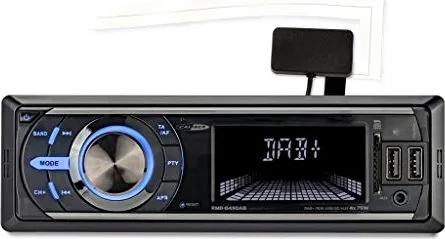
The Caliber RMD049DAB is a versatile in-car media receiver designed for drivers who want convenient digital radio, familiar FM listening, and flexible music playback in one compact dashboard unit. Its DAB+ tuner provides access to digital stations where coverage is available, while RDS radio support adds useful information to compatible FM broadcasts. The receiver is built to make everyday journeys more enjoyable, whether you prefer live radio, a personal music collection, or audio from an external device.
DAB+ radio with practical station storage
After the DAB antenna is connected, the Caliber RMD049DAB can automatically search for available digital stations when DAB mode is first selected. A new scan can also be started with the APS control whenever you travel to a different area or want to refresh the station list. Following a full scan, the unit stores up to 18 of the strongest stations across DAB1, DAB2, and DAB3, with six presets on each band. This layout makes it simple to return to frequently used stations without searching again.
Music from USB, SD, and AUX sources
For more listening options, the receiver includes a USB port and SD card reader for MP3 and WMA playback. Both storage options support media up to 32 GB, allowing drivers to keep a varied library close at hand. Playback tools include pause, track selection, fast forward, fast backward, intro scanning, repeat, and shuffle. A separate 5V USB charging output helps keep a compatible device powered while on the road.
The 3.5 mm AUX input is useful for connecting an external audio source through a wired connection. Switching among tuner, DAB, USB, SD, and AUX sources is handled through the Mode button, keeping core controls easy to reach.
Sound adjustment and everyday controls
A rotary volume control provides quick level adjustment, while the audio menu offers bass, treble, balance, fader, loudness, equalizer, DX/LOCAL, and stereo/mono settings. These options help tailor playback to the vehicle, speaker setup, and personal taste. Manual tuning and automatic seek functions support efficient station browsing, and the LCD display keeps the selected source and information visible.
Notes: Correct DAB antenna installation is important for reliable digital reception. The active antenna is powered through its antenna wire with +5V, so no separate power source is required. Use moderate volume levels to protect hearing, and use a non-metallic pointed object for a five-second factory reset when needed.
Search for 67,732 Manuals online


Type-in Brand or Model