
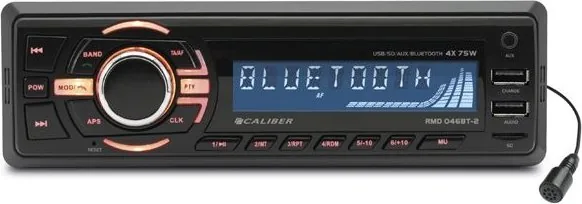
Caliber RMD046BT-2 Manual
PDF manual · 28 Pages
English



Quick check
Incorrect answer, please try again.
Chat with your Caliber RMD046BT-2 manual using AI
Get instant AI answers from your Caliber RMD046BT-2 manual
Ask anything about the Caliber RMD046BT-2. Answers come from this manual, with the pages they are based on.
Ask a Question
Do you recommend RMD046BT-2?
Yes No
Antonietta Donnelly
4 months ago
Does the quality justify the low price point?
Frequently Asked Questions
Press the MODE button to open Bluetooth. On your phone, search for available devices and select "RMD046BT-2 CALIBER". Enter the password 0000 if prompted. A successful connection displays BT ON.
Is this answer helpful?
The unit supports MP3 and WMA audio files. You can use a USB stick with a maximum capacity of 32GB to store your music library.
Is this answer helpful?
Yes, there is a 3.5mm AUX In Jack located on the front panel. This allows you to connect external audio systems or devices without Bluetooth capabilities.
Is this answer helpful?
When enabled, the Intro function plays a 10-second preview of each song on your USB or Micro SD card. If you hear a song you like, press the button again to play the full track.
Is this answer helpful?
Activating AF mode stores the strongest available stations automatically. Please note that this action will delete all previously saved station presets.
Is this answer helpful?
Use a non-metallic pointed object to press and hold the reset button for five seconds. The unit will revert to its original factory defaults.
Is this answer helpful?
Advantages and Disadvantages
Advantages

- Supports multiple input sources including USB, Micro SD, and Bluetooth
- Customizable audio settings with Bass, Treble, and EQ controls
- Six preset memory slots for quick station access
- Hands-free calling capability with call rejection feature
- Intro mode allows previewing tracks before full playback
Disadvantages

- High volume levels pose a risk of hearing damage if not monitored
- AF mode clears all previously stored stations when active
- Bluetooth pairing requires manual entry of the default password
- USB and Micro SD capacity is limited to 32GB maximum
- Reset procedure requires a specific non-metallic pointed tool
Product Specification
Type
Digital Receiver, 1-DIN
Display
7-Segment
Navigation
No
TMC
No
Tuner
FM, MW, LW
Media
USB Drive, Memory Card
Audio Formats
MP3, WMA
Power
4x 75W Peak
Connections
2x Preamp Output, 1x AUX In (Front), 1x USB (Front), Card Reader (microSD/microSDHC), Bluetooth
Features
Hands-free Kit
Product Description
Experience the Caliber RMD046BT-2 Manual
The Caliber RMD046BT-2 is a versatile multimedia receiver designed to elevate your audio experience in any vehicle. This unit seamlessly blends classic radio tuning with modern digital connectivity, offering a robust solution for music lovers and drivers alike. At its core lies a powerful tuner capable of scanning FM bands with precision, ensuring you never miss your favorite stations. The interface is intuitive, featuring a clear LCD display that provides all necessary information at a glance.
Connectivity is where this device truly shines. It supports both USB and Micro SD inputs, allowing you to play your personal MP3 and WMA collections directly from flash drives or memory cards up to 32GB. For those who prefer wireless freedom, built-in Bluetooth technology enables easy pairing with smartphones for hands-free calling and streaming audio. Simply search for "RMD046BT-2 CALIBER" on your phone and enter the default password to connect instantly.
Sound customization is effortless with the dedicated Audio Menu. You can fine-tune your listening environment using controls for Bass, Treble, Balance, Fader, Loudness, and Equalizer settings. Whether you need deep bass for hip-hop or crisp highs for classical music, the EQ options ensure the sound matches your preference. The rotary volume knob offers smooth control, while six preset buttons (M1-M6) let you save your most listened-to stations for quick access.
Beyond music, the Caliber RMD046BT-2 serves as a communication hub. Answering calls is simple with the designated button, and rejecting an incoming call is just as easy if you are busy driving. The unit also features a convenient 3.5mm AUX input for connecting external devices that do not support Bluetooth. Additional features like Intro mode, which previews ten seconds of each track, and Shuffle or Repeat functions, make managing your playlist enjoyable and efficient.
Important Notes
Always use a non-metallic object to reset the unit if it malfunctions. High volume levels can cause permanent hearing damage, so adjust carefully. When using AF mode, note that previous station memories will be cleared automatically.
Search for 67,732 Manuals online


Type-in Brand or Model
cupiditate_illum
5 months ago
Is this product good value for money and does it meet expectations?
Manual.ly
5 months ago
Yes, based on customer feedback, the product offers a great price-performance ratio and meets user expectations. It is considered both affordable and reliable.