
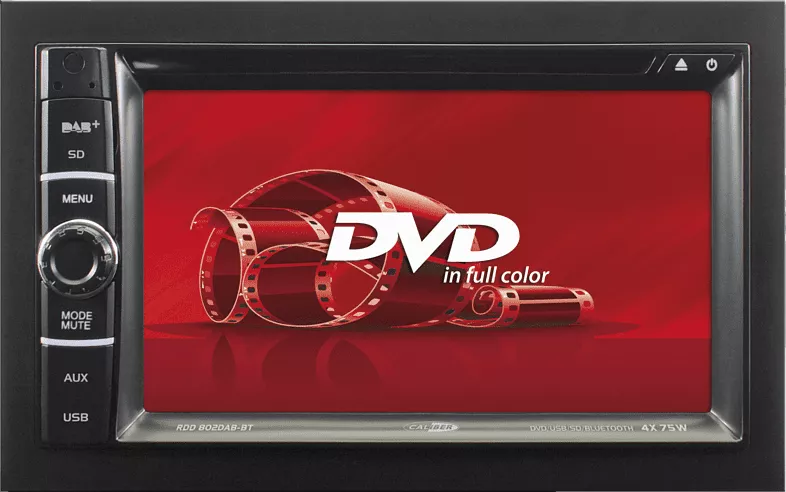
Caliber RDD802BT Manual
PDF manual · 16 Pages
English



Quick check
Incorrect answer, please try again.
Chat with your Caliber RDD802BT manual using AI
Get instant AI answers from your Caliber RDD802BT manual
Ask anything about the Caliber RDD802BT. Answers come from this manual, with the pages they are based on.
Ask a Question
Do you recommend RDD802BT?
Yes NoFrequently Asked Questions
It is designed for a double-DIN dashboard opening. Before buying, you should check the available space in your vehicle and confirm that the wiring and mounting depth are suitable.
Is this answer helpful?
Yes. It supports Bluetooth pairing for hands-free calls and wireless music playback. You can connect a phone, make calls, and stream audio without using a cable.
Is this answer helpful?
Yes. It supports USB and SD media, along with common audio formats like MP3. It is useful for drivers who still keep local music libraries on portable storage.
Is this answer helpful?
Yes. The unit includes wiring support for reverse camera use. When connected correctly, it can switch camera input when the vehicle is placed in reverse.
Is this answer helpful?
Professional installation is strongly recommended. The wiring, grounding, speaker matching, and vehicle integration can be tricky, and proper installation helps protect the unit and your car.
Is this answer helpful?
You can adjust volume, bass, treble, balance, fader, and equalizer settings. This gives you enough control to tune the sound for different speakers and listening preferences.
Is this answer helpful?
Advantages and Disadvantages
Advantages

- Supports Bluetooth calling and music streaming for hands-free convenience.
- Plays multiple media types, including DVD, CD, USB, SD, and MP3 files.
- Touchscreen controls make basic audio and playback adjustments simple.
- Compatible with camera, steering wheel control, and amplifier connections.
Disadvantages

- Installation can be complex and may require professional fitting.
- Not ideal if your vehicle has limited double-DIN dashboard space.
- Some features depend on vehicle wiring and regional compatibility.
- Disc-based functions may feel less relevant for users who prefer streaming-only setups.
Product Specification
Type
Moniceiver, 2-DIN
Display
6.2", LCD, 800x480 Pixels, Touchscreen
Navigation
no
TMC
no
Tuner
FM, MW, LW
Media
CD (CD-R/RW), DVD (DVD-R/RW), USB storage, Memory card
Audio formats
MP3, WMA
Video formats
DivX, MPEG-4
Image formats
JPG
Power
4x 75W Peak
Connections
3x Pre-out, 2x Video In, 1x Video Out, 1x USB (Front), Card reader (microSD/microSDHC), Bluetooth
Special features
3-Band Equalizer
Product Description
Caliber RDD802BT: A Practical Double-DIN Upgrade for Everyday Driving
The Caliber RDD802BT is built for drivers who want a modern in-car entertainment system without overcomplicating the dashboard. It combines a touchscreen interface, Bluetooth calling and music streaming, disc playback, USB/SD support, and flexible audio controls in one compact unit. For many vehicles, it can be a strong step up from a basic factory radio.
One of its main strengths is versatility. The unit supports multiple media sources, including DVD, CD, MP3, USB, SD, and AUX-style input modes. That makes it easy to switch between music, video, and external sources depending on the trip. The built-in Bluetooth function adds convenience for hands-free calling and wireless audio, while the steering wheel control input helps preserve familiar factory-style operation.
The display is designed for daily use, with a 16:9 TFT screen and a straightforward menu system. Drivers can adjust volume, bass, treble, balance, fader, and equalizer settings directly from the interface. The radio section offers FM and AM coverage with preset memory, which is useful for commuting or long-distance travel. Support for RDS in compatible regions adds another layer of convenience.
Installation guidance emphasizes proper grounding, speaker matching, and battery disconnection before setup. The RDD802BT is meant for a double-DIN opening, so checking vehicle compatibility is important before fitting it in. It also supports camera and reverse-related connections, making it a useful choice for drivers who want to expand safety and visibility features.
If you are looking for a balanced infotainment upgrade, the Caliber RDD802BT Manual points to a unit that focuses on practical control, broad playback support, and everyday usability. It is not just about entertainment; it is about making the center console more functional and connected.
Notes
- Professional installation is recommended for the best result.
- Confirm speaker impedance and wiring before connecting power.
- Remove transport screws before mounting the unit.
- Check that the dashboard has enough space for a double-DIN fit.
Search for 67,732 Manuals online


Type-in Brand or Model